Shopify SEO + AI search

Your Shopify SEO. Fixed, published, tracked.

Find search opportunities, improve product pages and plan content in one workspace. RankEngine writes supported fixes through the Shopify API, verifies each one against the live value, and helps you track search performance and AI visibility.

  • Rated 5.0 out of 5 from 10 reviews on the Shopify App Store.
  • Shopify runs the trial and does not charge you during it. Plans from $19/month after.
  • Meta and page-content changes can be undone for 48 hours. Page titles wait for your approval.
rankengine.app/video
Shopify SEO App: Audit, Fix & Track AI Visibility (ChatGPT, Gemini) | RankEngine
Chapters & transcript →
  1. 1 Audit the store
  2. 2 Fix through the Shopify API
  3. 3 Verify against the live value
What the reporting looks like

Real Search Console views from sites we operate.

Original screenshots, three-month view, captured 27 September 2026. Click any chart to open the full image.

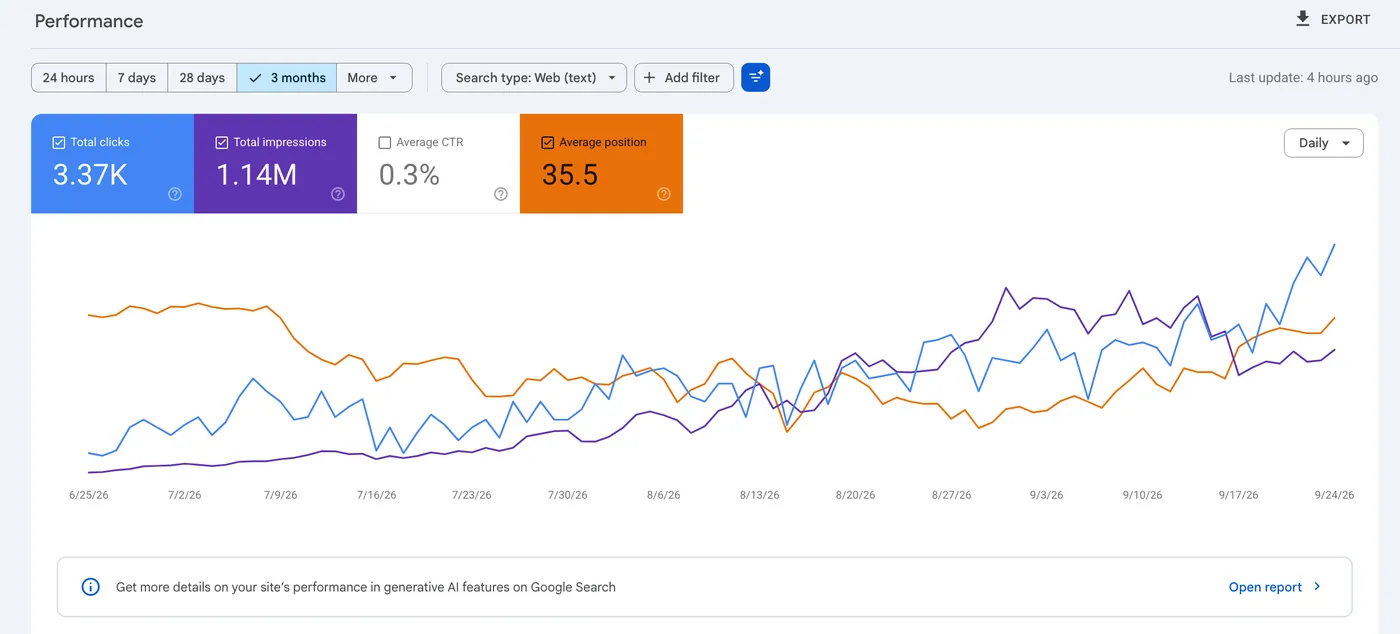
Site AGoogle Search Console · 25 Jun – 24 Sep 2026
Search Console performance chart for Site A: 3.37K clicks, 1.14M impressions, average CTR 0.3%, average position 35.5, clicks rising through September
3.37K clicks1.14M impressions0.3% CTR35.5 avg position
Observed site performance over the displayed window. The capture does not isolate what RankEngine changed on the site.
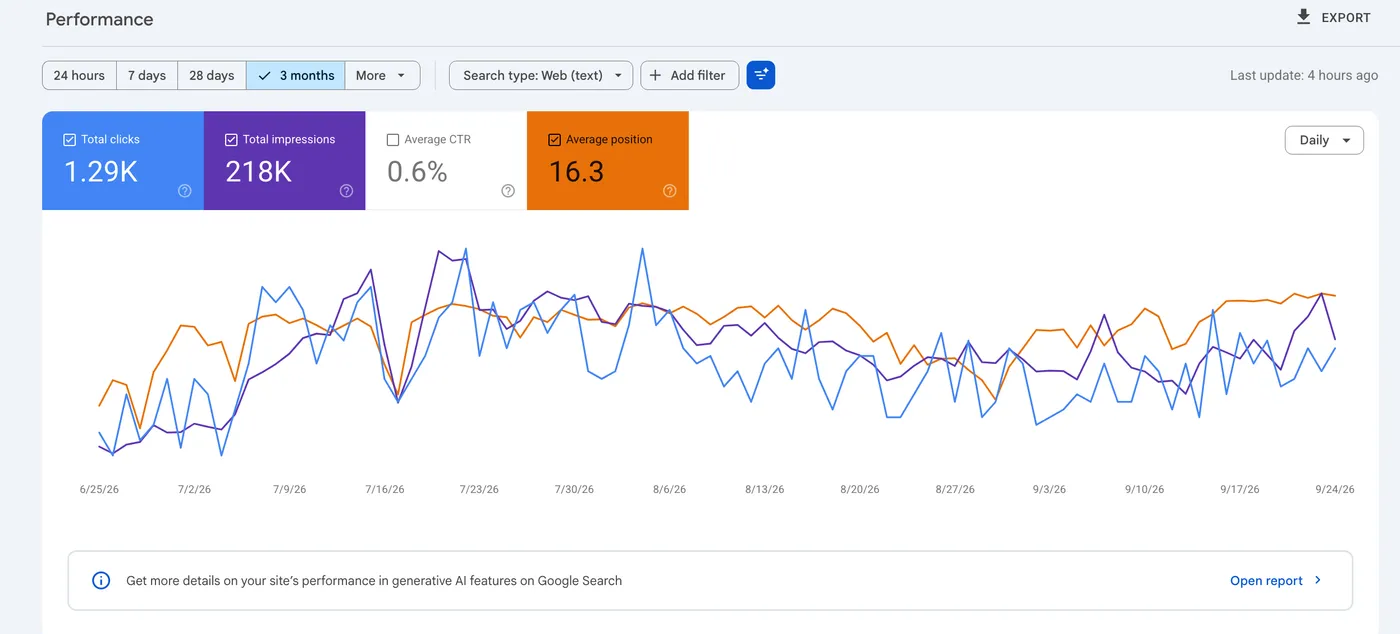
Site BGoogle Search Console · 25 Jun – 24 Sep 2026
Search Console performance chart for Site B: 1.29K clicks, 218K impressions, average CTR 0.6%, average position 16.3
1.29K clicks218K impressions0.6% CTR16.3 avg position
A reporting example, not a straight-line growth claim: the daily chart fluctuates.
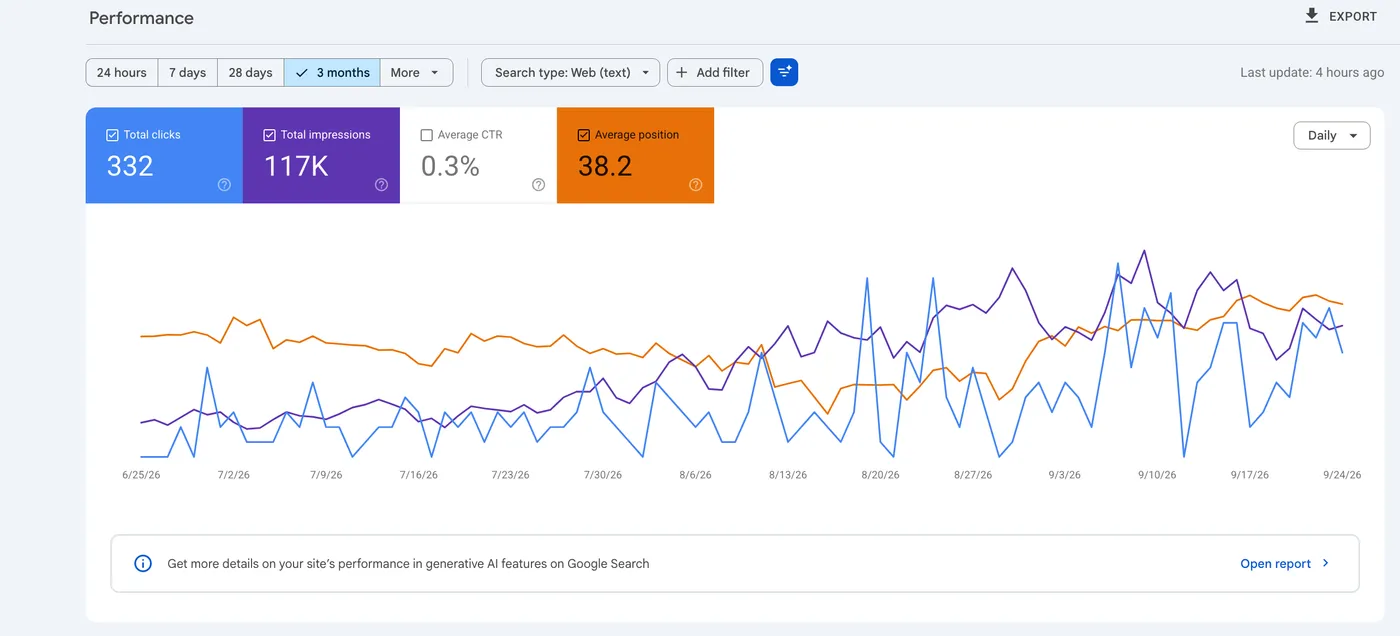
Site CGoogle Search Console · 25 Jun – 24 Sep 2026
Search Console performance chart for Site C: 332 clicks, 117K impressions, average CTR 0.3%, average position 38.2, impressions rising unevenly from August
332 clicks117K impressions0.3% CTR38.2 avg position
A smaller site. Impressions rise unevenly; 117K impressions are not 117K visitors.
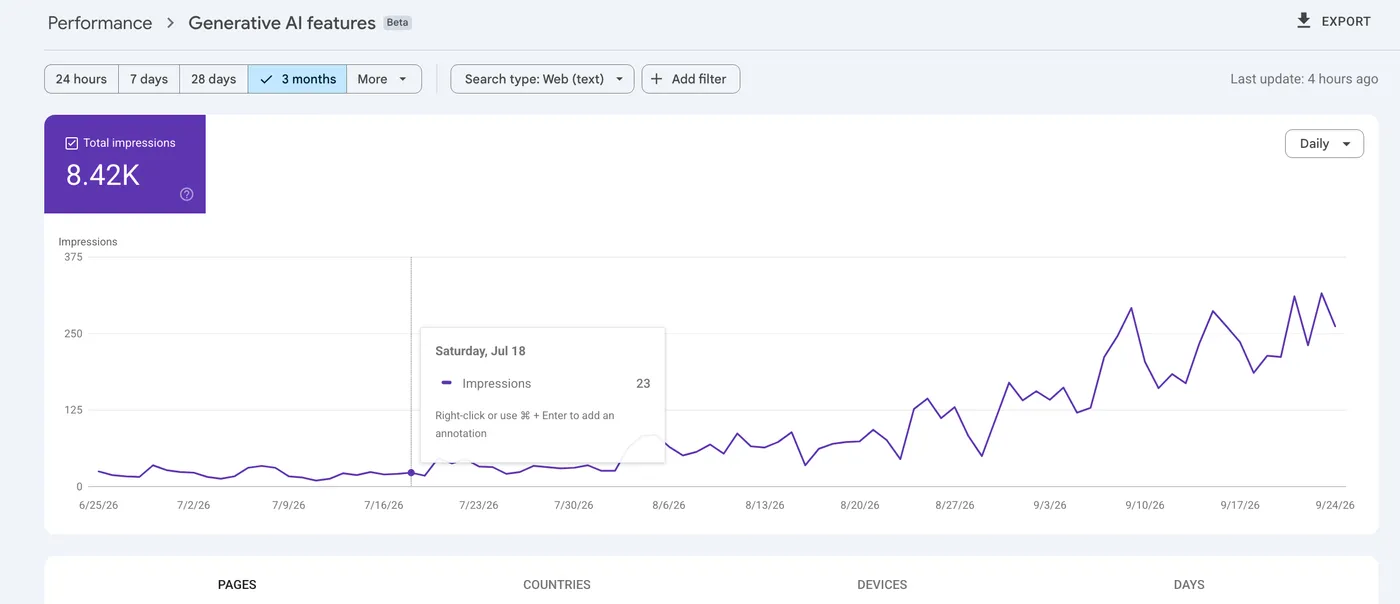
Site CSearch Console · Generative AI features (Beta) · 3 months
Search Console Generative AI features report for Site C: 8.42K total impressions, near zero until late July, then climbing to around 250 a day by September
8.42K impressions in Google's AI features
Google's own report label is kept as is. These are impressions in generative AI features on Google Search, not ChatGPT citations or visits.
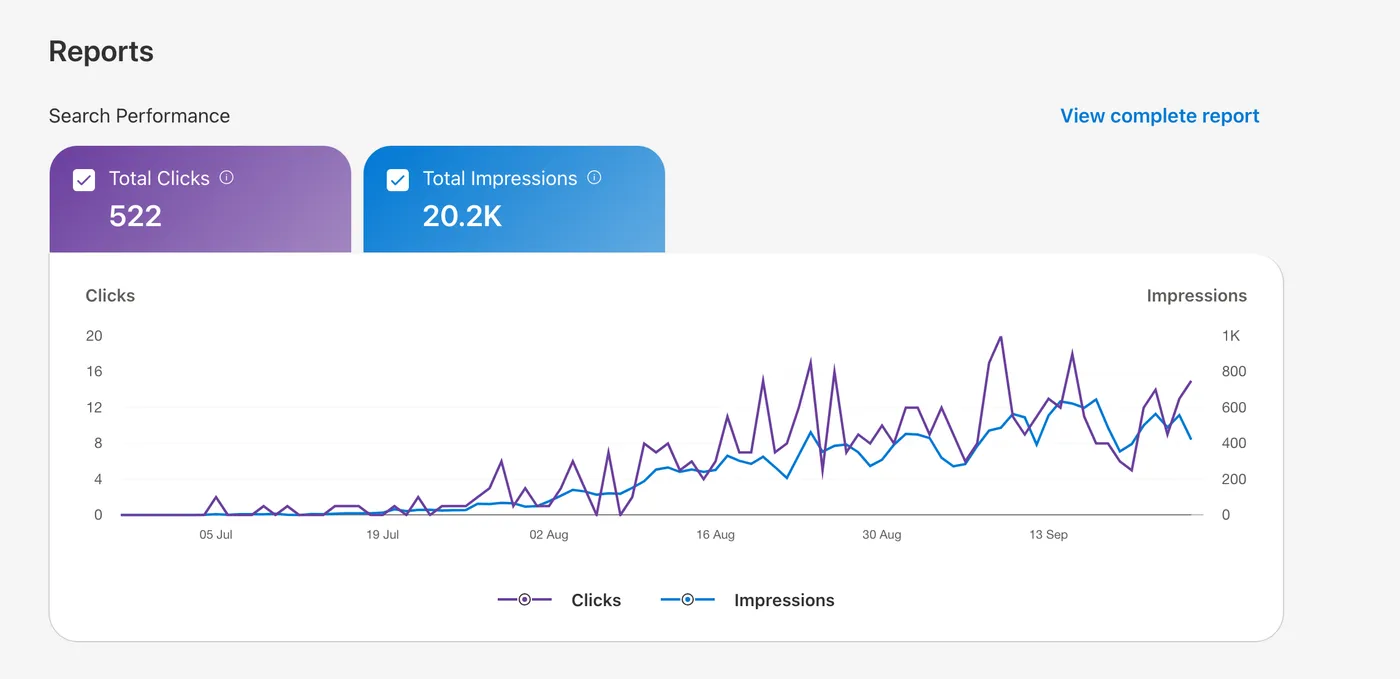
Bing Webmaster ToolsSearch performance · 3 months
Bing Webmaster Tools search performance: 522 total clicks and 20.2K impressions over three months, both rising from August
522 clicks20.2K impressions
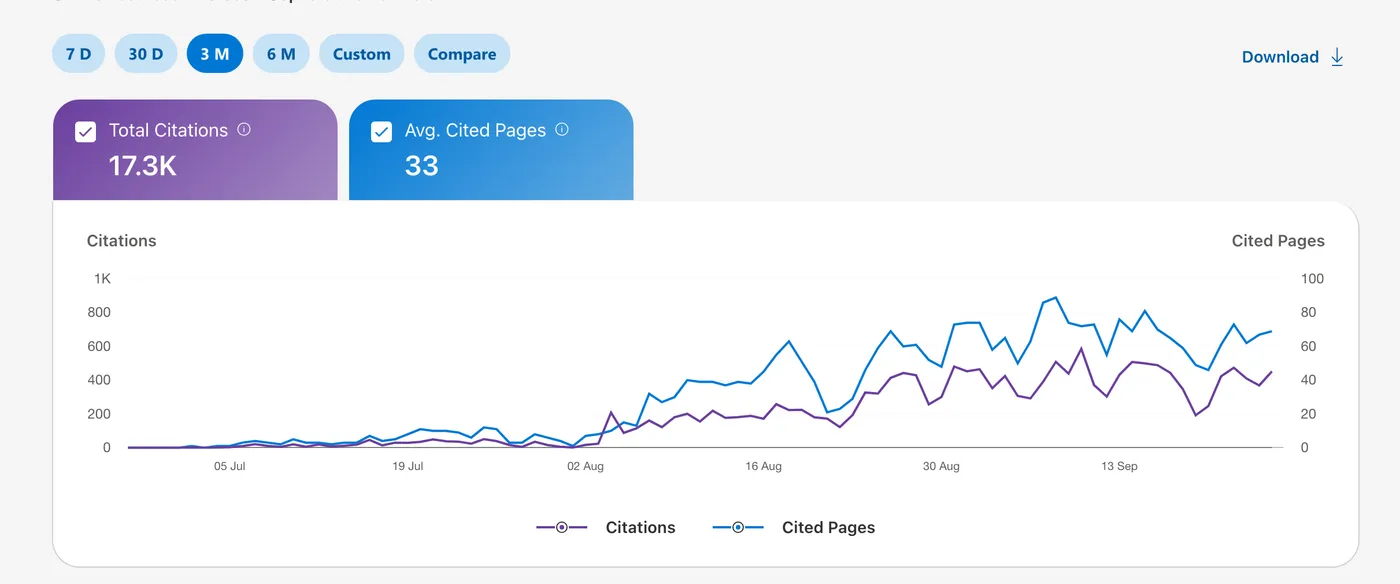
Bing Webmaster ToolsCitations · 3 months
Bing Webmaster Tools citations report: 17.3K total citations and 33 average cited pages over three months
17.3K citations33 avg cited pages
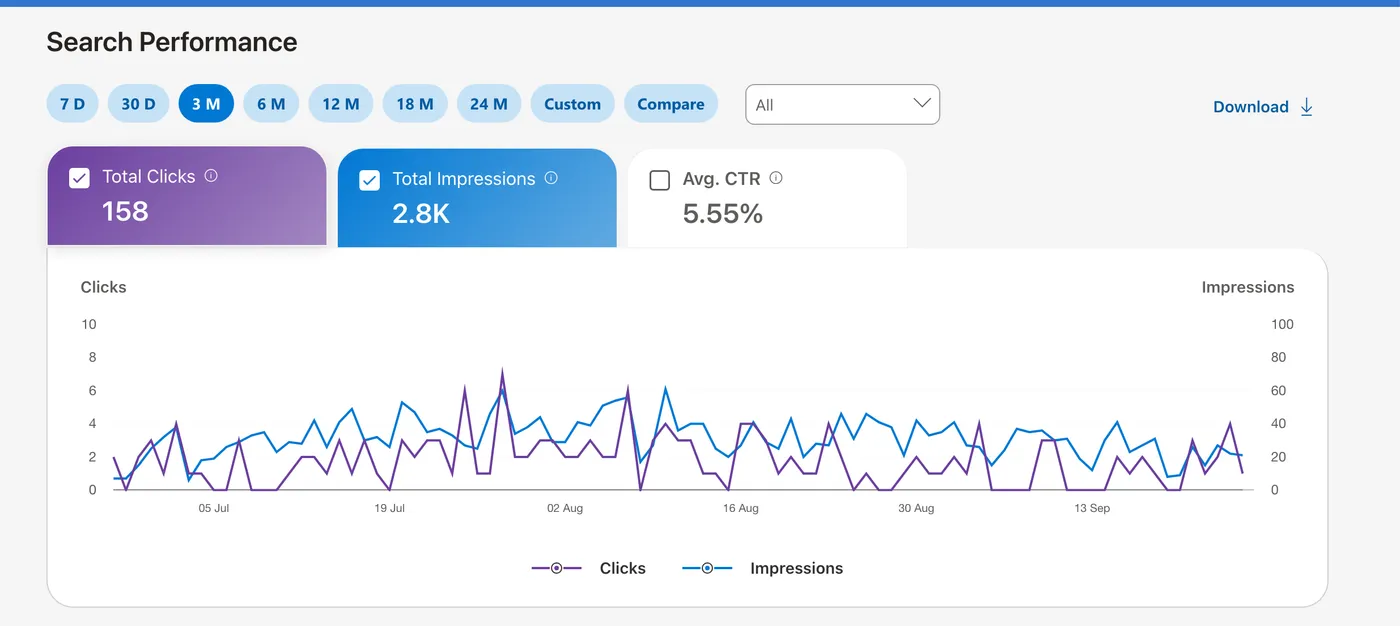
Bing Webmaster ToolsSearch performance · 3 months
Bing Webmaster Tools search performance: 158 total clicks, 2.8K impressions, average CTR 5.55% over three months
158 clicks2.8K impressions5.55% CTR

These properties are operated by the RankEngine team, not customer testimonials. Numbers are as displayed in each report; the Bing captures do not show the property name in frame. None of these charts is a controlled comparison, and a three-month total is not a percentage uplift.

Our research

What do nine Shopify SEO apps do on their own websites?

We ran the same audit on nine SEO apps’ marketing sites, ours included, on 23 September 2026: sitemaps, structured data, llms.txt, AI-crawler rules, hreflang, page weight. Eight publish in one language only; two ship a home page with no structured data. The raw numbers are published so you can check them.

Read the audit
Find the issues

The audit reads your Shopify data first, then the live pages.

Products, collections, pages, articles and images are checked against 14 on-page rules, and the storefront is crawled to confirm what Google actually sees. Three examples of what it finds:

Metadata212 products share the same title pattern; 57 have no meta description
Accessrobots.txt blocks GPTBot and PerplexityBot; two collections carry noindex
MeasurementSearch Console not connected, so clicks and impressions are not in the report

Illustrative findings; the counts on your store will differ.

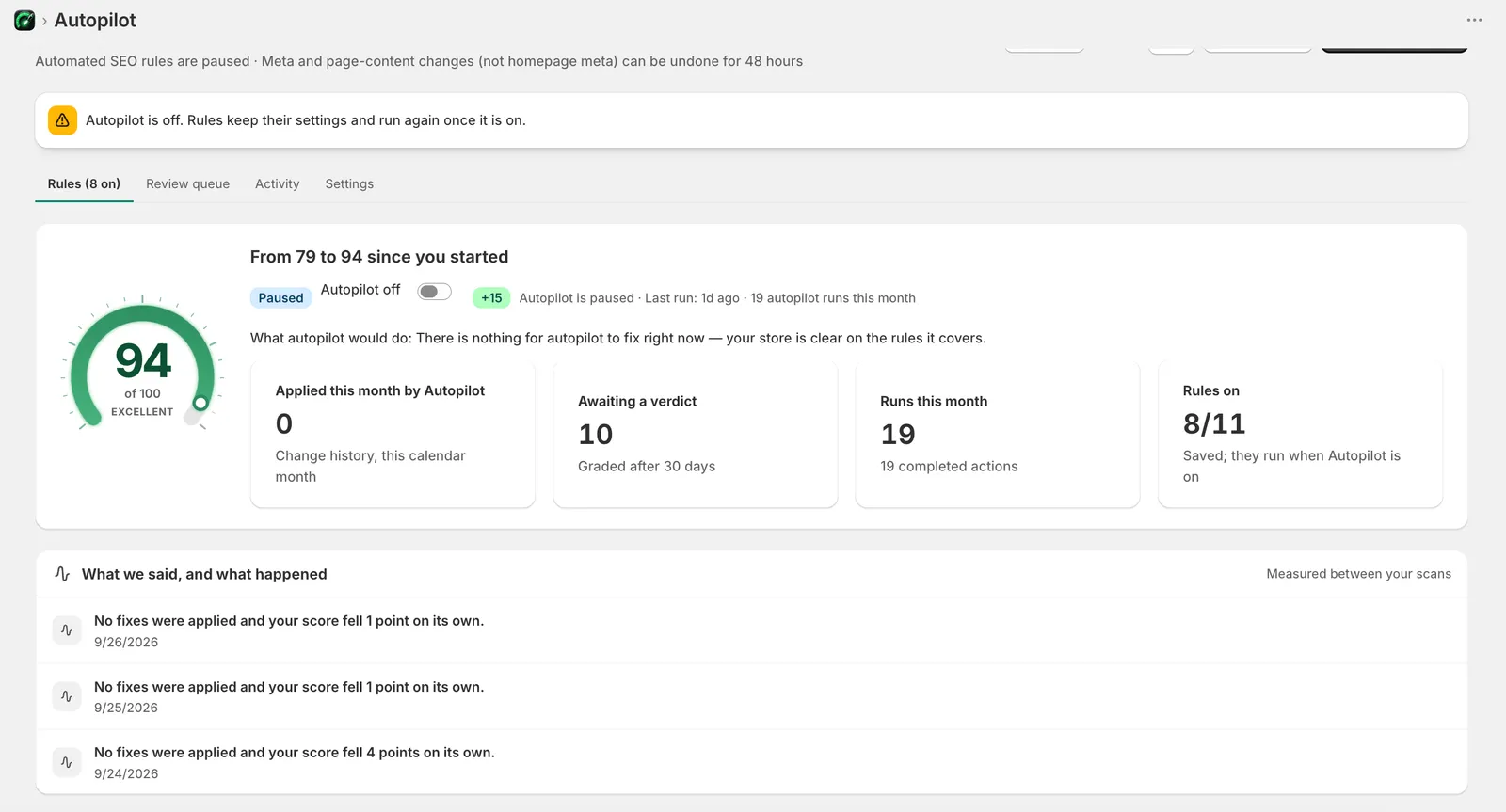
RankEngine Autopilot: score from 79 to 94 since you started, Autopilot paused, 0 applied this month by Autopilot, 10 awaiting a verdict graded after 30 days, 19 runs this month, 8 of 11 rules on; a log reads 'No fixes were applied and your score fell 1 point on its own'
Apply and verify

A fix is done when the live value matches, not when the request was sent.

Every applied change records the previous value, the new value and a verification read from Shopify. A change that does not read back as written is reported as a failure, never as done.

  • Change history. Each fix shows what it was, what it is now and when it was verified.
  • Undo window. Meta and page-content changes (not homepage meta) can be undone for 48 hours.
  • Graded after 30 days. Each change is scored against the store's own trend, so a page that held steady while the store fell counts as a win and a page that rose with the store counts as flat.
  • Honest log. "No fixes were applied and your score fell 1 point on its own" is a real line from the capture: the app reports movement it did not cause.
The platform

Four jobs, one workspace.

Research what to target, improve the pages you have, publish what is missing and measure what happened. Each tool below is included in both plans unless marked Pro.

Research

  • Keyword research with volume, difficulty, CPC and intent
  • Rank tracking, refreshed weekly
  • Competitor tracking and backlink monitoring
  • Google Shopping research Pro

Improve

  • Meta titles and descriptions, written and verified
  • Image alt text from vision AI, compression
  • JSON-LD schema: product, article, FAQ, breadcrumb, organization
  • Redirects, sitemap, robots and canonical checks

Publish

  • Content Studio: briefs, drafts, calendar
  • Brand voice, plagiarism and AI-detection checks
  • Translated meta and hreflang for multi-language stores
  • llms.txt, agent.json and AI-crawler rules

Measure

  • Search Console clicks, impressions and indexing verdicts
  • AI visibility across ChatGPT, Claude, Gemini, Perplexity
  • Agent Ready checks for AI shopping agents
  • Change history and 30-day outcome grading
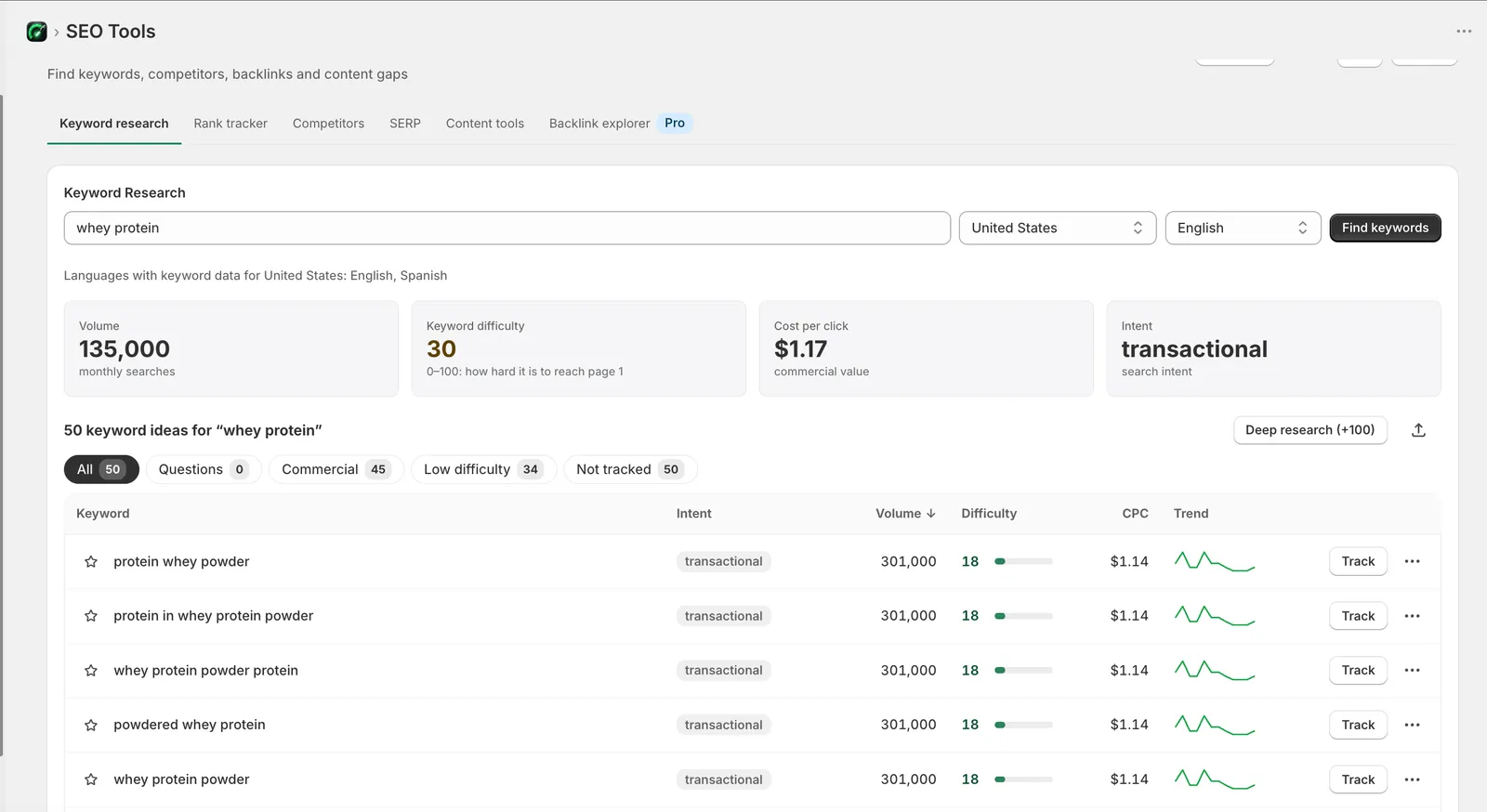
RankEngine keyword research for 'whey protein' in the United States: 135,000 monthly searches, difficulty 30, cost per click $1.17, transactional intent, with 50 keyword ideas and a Track button on each row
Research

Know what to target before you write a word.

Each keyword shows monthly volume, a 0–100 difficulty score, cost per click and the intent behind the query, so a product page goes after buying terms and a guide goes after questions.

Example"whey protein" · 135,000 searches a month · difficulty 30 · $1.17 CPC · transactional
Read it asHigh demand, page-one is reachable for a store with some authority, and searchers are ready to buy: a collection page, not a blog post.

Volumes and difficulty are third-party estimates, not measured outcomes.

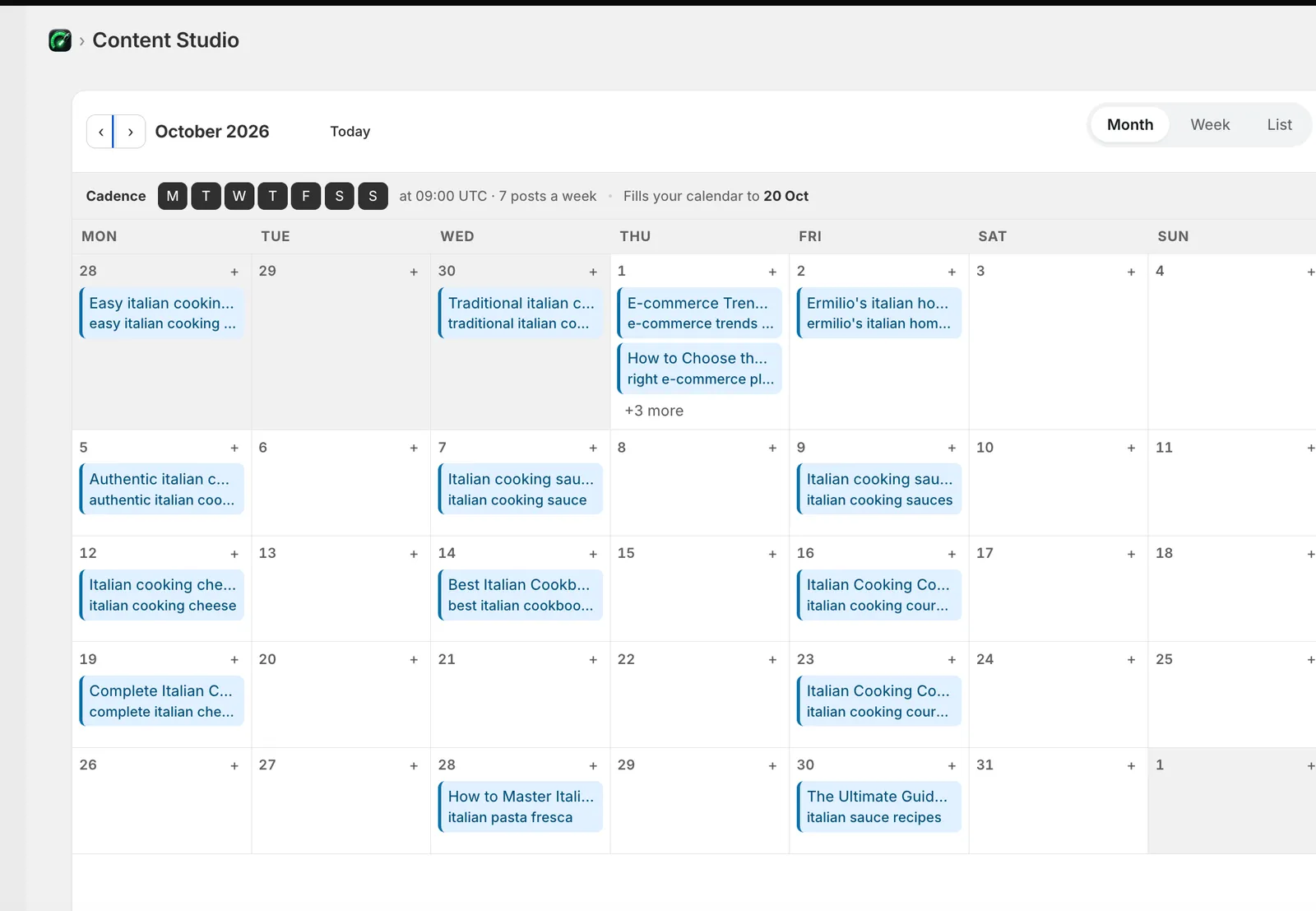
RankEngine Content Studio calendar for October 2026 with a seven-posts-a-week cadence, 12 drafts and 18 scheduled posts about Italian cooking
Content Studio

Plan, review and schedule content your products deserve.

Ideas come from your keyword research and your catalogue. Drafts are written in your brand voice, checked for plagiarism and machine-sounding prose, and scheduled on a calendar you control. Nothing publishes without a slot you approved.

  • 10 or 31 posts a month depending on plan, each with a hero image and internal links.
  • Structured data on every post so articles carry Article, FAQ and breadcrumb schema from the first publish.
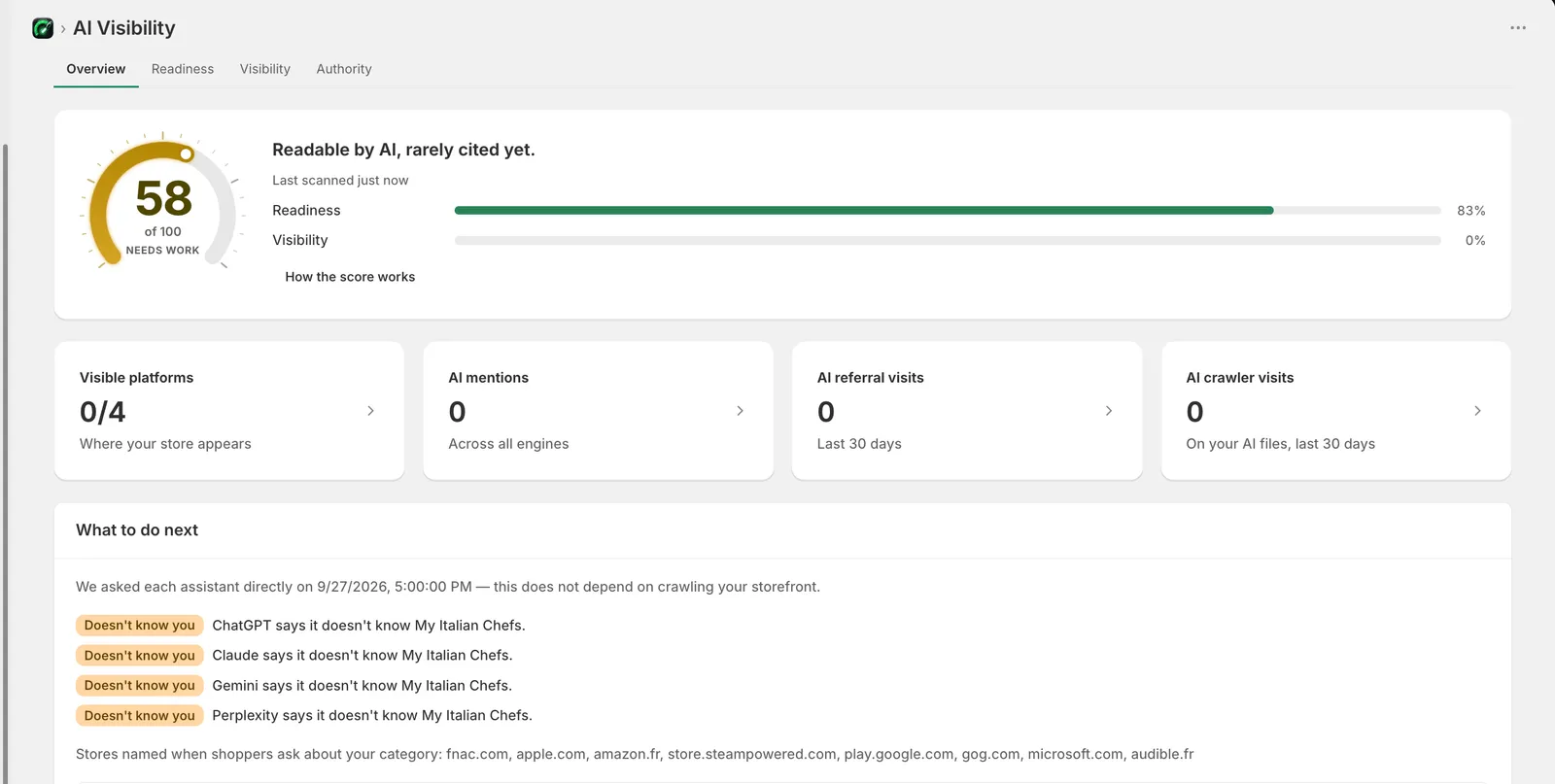
RankEngine AI Visibility: score 58 of 100, readiness 83%, visibility 0%, visible on 0 of 4 platforms, 0 AI mentions; a list dated 27 September 2026 shows ChatGPT, Claude, Gemini and Perplexity each answering that they do not know the store
AI visibility

Readiness and actual mentions, reported separately.

Readiness is what you control: files, schema, crawler access. Visibility is what the assistants actually say. This capture is a store that is 83% ready and not yet mentioned anywhere, and the app says so.

MethodEach engine is asked shopper prompts for the store's category · engines: ChatGPT, Claude, Gemini, Perplexity · checked 27 Sep 2026
ResultDoesn't know you · 0 of 4 · stores named instead: fnac.com, apple.com, amazon.fr …

Why start now: assistants answer from today's search results and from what they have already seen cited. A store that is readable and mentioned this year tends to keep being recommended; catching up later means displacing whoever got there first.

Google states its AI features need no special files or schema; llms.txt and crawler rules are readiness hygiene and do not, on their own, get a store cited. See our audit of nine SEO apps' own websites →

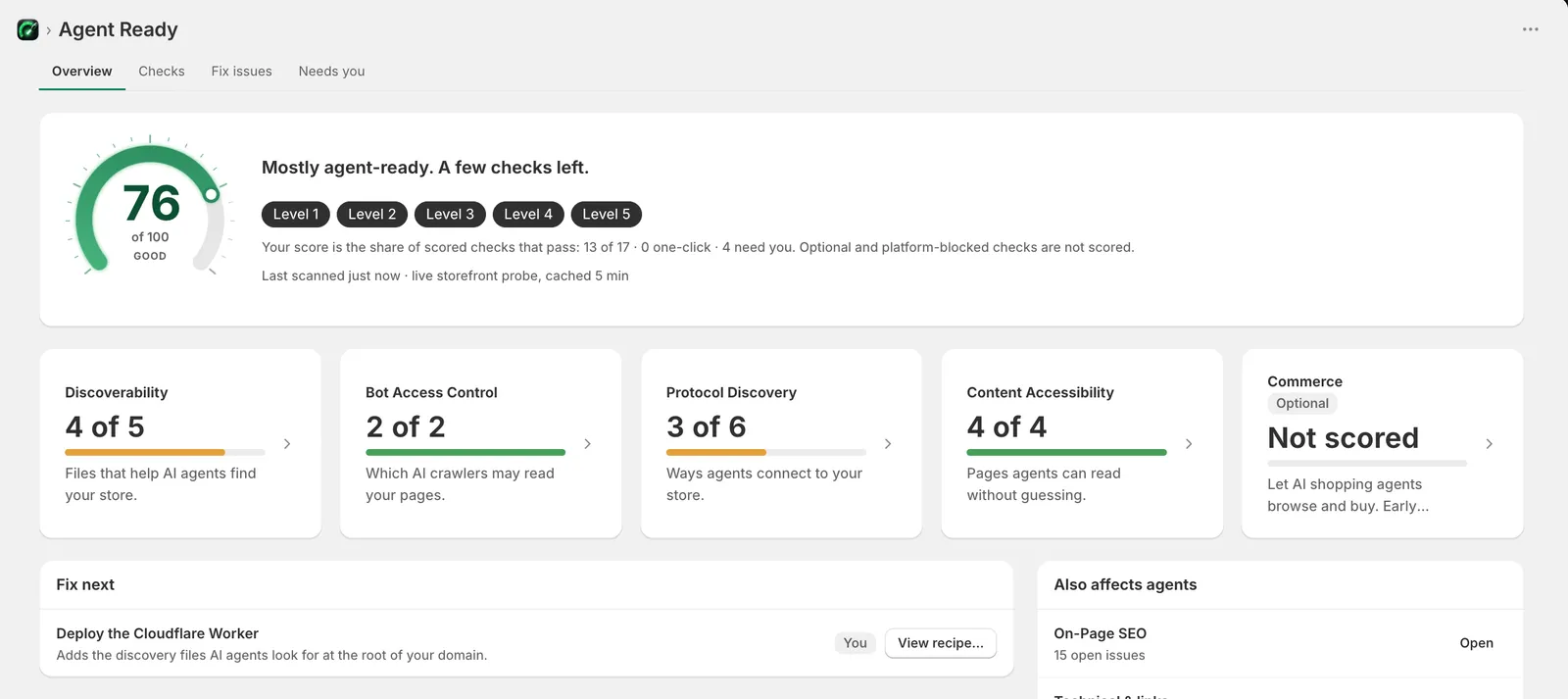
RankEngine Agent Ready: 76 of 100, mostly agent-ready with 13 of 17 scored checks passing; discoverability 4 of 5, bot access control 2 of 2, protocol discovery 3 of 6, content accessibility 4 of 4, commerce not scored; next fix is to deploy the Cloudflare Worker, marked as something the merchant does
Technical readiness

Readable product facts, valid schema, and a list of what only you can set up.

Seventeen checks cover discoverability files, crawler access, protocol discovery and content accessibility. Each one says whether the app can fix it or whether it needs you, and why. The score is the share of scored checks that pass; it is not a probability of being cited.

App fixesllms.txt, agent.json, robots rules for AI crawlers, JSON-LD on products and articles
You doDeploy the Cloudflare Worker for root-level discovery files needs you
How it works

Audit, review, apply, verify. Then keep watching.

The same loop runs whether you click a fix, turn on an Autopilot rule, or connect an AI agent through MCP.

STEP 1

Audit

Shopify data first, then a crawl of the live storefront.

STEP 2

Review

Issues grouped by impact, with the expected score change per fix.

STEP 3

Apply

Supported changes are written through the Shopify API. Titles wait for approval.

STEP 4

Verify

The live value is read back. A mismatch is a failure, not a done state.

STEP 5

Monitor

Search Console, rankings and AI mentions, graded after 30 days.

Reporting

What changed, what search did, what needs attention.

Operational changes and outcomes are reported apart from each other. The score you see in the app is the same score in the report, and each metric keeps its own definition: SEO health, readiness, clicks, impressions, citations. There is no blended growth number.

  • Changes: fixes applied and verified, by type, with undo state.
  • Search: Search Console clicks, impressions and Google's own indexing verdict per page, fetched nightly.
  • Attention: the tasks the app cannot do for you, in one list, with the reason.

PDF and CSV export on Pro; CSV on Basic.

What it does, and what stays with you

Confirmed capabilities and requirements.

Shopify lets an app write some things and not others. This table says which is which, so there is no surprise after install.

AreaRankEngineRequires you
Meta descriptions, alt text, schema, redirectsWrites, verifies, logs, undo for 48 hoursNothing after install
Page and product titlesProposes the changeApprove each title
Theme code: heading orderMoves a heading in front of the H1 when you apply the fix; backs up, checks the look, reads backApply the fix, or leave it
Theme code: page layoutNames the file and the changeEdit the theme, or ask your developer
Search Console and BingReads performance and indexing, submits sitemaps and IndexNowConnect the account once
AI visibilityProbes four assistants and reports readiness and mentions separatelyNothing; a zero is reported as a zero
ContentDrafts, checks and schedules postsApprove the calendar; review anything you want to change
Root-level discovery filesGenerates llms.txt and agent.jsonDeploy the Cloudflare Worker for the domain root
Pricing

Two plans. Both start with a 3-day free trial.

Billed through Shopify. You are not charged during the trial, and you can cancel any time. Monthly, or yearly at 20% off.

Basic

$19 /mo
or $182.40/year: $15.20/month, billed yearly · save 20%
For a growing store that wants audits, verified fixes and fresh articles every week.
  • ✓10 AI blog posts a month with hero images
  • ✓25 keywords refreshed weekly, daily scans
  • ✓Up to 20 Autopilot rules
  • ✓Unlimited competitors, bulk product SEO, CSV export
Start 3-day free trial

For scale: SEO freelancers average $1,348 a month and agencies $3,209 (Ahrefs survey of 439 SEO providers). Prices in USD; stores already on Starter or Growth keep their plan. Full plan details on the pricing page.

Running several stores? Each store is its own subscription. Tell us how many and we will help you set them up.

FAQ

Setup, approvals, undo and results.

How long does setup take?

Install from the Shopify App Store, approve the permissions and the first audit starts on its own. The first results appear within a few minutes; a full catalogue is scanned in the background.

What does RankEngine change without asking?

Nothing on install. Fixes are applied when you click them, or by Autopilot rules you turn on. Page titles always wait for your approval. Theme code, brand decisions and external accounts stay with you and are listed in a separate queue.

Can I undo a change?

Meta and page-content changes (not homepage meta) can be undone from Change history for 48 hours. Every applied change records the previous value, the new value and the verification result.

How is AI visibility measured?

RankEngine asks ChatGPT, Claude, Gemini and Perplexity a set of shopper prompts for your category, records whether your store is named or cited, and shows the prompts, the engines and the check date. Readiness (files, schema, crawler access) is reported separately from observed visibility, and a zero is shown as a zero. How AI visibility tracking works.

When should I expect results?

Fixes land in minutes and are verified the same day. Search engines take weeks to re-crawl and re-rank, so track clicks and impressions in Search Console over a month or more. RankEngine does not promise a ranking, a traffic figure or a sales figure.

Does it work with a large catalogue?

Yes. The audit reads the catalogue through the Shopify API in pages, so a store with thousands of products is scanned in the background and fixes are applied in batches, each verified. Daily scans on Basic, every 6 hours on Pro.

Does it touch my theme?

Only for one fix, and only when you apply it. Storefront features are a theme app embed you switch on yourself. The one fix that edits theme code moves a heading that sits in front of the page’s H1: RankEngine checks your theme’s CSS so the page looks the same, keeps a backup, reads the file back and restores it if anything differs, and refuses themes where the look could change.

Can I cancel?

Yes, from the Shopify admin at any time. Shopify stops the charge; there is no notice period and nothing to email. Cancel during the 3-day trial and you pay nothing.

Does this replace Google Search Console?

No. Connect Search Console and RankEngine reads its data alongside the audit, so you see what changed and what search did in one place. Setting up Search Console for Shopify.

Start with the audit. Keep what it finds.

Three days is enough to see every issue on your store and watch the first fixes verify. Shopify runs the trial; you are not charged during it.

Start 3-day free trial

Read the AI SEO agent guide or the Shopify SEO guide first.