 RankEngine
A shopper lands on your product page for a gift box. They want to add a name to the lid, choose a date for the inside card, upload a photo, and see how it all looks before they buy. Your store can sell the box. Shopify can handle the purchase. But the moment the buyer asks for that level of personalization, the standard product form starts to feel small.
That's the point where many merchant teams start searching for a Shopify product customization app. Not because they want more software, but because they need a practical way to capture custom input, show buyers what they're ordering, and pass the right details to production without a mess in the cart or inbox.
That demand isn't fringe anymore. Independent ecommerce research reports that 77% of consumers have chosen, recommended, or paid more for a brand that provides product personalization, and that shoppers are willing to pay an average 25% premium for personalized or customized items. The same summary reports that 48% of consumers will wait longer for a personalized product and 50% say customized products make ideal gifts (personalization statistics for ecommerce). For merchants, that changes the conversation from “Should we offer customization?” to “How do we offer it without hurting the storefront?”
The answer usually isn't just design. It touches your theme, your product model, your fulfillment process, and even how your pages get understood by search engines and AI systems. If your team is already refining product storytelling and campaign pages, this guide on landing page design for DTC brands is a useful companion because the same principle applies here: the product page has to reduce hesitation, not add it.
Table of Contents
- Introduction Why Customization Matters for Shopify Stores Today
- What a Shopify Product Customization App Actually Does
- Key Technical Requirements Every Merchant Should Check
- How to Choose the Right Shopify Product Customization App
- How Customization Apps Affect SEO and AEO Workflows
- Real World Applications and Examples That Drive Results
- Conclusion Your Next Steps to Launch Customization Confidently
Introduction Why Customization Matters for Shopify Stores Today
Shopify itself now treats product customization as a standard extension of the platform, not a rare workaround. In its own guidance, Shopify says merchants usually need a product customization app when they want custom fields such as names, dates, text, or uploaded images, because native variants are meant mainly for simple choices like size or color. The same guidance also frames customization apps as the usual path for visual configurators on the product page and highlights preview accuracy, fulfillment integration, design retention, and pricing and support as the main evaluation points (Shopify guidance on product customization).
That matters because many teams still assume customization is just “add one text box.” In practice, it's closer to adding a mini ordering system inside the product page. The buyer isn't only choosing a SKU. They're building a version of that SKU.
What merchants often underestimate
The first challenge is usually buyer confidence. If shoppers can't tell what the final product will look like, they hesitate.
The second is operational clarity. If the order reaches production with missing notes, mismatched files, or unclear selections, your support team becomes the bridge between storefront and fulfillment.
The third is storefront impact. A customization tool can improve the buying experience, but it can also make pages slower, harder to maintain, or less clean for search if it's bolted on carelessly.
The best customization setup doesn't just collect extra inputs. It helps the buyer feel certain and helps the team fulfill without interpretation.
Where this gets confusing
Many merchants use the same word, “customization,” for very different needs:
- Simple personalization: add a name, initials, or short message.
- Guided configuration: choose multiple components, materials, or finishes.
- Visual assembly: upload artwork, position elements, and preview the finished item.
Those aren't the same technical problem. A store selling engraved mugs doesn't need the same setup as a store selling made-to-order wall art or custom team apparel.
That's why app selection can't start with feature lists alone. You need to know what the app is doing under the hood, where Shopify's native model stops, and which trade-offs affect speed, SEO, and long-term maintainability.
What a Shopify Product Customization App Actually Does
Shopify's native product model is strong at structured choices. A shopper can choose size, color, or material from predefined options. That works well when every combination is a known variant and your team can manage it cleanly inside the catalog.
Customization apps step in when the buyer needs to provide something that isn't a normal variant value. Think of a name, a special date, a logo file, a custom note, or a visual arrangement of pieces. Shopify's own guidance points merchants in this direction when those use cases appear.
Native variants are the shelf
A useful analogy is this. Native Shopify variants are like products arranged on a retail shelf. Each one is already boxed, labeled, and ready to sell. The customer picks among available combinations.
A Shopify product customization app is more like a workshop counter next to that shelf. The base product still exists, but the buyer can now request alterations before checkout.
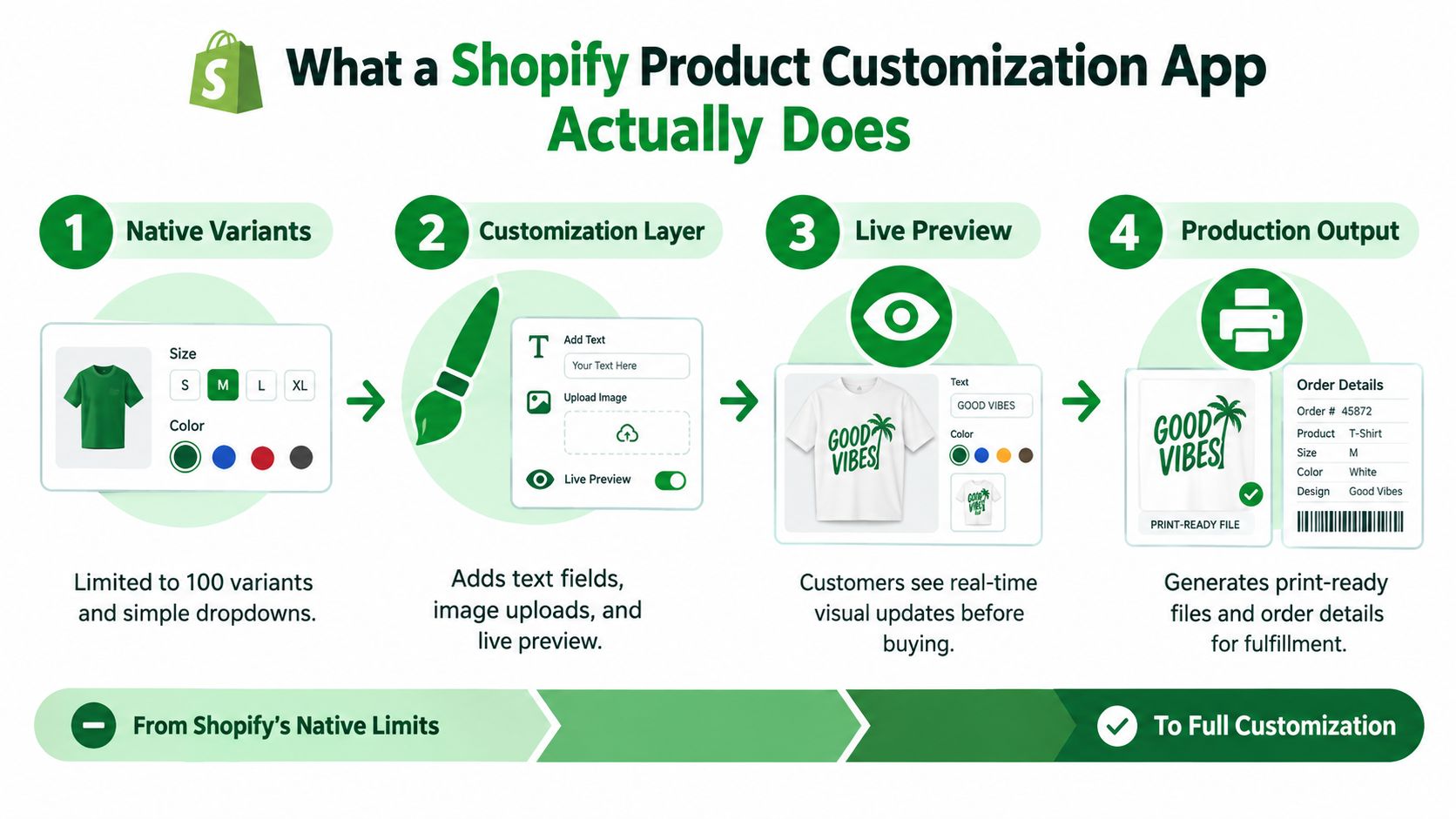
In practical terms, the app adds a customization layer to the product page. That layer can include:
- Text inputs for names, initials, dates, or short messages
- File uploads for logos, images, or artwork
- Conditional fields that appear only when relevant
- Visual previews so the shopper can see the result before buying
- Production details that travel with the order for fulfillment
How the data moves
If the custom choice isn't a native variant, where does it go?
Usually, the app stores or passes those buyer selections through structures outside simple variant values, such as line-item properties, metafields, or app-specific option logic. That lets the store capture selections without turning every possible personalized combination into a separate variant.
Shopify now supports up to 2,048 variants per product, but a product can still have only three options, which means apps that need more than three customer-facing choices must model extra selections outside native variants (Shopify variant limits).
Practical rule: If your customer has to type, upload, position, or assemble something, you're usually beyond what native variants were built to do on their own.
What “full customization” usually includes
Not every app does every job. Some handle only storefront input. Others extend into fulfillment.
A more complete setup usually does four things in sequence:
- Captures the buyer's selections on the product page.
- Shows a preview or at least a clear summary before add to cart.
- Passes clean order data into the cart and order record.
- Prepares production output that your team or vendor can use.
That last point matters more than merchants expect. A beautiful configurator that creates messy order details is still a bad system. The goal isn't just a fancier product page. It's a reliable path from buyer input to shipped product.
Key Technical Requirements Every Merchant Should Check
A customization app can look impressive in a demo and still cause problems once you install it across a real catalog. The technical questions aren't glamorous, but they decide whether the app will hold up when traffic rises, products expand, and your team wants fewer manual fixes.
Start with product model fit
Before you compare styling or pricing, check whether the app matches the way your products work.
If your catalog relies on simple personalization, the app should capture extra fields cleanly and show them in the cart and order details. If your products involve layered options, conditional logic, or artwork handling, the app needs to do more than append notes to an order.
Three technical questions matter first:
- How does it model extra choices? If the app needs more than Shopify's three native options, it should use a clear approach for handling the additional inputs.
- How does it keep order data readable? Production teams shouldn't decode cryptic strings or hunt through scattered fields.
- How does it scale across many products? Manual setup might be fine for five products. It becomes painful across a large catalog.
A good background read here is this explanation of Shopify metafields for merchants, because many customization workflows depend on product data being structured cleanly outside the standard variant framework.
Theme compatibility and storefront behavior
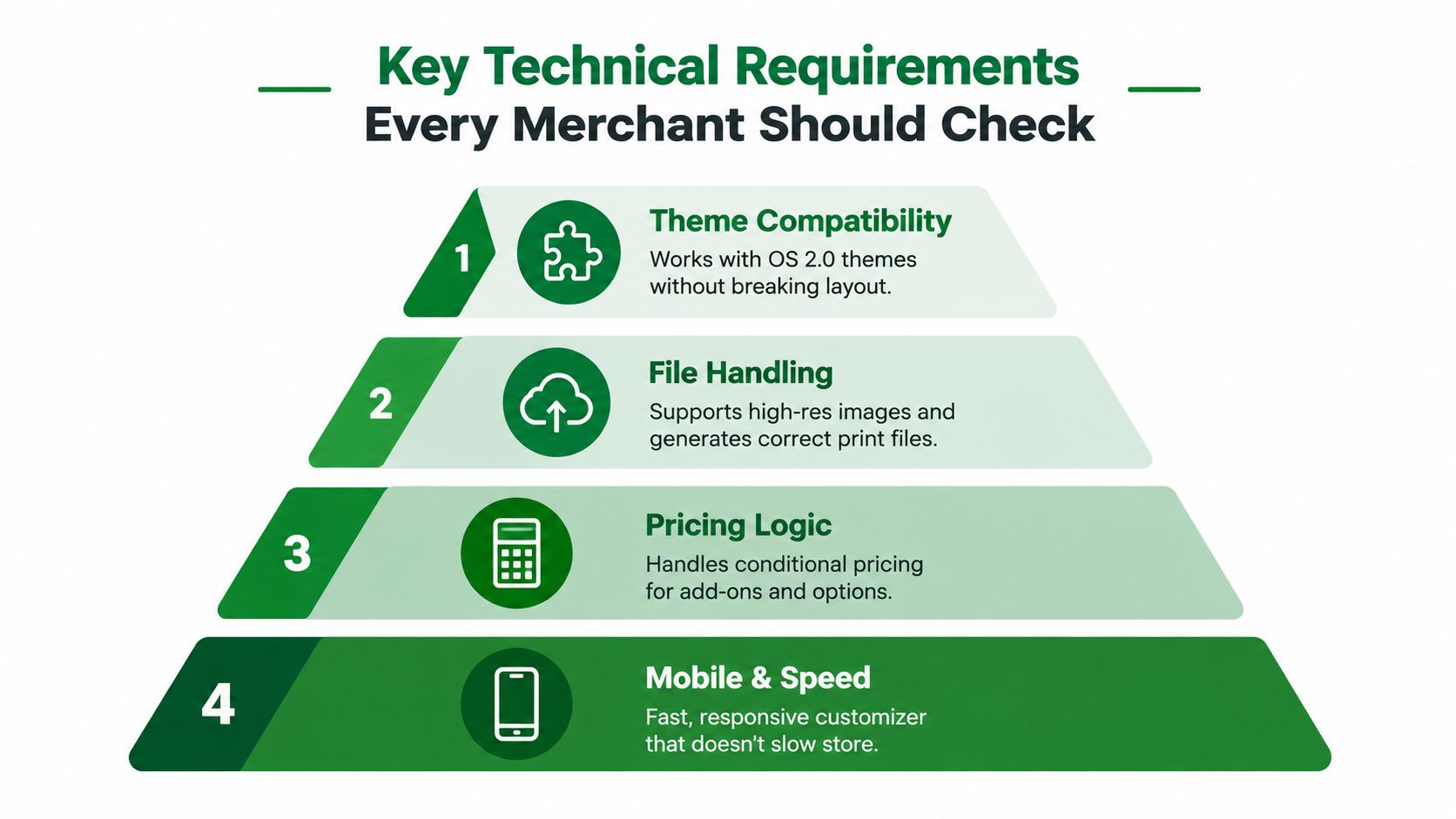
A product customizer lives inside your storefront, so it has to cooperate with the theme you already use. That sounds obvious, but many teams run into layout breaks, duplicate buttons, cart issues, or odd behavior on mobile.
Check for these basics:
- OS 2.0 support: The app should work with modern Shopify theme architecture.
- Section compatibility: It shouldn't require fragile template edits for every product page.
- Cart and drawer behavior: Customized selections should stay visible and intact after add to cart.
- Mobile interaction: Fields, previews, and upload controls should feel usable on phones, not just desktops.
Mobile matters even more now because 2026 trend reporting describes mobile-first configurator UX as a requirement and notes that AI-assisted 3D asset creation is reducing configurator setup costs, while Shopify's own 2026 guidance says customizations usually require an app or custom configurator (ecommerce customization trends for 2026).
If your team is also exploring immersive product experiences, these AR try-on SDK integration patterns are useful for understanding how visual layers can affect implementation choices.
Performance is part of the buying experience
This is the most overlooked part of app selection. A customization tool can improve confidence and still drag down the page if it loads too much data or injects too many scripts.
Shopify warns that iterating over product.variants forces the server to load and process every variant during render, which can significantly increase TTFB for products with hundreds or thousands of variants. Shopify recommends using lighter option data such as product.options_with_values when possible to reduce render cost (Shopify theme performance guidance).
That warning has a direct implication for customization-heavy stores. If an app leans on bloated variant handling, oversized preview assets, or heavy front-end logic, your product page may get slower as product complexity rises.
Look for signs of restraint:
- Lazy-loaded scripts instead of loading everything immediately
- Efficient previews that don't block the initial page render
- Selective data fetching rather than loading every possible combination
- Clean fallback behavior if the preview or upload component fails
Slow customizers don't just annoy shoppers. They make it harder for every other element on the product page to do its job.
Fulfillment, file output, and support reality
The final check is operational. Your app should produce something your team can use without guesswork.
Review these points with actual test orders:
Preview accuracy
What the shopper sees should match what production receives as closely as possible.Design retention
If a shopper returns to cart or edits their configuration, the design shouldn't disappear.File handling
Uploaded images and artwork should remain attached and accessible in a production-friendly format.Support path
When something breaks, you need a vendor that can explain the issue in plain language and help resolve it.
That's the difference between a novelty feature and a reliable commerce workflow.
How to Choose the Right Shopify Product Customization App
By the time teams evaluate apps, they've already seen too many feature grids. Every listing promises flexibility. Every demo looks smooth. The hard part is matching the app to the kind of customization your catalog needs.
A simple way to decide is to sort apps into tiers of complexity, then judge each option against the same buying and operating criteria.
Match the app to the job
Some stores only need basic personalization. Others need a full product builder.
Here's a practical way to think about the app types:
- Basic option apps work for names, dates, short notes, and simple add-ons.
- Visual customization apps fit products where the shopper needs to see the result before buying.
- Advanced configurators suit products with many interdependent choices, layered design logic, or production output needs.
If your store sells gifts, monogrammed accessories, or made-to-order apparel, the app should reduce friction for first-time buyers. If your store sells complex configurable items, the app should prevent invalid combinations and keep the order data structured.
Shopify Product Customization App Evaluation Checklist
| Evaluation Criteria | What to Look For | Why It Matters |
|---|---|---|
| Catalog fit | The app supports your real use case, whether that's text fields, file uploads, or live assembly | A mismatch creates workarounds from day one |
| Preview quality | Buyers can clearly understand the final product before checkout | Confidence matters more than decorative UI |
| Mobile experience | Inputs, uploads, and previews are easy to use on a phone | Many customization journeys now start and finish on mobile |
| Setup effort | Your team can launch and maintain it without constant developer help | Self-serve management keeps the program sustainable |
| Order clarity | Selections appear cleanly in cart, order records, and fulfillment handoff | Production errors often begin with unclear order data |
| Pricing logic | The app can handle add-ons, conditions, and custom charges in a manageable way | Customization often changes the economics of the order |
| Support quality | Documentation and support responses are clear and practical | Custom workflows break in edge cases, not demos |
| Store impact | The app doesn't clutter the page or create obvious speed issues | Better feature depth isn't worth a weaker shopping experience |
For a broader view of complementary tooling around merchandising and store operations, this roundup of best Shopify apps for growth teams helps put customization in context.
A short decision filter
If your team is stuck, use this filter:
Choose a basic app if the buyer only needs to enter simple information and a text summary is enough.
Choose a visual app if the buyer needs reassurance about placement, colors, or uploaded artwork.
Choose a deeper configurator if product rules, production output, or catalog complexity are the main challenge.
Don't buy for the most impressive demo. Buy for the cleanest path from shopper input to fulfilled order.
This usually eliminates half the shortlist quickly.
How Customization Apps Affect SEO and AEO Workflows
A customization app doesn't live in isolation. It changes the product page, adds scripts, alters page behavior, and sometimes creates new URL patterns or front-end states. That means it can influence not only conversions, but also how well the page stays readable for search engines and AI systems.
Keep the product page understandable
The main SEO risk isn't customization itself. It's messy implementation.
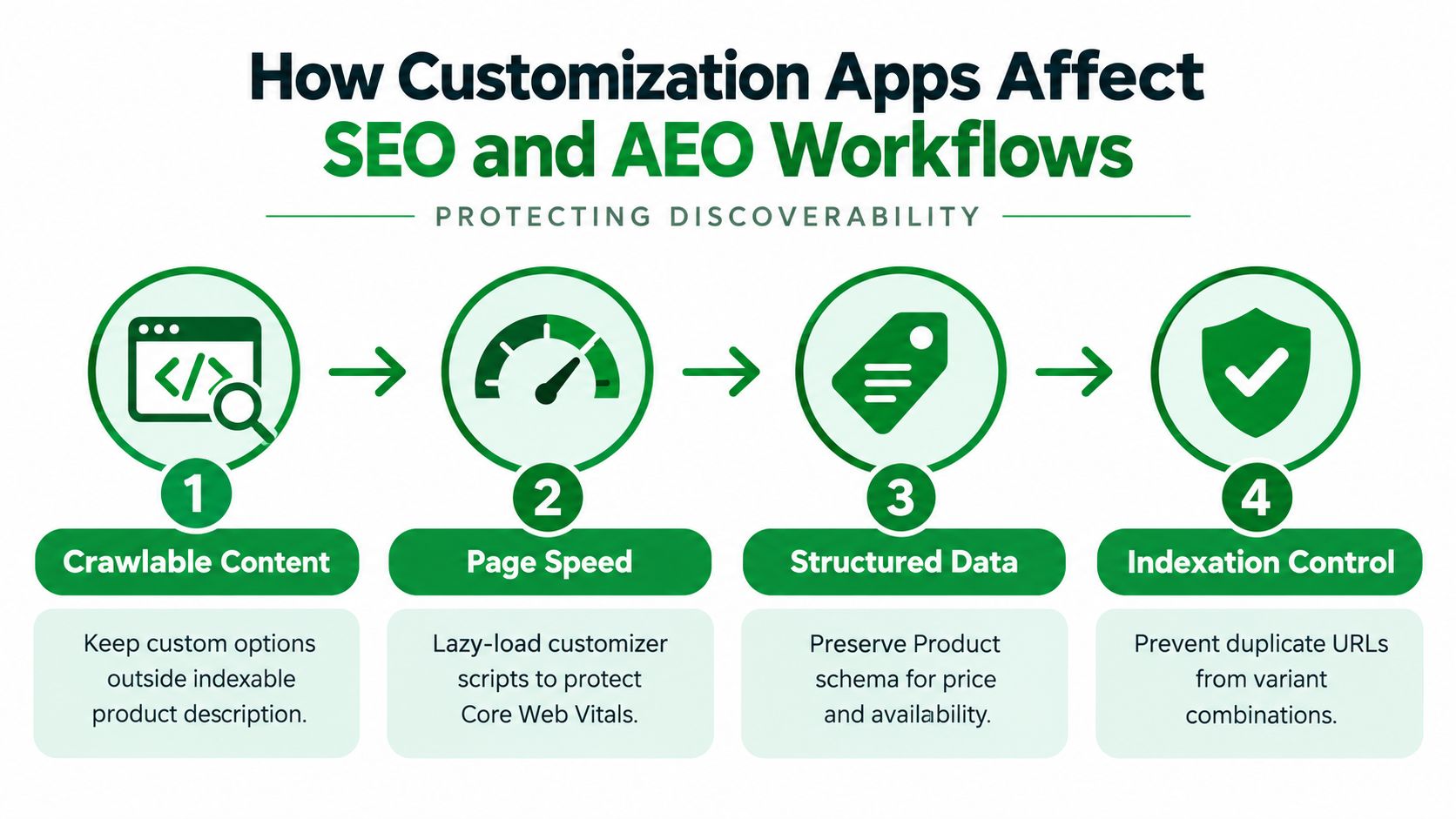
When app logic overwhelms the page, three problems tend to show up:
- Important product content gets buried under interactive elements
- Structured data breaks or goes stale when product details are rewritten awkwardly
- Crawlable page output becomes noisy because too much of the experience depends on front-end scripts
A shopper can still use the page. A crawler or AI assistant may get a thinner, less stable interpretation of it.
That's why customization content should support the product page, not replace its core meaning. Your product title, description, price, availability, and main value proposition still need to be easy to parse.
Speed and indexation still matter
Performance issues from a customizer aren't just technical debt. They can affect discoverability because slow or script-heavy product pages are harder to keep clean and efficient.
This is especially important when merchants turn many options into variant-like page states, duplicate templates, or query-parameter combinations. The goal is to let buyers customize without multiplying thin, duplicative, or low-value indexable states.
A strong operating rule is simple:
- Keep the canonical product page as the main indexable asset.
- Treat the customizer as an enhancement to that page.
- Avoid creating unnecessary crawlable URLs for every selection path.
- Preserve valid product schema even when the page has rich interactive behavior.
For teams refining the product page itself, this guide to Shopify product page SEO is a useful reference because customization often changes exactly the parts of the page that search systems rely on most.
AEO adds another layer
AI answer engines and assistants don't interact with pages the way shoppers do. They look for clean signals: what the product is, what it costs, whether it's available, how it differs, and whether the page appears trustworthy and machine-readable.
A cluttered customizer can make those signals harder to interpret if it obscures the core product narrative or breaks schema implementation. A well-implemented one can do the opposite by making the offer clearer while preserving structure.
The safest pattern is to let the customizer add choice while the page keeps a stable, machine-readable description of the base product and its buying context.
That's the balance merchants should aim for. Rich buyer interaction on the surface. Clean technical interpretation underneath.
Real World Applications and Examples That Drive Results
The easiest way to judge a customization strategy is to picture how a real shopper uses it. Different categories need different levels of interaction, and the right setup usually feels obvious once you map the buying moment.

Personalized gifts
A gift buyer often wants speed and certainty. They're choosing a base product, adding a name or date, and checking whether the final item looks appropriate enough to send directly to someone else.
A lightweight visual customizer works well. The product page doesn't need to feel like design software. It needs to make the final result obvious. That matters because recent trend coverage says real-time product previews can reduce cart abandonment by up to 40% by removing uncertainty about the final result (personalization trends and preview impact).
Custom apparel and uploaded artwork
Apparel gets trickier fast. A buyer may want to enter a team name, add a number, choose placement, or upload an image. In those cases, the app has to help the shopper understand scale, positioning, and print intent.
If the preview is vague, support requests rise. If the upload flow is clumsy on mobile, the buyer may quit before finishing.
Broader personalization research also notes that 71% of consumers expect personalized communications and products or services, and that 74% of Gen Zers are interested in personalized products as summarized in the earlier cited ecommerce research. That's one reason apparel brands keep moving toward easier, faster self-serve customization instead of manual “order notes” workflows.
A short product demo can help teams pressure-test the shopper journey before launch:
Configurable home goods and made-to-order items
Home goods often need guided configuration rather than simple personalization. A shopper may choose materials, finishes, text, and layout details in one flow.
The best experiences here don't throw every control on screen at once. They reveal options progressively, keep the preview stable, and make the final order summary easy to verify. Current coverage points to a broader shift from static rules toward real-time behavioral signals and fewer funnel steps, which supports a simple lesson for merchants: the winning customizer is often the one that removes decision friction, not the one that offers the most knobs.
Conclusion Your Next Steps to Launch Customization Confidently
A Shopify product customization app is rarely just an add-on. It becomes part of your product model, your storefront experience, and your operations. That's why the best decision usually comes from three questions.
First, how should the buyer's choices be modeled? If the product only needs simple personalization, keep the setup lightweight. If the buyer needs to assemble or preview something complex, choose an app that can manage those inputs without forcing awkward catalog workarounds.
Second, what will this do to the page itself? A customizer has to earn its place on the product page. It should preserve speed, work smoothly on mobile, and avoid creating technical clutter that weakens SEO or AI readability.
Third, can your team operate it after launch? That includes setup effort, order clarity, fulfillment handoff, support quality, and how easily merchandisers can update options without constant developer help.
A practical launch sequence looks like this:
- Map one use case first: start with a single product type, not your full catalog.
- Test the buyer flow on mobile: especially uploads, previews, and add-to-cart behavior.
- Place test orders end to end: confirm that fulfillment receives exactly what it needs.
- Review the live product page: check speed, structured data, and page clarity after the app is installed.
- Expand only after the workflow is stable: scale the model that works.
Teams that treat customization as both a merchandising decision and a technical implementation usually avoid the expensive second rebuild.
If you want help checking the SEO and AI-search side after a customizer goes live, RankEngine gives Shopify teams one place to audit product pages, verify supported fixes against the live store, and monitor structured data, indexing, and answer-engine readiness. It's a practical way to make sure a stronger customization experience doesn't weaken discoverability.