 RankEngine
Your store ranks a blog post for best waterproof jackets, but the collection that sells them stays buried. Meanwhile, product pages compete for the same broad phrase, and your merchandising team keeps adding keywords without knowing which URL should own the search.
That's not a shortage of target key words. It's an assignment problem. Before editing another title or commissioning another guide, decide which shopping task each page should satisfy and which canonical Shopify URL should represent it.
Table of Contents
- Map Each Target Keyword to One Shopify URL
- How to Research and Validate Target Keywords
- Prioritize Keywords by Demand Fit and Risk
- Place Keywords on the Page Without Stuffing
- Track Rankings and AI Mentions Separately
- Start With One Collection This Week
Map Each Target Keyword to One Shopify URL
Intent to Shopify URL map
| Intent | Shopify asset | Example query | Do not |
|---|---|---|---|
| Informational | Blog or buying guide | how to wax a canvas jacket | Send it to a product URL |
| Commercial | Collection or comparison page | best waxed jackets for rain | Split the same query across many products |
| Transactional | Product page | buy waxed field jacket olive medium | Bury the SKU inside a blog |
| Navigational or policy | Brand, help, or policy page | jacket returns window | Optimize a product for the store name alone |
| Constraint or fit | Filterable collection plus a short buying note | will this jacket fit over a hoodie | Hide the filter behind a non-crawlable app block |
A target keyword is the primary query you want a particular URL to win, supported by natural variants that express the same intent. It isn't a phrase to paste onto every product in a category. A collection can cover waterproof jackets, rain jackets, and related shopping language without needing a separate landing page for every wording.
Start with the task behind the query. Someone learning how to wax a jacket needs instructions, materials, and care warnings. Someone comparing jackets needs a useful assortment, distinctions between products, and a clear route to purchase.
Choose the template that can finish the task
A collection is usually the strongest owner when shoppers need to browse your assortment. Give it meaningful filters, available products, and buying guidance that helps someone choose. The practical work in Shopify collection page SEO matters more than turning a category page into a long essay.
A comparison page earns its place when the shopper needs explicit trade-offs that a product grid can't explain. Keep it distinct from the collection: compare materials, intended use, care, or fit rather than duplicating the same introduction and product cards.
Constraint queries need closer inspection. A broad layering question can belong on a crawlable collection with a short fit note, while a question about a specific jacket's chest measurements belongs on that product. Don't make every filter combination indexable; promote only combinations with a coherent assortment and a useful standalone purpose.
Record why the alternatives lost
For each assignment, write a short rejection note: product page rejected because the shopper wants a choice, or guide rejected because the shopper wants to buy. This stops another team member from reopening the same decision during the next catalog update.
The commercial stakes aren't trivial: Shopify's global ecommerce sales overview estimated worldwide retail ecommerce sales at approximately $6.33 trillion in 2024, up 8.8% from 2023. That doesn't predict your store's opportunity, but it puts misdirected demand in perspective.
Assignment rule: One primary intent, one canonical URL, and a written reason the other templates were rejected.
Canonical ownership is an editorial decision backed by technical configuration. It doesn't mean placing a canonical tag from an unrelated guide onto a collection.
How to Research and Validate Target Keywords
A keyword sheet should make one decision clear: which Shopify URL owns the query's primary intent? Record the wording, the page type in live results, and any competing URL before drafting or optimizing a page.
| primary keyword | variants | intent label | live SERP type | target URL | funnel stage | cannibalization risk |
|---|---|---|---|---|---|---|
| best waxed jackets for rain | waxed rain jacket; waxed cotton rainwear | Commercial | Jacket collections and buying guides | /collections/waxed-jackets |
Consideration | A buying guide targeting “best waxed jackets for rain” could compete with the collection |
The example is a starting assignment, not a reason to treat every similar phrase as a separate page.
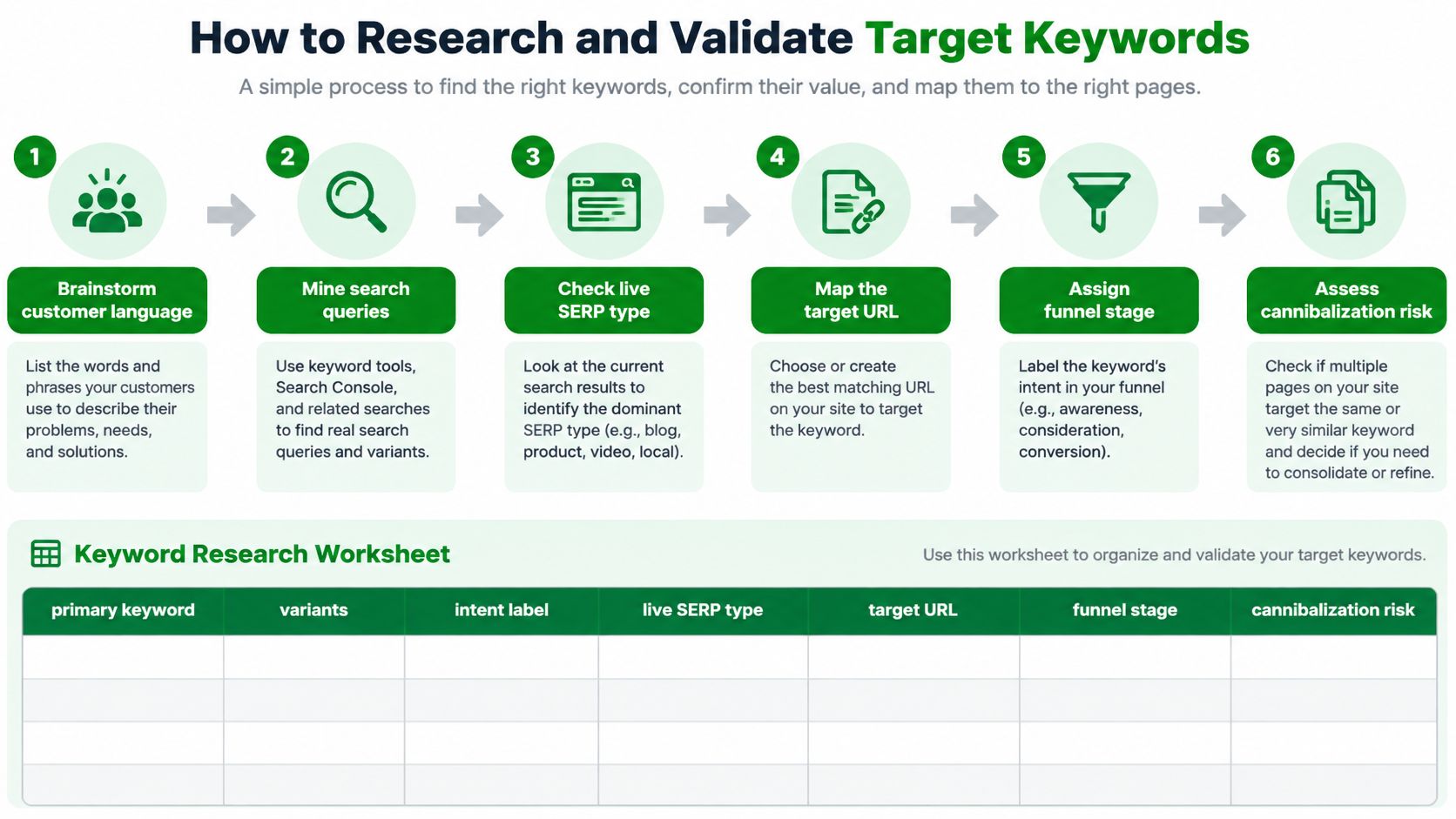
Discover the language before judging demand
Collect customer wording. Pull phrases from support tickets, reviews, return reasons, and sizing chats. A novice might ask for a rain coat; an experienced shopper might ask for a waxed cotton field jacket. Keep both phrases until you establish whether they express the same need. Google's SEO Starter Guide explains that people with different levels of knowledge may search using different terms.
Expand each seed with actual queries. Use Google Keyword Planner or another keyword tool, then compare suggestions with Shopify search analytics where available. For the jacket store, retain modifiers for material, layering, packability, budget, and use. A packable rain shell and a heavy waxed jacket serve different product needs, even if a tool groups their searches together. Customer discussions can also suggest wording to investigate. For example, use this guide to map Reddit phrases to SEO. Treat discussion phrases as candidates, then check whether they match your catalog and search results.
Assign a provisional intent label. Mark queries informational, commercial, or transactional, with separate labels for navigation and policy when needed. “Best waxed jackets” suggests comparison; “buy waxed field jacket olive medium” suggests a product purchase. Keep the tool's label beside your own judgement when the wording could fit more than one intent.
Validate the page type before assigning the URL
Inspect current search results. Search in your target market and note whether relevant organic results are guides, collections, comparisons, or products. For “best waxed jackets for rain,” don't assign the collection solely because you sell jackets. If buying guides dominate, decide whether your store can create a useful comparison page. If collections dominate, the collection is a stronger fit.
Assign one URL and record the overlap. Set the funnel stage, choose the canonical Shopify URL for the primary intent, and check Search Console for pages already earning impressions on the query. If a rainwear guide appears for a query assigned to
/collections/waxed-jackets, record that specific overlap and decide which page should own the intent. Several URLs receiving impressions do not automatically indicate cannibalization; the concern is interchangeable pages competing to satisfy the same search.
Use this video alongside the sheet for a keyword-research walkthrough.
The main errors happen during assignment: a high-volume head term can pull the shortlist away from the products you stock, a tool's intent label can disguise a template mismatch, and repeated product targets can blur real differences between SKUs.
Keep variants together when they describe the same task. Separate them when shoppers need a different assortment, answer, or product. Measure AI mentions as a high-engagement check alongside Google rankings, not as a substitute for them.
Prioritize Keywords by Demand Fit and Risk
The best next keyword isn't necessarily the largest opportunity in a tool. It's the query your store can satisfy, with a page you can improve and merchandise without creating avoidable overlap.
Use a decision table rather than a single blended score. A numerical total can make a poor intent match look acceptable because the search volume is attractive.
How to score a target keyword
| Signal | Use it to | Watch-out |
|---|---|---|
| Monthly search volume | Size the demand | A huge head term can miss your actual products |
| Difficulty 0–100 | Judge whether you can rank | Tool scores ignore your links and catalog depth |
| Cost per click | Spot commercial value | A high CPC can reflect an ads opportunity, not an organic one |
| Intent versus live results | Keep or reject the URL | A tool label isn't proof of the page type Google shows |
| Cannibalization | Force one canonical owner for the intent | Interchangeable product targets can fragment clicks |
| Current position | Find quick wins | Impressions on the wrong URL aren't a ranking win |
Compare the work, not just the metrics
Say the jacket store has a collection targeting waterproof jackets under 200, a blog targeting best waxed jackets, and a product targeting buy waxed field jacket olive medium. These are hypothetical candidates, not measured performance claims.
The budget collection looks promising if it already receives relevant impressions, appears within reach of stronger visibility, and contains enough eligible stock. Moderate demand can be worth pursuing when the assortment fits precisely. Check the budget against the shopper's market and displayed currency before treating the query as a match.
The blog needs a different decision. If live results favor collections and shoppers need to browse, mark it remap, not rewrite. Keep useful editorial material on the guide, but change its purpose and internal links so it supports the shopping destination instead of imitating it.
The exact-product query may show tiny estimated demand. It can still justify a title review because the product matches a clear purchase request. Don't promise that it converts without checking orders, and don't create separate indexable variant pages solely to chase wording.
A template mismatch is a stop sign, not a small deduction from an otherwise attractive keyword score.
Build an actionable queue
- Resolve remaps first. Clarify which existing page owns the shopping task before commissioning competing content.
- Improve plausible quick wins. Favor relevant pages with existing visibility, useful stock, and fixable shortcomings.
- Keep exact-fit product terms. Small demand isn't a reason to obscure a product's model, material, color, or fit.
- Park broad expansion terms. Delay ambitious head terms when your assortment or supporting content can't satisfy the results you're competing against.
Read difficulty as a screening aid, not a verdict. Inspect the competing pages for assortment depth, useful guidance, brand strength, and links. CPC is also directional: advertisers' willingness to pay doesn't tell you what organic traffic will earn.
Finally, downgrade any row whose impressions consistently arrive on the wrong template. Leave it in the sheet with a diagnosis rather than celebrating visibility your intended landing page hasn't earned.
Place Keywords on the Page Without Stuffing
Take the approved collection for waterproof jackets under 200. In this scenario, the budget matches the store's displayed currency, and the collection only includes qualifying products. That qualification matters more than fitting the phrase into every field.
Use Waterproof Jackets Under 200 as the H1, with a unique title that adds a useful distinction or the store name. The collection description should explain what shoppers can choose, not announce that this is the best destination for the keyword.
Write for the selection decision
A useful introduction might explain that the assortment includes lightweight rain shells and packable waterproof options, then distinguish everyday use from more demanding conditions. Only use those descriptions when the products support them. Waxed fabric, water resistance, and waterproof construction aren't interchangeable claims.
Google's SEO Starter Guide identifies titles, main headings, alt text, and link text as useful places for descriptive search language. That's a placement principle, not a repetition target.
Use this layout to check whether the phrase supports the page rather than taking it over.
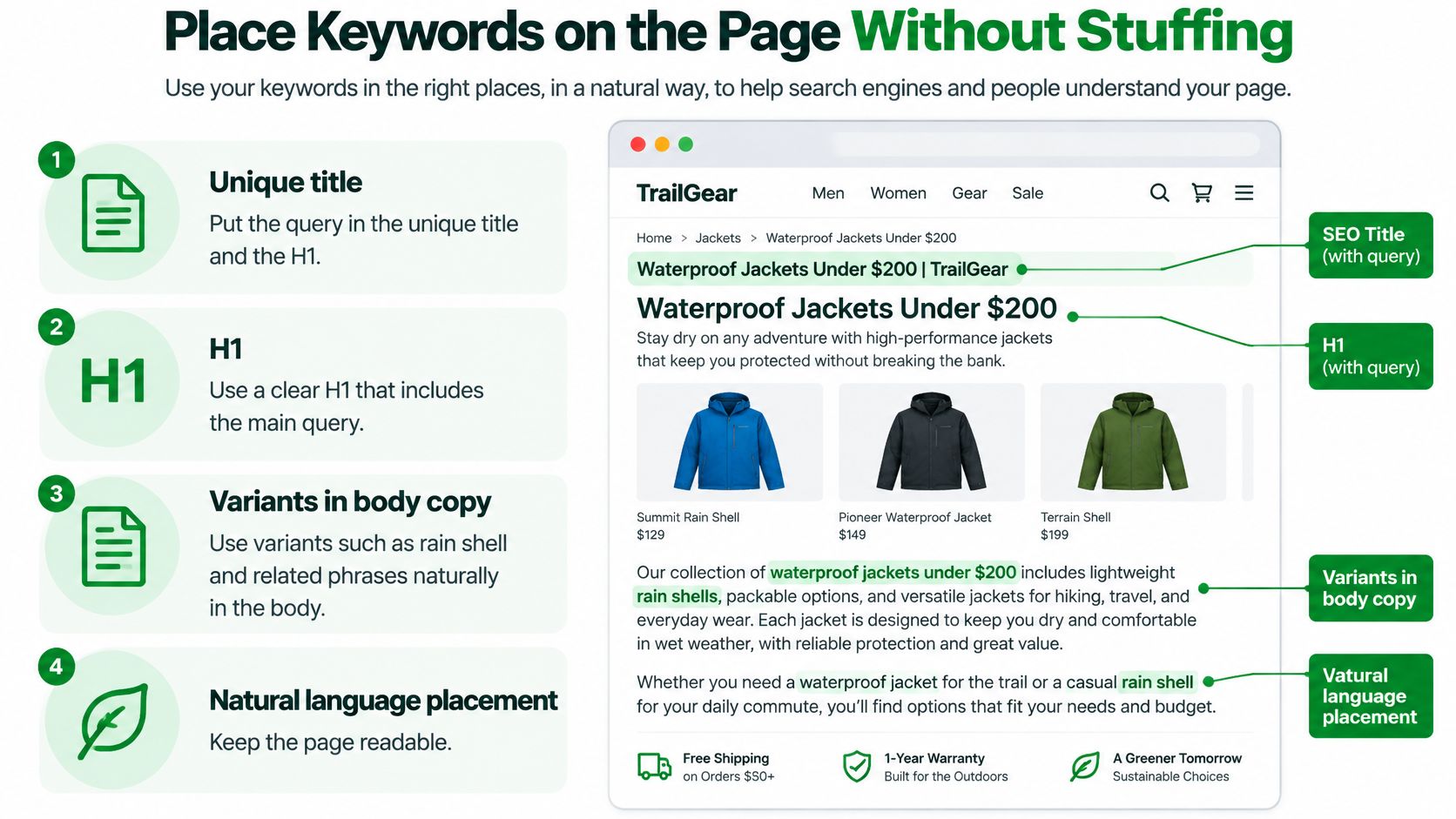
Add natural variants where they help shoppers compare. A product-card introduction can identify a packable waterproof shell if that fact is accurate, but every card doesn't need the collection's budget phrase. Product titles still need to distinguish the individual items.
From the rainwear guide, use a descriptive anchor such as shop waterproof jackets within your budget. For an image showing a hood adjustment, describe the visible action and garment, not the commercial query. The implementation details in how to add keywords to Shopify help translate the approved wording into the appropriate fields.
Check the deployed page
- Confirm the canonical destination. Inspect the collection's canonical tag and check that navigation and editorial links use the intended URL.
- Check the title and H1. Make sure they're unique, describe the assortment, and agree with the assigned intent.
- Inspect rendered copy. Confirm the theme displays the description and buying notes where shoppers can use them.
- Add crawlable internal links. Use standard links from relevant, established pages rather than relying on search boxes or scripted controls.
- Review image descriptions. Remove repeated keyword strings and retain useful descriptions of meaningful images.
- Re-read after publishing. Check both the live page and its HTML because a theme or app can overwrite an edited title or canonical.
Large catalogs commonly fail through repetition and omission rather than a lack of keywords. Duplicate titles make products hard to distinguish; useful variants confined to meta descriptions never improve visible buying guidance. Orphaned products and links trapped inside inaccessible interface elements create discovery problems that copy edits won't resolve.
Save the pre-change Search Console view for impressions, clicks, click-through rate, and query-to-URL alignment. Compare like-for-like periods and note changes in stock, promotions, and seasonality before attributing movement to an edit.
A better average position on the wrong URL can still leave shoppers with a weak route to purchase. Judge whether the intended collection receives relevant visits and presents the products those visitors expected.
Track Rankings and AI Mentions Separately
Set a monthly review for decisions, rather than reacting to daily movement. Keep an operational eye on broken pages or tracking failures, but don't rewrite a collection because a ranking briefly shifts.
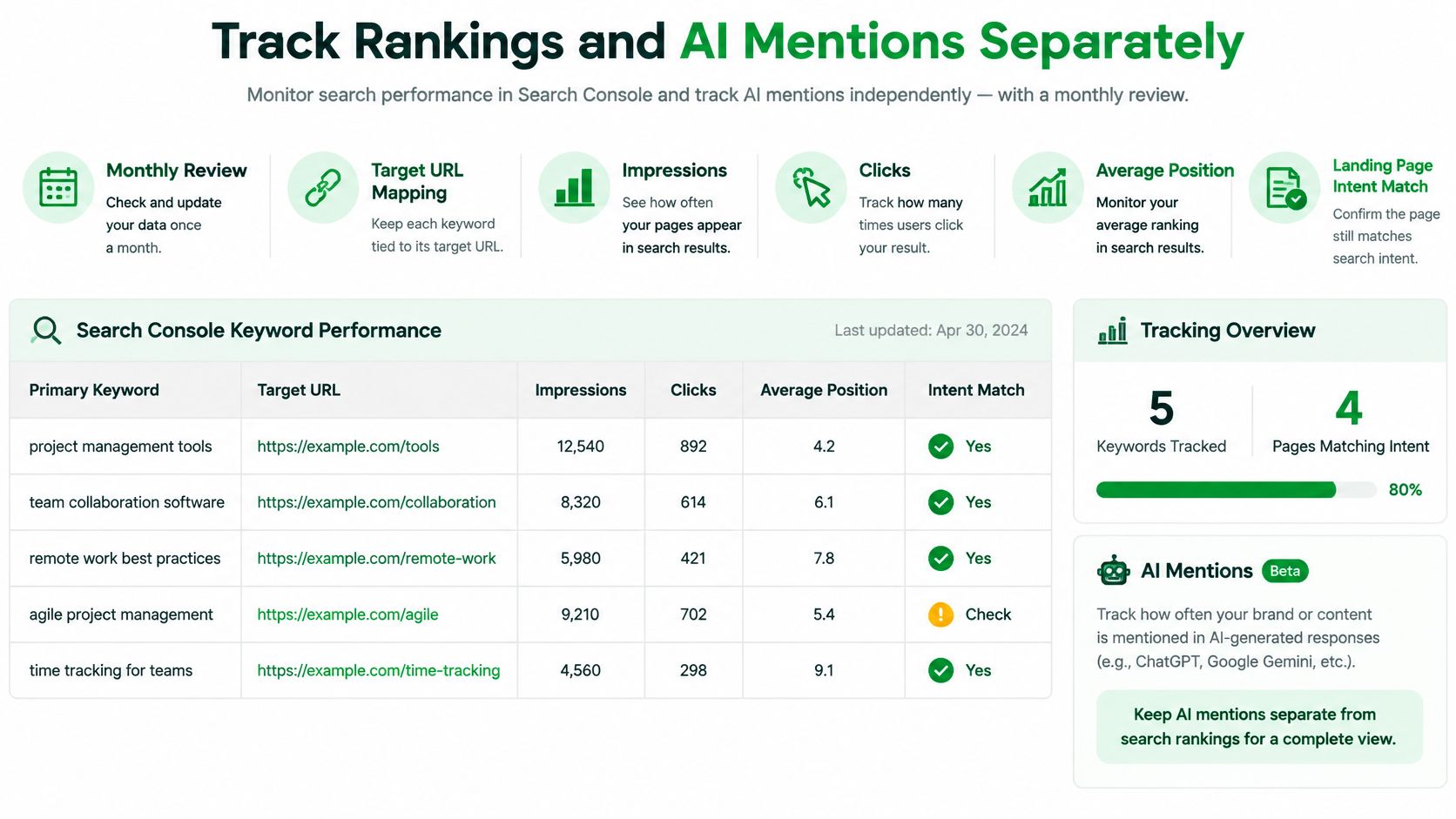
Maintain separate views for Google performance and AI discovery. This dashboard layout keeps the intended landing page visible alongside the search metrics.
Keep Google reporting tied to the destination
In Search Console, filter by the primary query and inspect the Pages view. Record impressions, clicks, average position, and whether the landing page still matches the assigned shopping task. Investigate when another URL starts replacing the intended destination.
A keyword rank tracker can supplement that view with consistent monitoring. Keep the market and device settings stable, and don't treat a tracked position as interchangeable with Search Console's aggregated average.
AI deserves attention for a different reason: the BrightEdge release on AI shopping reports that generative-AI referrals to U.S. retail websites rose 1,200% from July 2024 to February 2025, while AI-referred visitors viewed 12% more pages than visitors from other channels. AI referrals nevertheless remained a relatively small share of total traffic, so treat them as a high-engagement discovery check, not a replacement for Google rankings.
Log mentions and verify the answers
Use a stable set of shopping prompts, including layering, suitability, budget, and delivery questions. MyMentions' guide to measure share of voice in AI answers is useful for keeping comparisons consistent.
- Citations and mentions. Record whether the assistant links a page, names the brand, or recommends a specific product. These aren't equivalent outcomes.
- Referral sessions. Track identifiable assistant referrals in analytics, acknowledging that attribution won't capture every exposure.
- Assisted conversions. Record observable purchases involving those visits without claiming the assistant caused every sale.
- Branded-search movement. Watch branded queries alongside campaigns and promotions; an increase alone doesn't prove AI influence.
- Factual accuracy. Check price, variant, availability, shipping, and returns against the live store.
Conversational questions should become product facts and useful answers, not longer keyword strings. In a 2025 U.S. survey documented by Constructor, 54% of respondents felt their search behavior had become more conversational. A question about fitting a jacket over a hoodie calls for measurements and layering guidance, not repeated mentions of hoodie-friendly jackets.
Google's structured-data guidance explains that markup can make pages eligible for rich results but doesn't guarantee them. Product schema can expose facts such as price and availability; it can't repair contradictory variant records or unclear policies.
Fix a wrong stock status or returns answer before commissioning more AI-focused content.
Start With One Collection This Week
Don't begin by assigning target key words across the entire catalog. Choose a collection with a clear commercial purpose, a maintainable assortment, and someone responsible for its merchandising. You need a complete working example before scaling the process.
Use waterproof jackets under 200 as a hypothetical assignment only if your actual stock and market support it. Otherwise, choose the closest commercial query your store can reliably satisfy.
A contained weekly assignment
- Day one. Inspect the live results and confirm that collections are an appropriate destination. Check that the selected assortment delivers the promised material, use case, and budget.
- Day two. Complete the sheet row with the primary keyword, supporting variants, intent, canonical URL, and competing pages. Write the rejection note for the other templates.
- Day three. Update only the approved URL's title, H1, and short description. Add relevant links from the rainwear guide, then verify the deployed changes.
- Day four. Save the pre-edit Search Console period as your baseline, record the publication date, and schedule the monthly review. Leave the AI mention checks for that review.
Don't spend the remaining time producing near-identical collections for every modifier. Ask the merchandiser to confirm product eligibility and the support team to check the buying note. Those checks prevent a polished page from making promises the catalog can't keep.
Choose a workspace you'll maintain
For a large catalog, RankEngine can hold the working sheet alongside keyword research showing monthly search volume, a 0–100 difficulty score, CPC, and search intent. A spreadsheet works just as well if the team keeps ownership and status current. The workspace is secondary to the decision recorded in it.
Keep the pilot narrow enough that you can explain every change. If the collection fails to attract the intended queries, you'll have a manageable diagnosis: page type, assortment, copy, internal links, or technical access, rather than an untraceable catalog-wide rewrite.
Your assignment is one collection this week. Approve its primary keyword, publish the supported changes, and check whether that specific URL becomes the useful shopping destination you intended.
RankEngine brings Shopify keyword research, ranking monitoring, on-page fixes, and AI-visibility checks into one workspace, with supported fixes verified against the live store. Visit RankEngine to put your collection's keyword assignment into practice and monitor Google performance separately from AI mentions.