 RankEngine
An SEO content brief template is a structured planning document with 11 core fields, including the target keyword, search intent, outline, audience, competitor summary, and quality checks. It specifies what a Shopify page must achieve before drafting starts, so the page is built to rank and serve shoppers from day one.
The familiar pattern is easy to recognize. A merchant adds products to Shopify, creates collection pages, publishes a few blog posts, and eventually hands writing to several people. One writer repeats the same keyword across product descriptions, another produces a blog article aimed at the wrong intent, and a third forgets internal links entirely. By the time someone notices, the store has a catalogue of pages that sound different, compete with one another, and give search engines no clear structure to follow.
A good brief fixes the handoff before it becomes a rewrite. For Shopify teams, it must work across product pages, collections, landing pages, and blog content while remaining practical enough to use repeatedly.
Table of Contents
- Why Shopify Stores Need a Standardized SEO Content Brief
- What an SEO Content Brief Template Actually Is
- How to Build Your SEO Content Brief Step by Step
- Applying the Brief to Shopify Products and Blogs
- The Hidden Pitfall of Keyword-Heavy Briefs
- QA Checklist Before Publishing Any Shopify Page
- FAQs About the SEO Content Brief Template
Why Shopify Stores Need a Standardized SEO Content Brief
Unstructured briefs create predictable problems. A writer receives a keyword and a rough title, then has to guess the audience, page format, desired action, supporting topics, and evidence requirements. The resulting draft might be grammatically strong, but it can still target the wrong search intent or duplicate a page that already exists on the store.
That problem becomes more serious as a catalogue expands. Product pages need commercial language and buying details. Collection pages need category context without competing with individual products. Blog articles need a clear informational purpose and a useful path toward relevant products or collections. Treating all three as generic “SEO content” produces pages that miss their role in the site architecture.
Practical rule: A brief should tell the writer what the page must accomplish, not merely what phrase to repeat.

Turn editorial requests into operating instructions
A standardized template gives every page the same decision points:
- Targeting: Which primary keyword and related terms belong to the page?
- Purpose: Is the searcher researching, comparing, choosing, or ready to buy?
- Coverage: Which questions and subtopics must the page answer?
- Architecture: Which Shopify page type owns the topic, and which pages should it link to?
- Evidence: Which sources, product facts, or company materials can support the copy?
- Validation: Which on-page and structured-data elements need checking before publication?
This is why the brief functions as a control layer between SEO strategy and production. It synchronizes keyword targeting, intent, information architecture, brand requirements, and quality checks before anyone invests time in a draft. A standardized set of fields has become common in practical SEO workflows, with a 2026 template example presenting 11 fields as the working structure of a repeatable brief. That standardized field structure reflects the move from an informal editorial note to an operational production document.
For a busy merchant, reducing ambiguity is more valuable than adding another meeting. The brief makes the writer's assignment clear, gives the editor a consistent approval standard, and makes future updates easier to manage. If you also need visual assets for product education or campaign content, a cinematic AI video generator can support the creative production layer, but it shouldn't replace the search and commerce decisions documented in the brief.
What an SEO Content Brief Template Actually Is
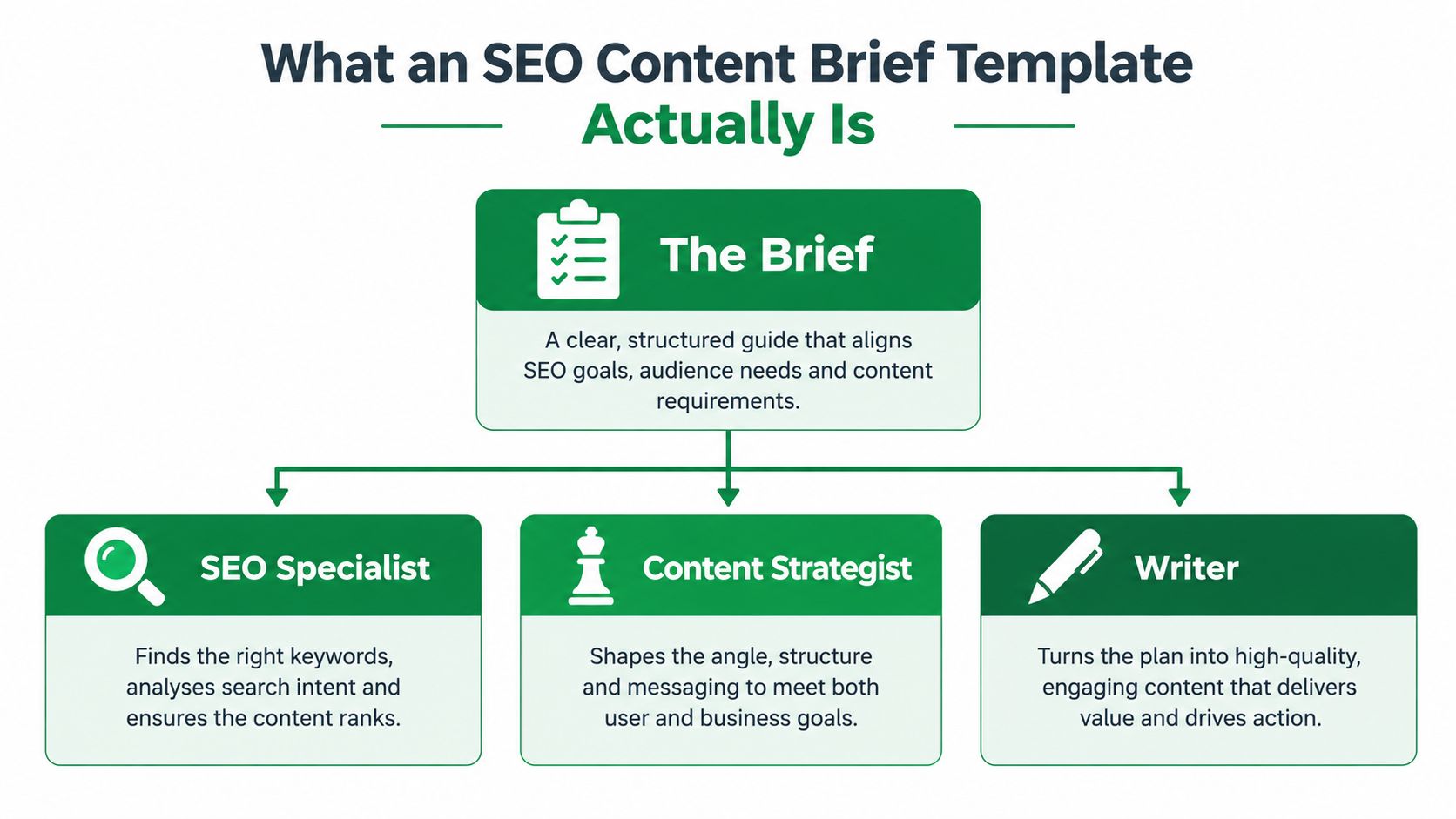
An SEO content brief template is a shared planning document used by the SEO specialist, content strategist, writer, editor, and sometimes designer. It turns research into instructions for one specific page. The document should state the page's target keyword, search intent, reader profile, job-to-be-done, format, outline, metadata direction, internal-link targets, source requirements, and publishing checks.
It isn't the article outline by itself. An outline shows the order of headings. A brief explains why those headings exist, who they're for, what each section must answer, how the page fits the Shopify store, and which standards determine whether the finished work is ready.
The brief as a production specification
For a product page, the brief might define the product's buying use case, differentiators, required attributes, related collection, and structured-data expectations. For a blog article, it might define the question to answer, the informational format, relevant products to mention, and the next action for a reader who has finished researching.
A useful template includes these fields:
| Field | What it controls |
|---|---|
| Primary keyword | The page's central search target |
| Secondary terms | Closely related language to use naturally |
| Search intent | The result the searcher expects |
| Format | Product page, collection page, guide, comparison, or another type |
| Reader profile | The person and situation behind the query |
| Job-to-be-done | What the reader needs to decide or accomplish |
| Word-count range | The depth justified by the topic and page type |
| Competitor summary | What relevant ranking pages already cover |
| Outline | The required heading and content sequence |
| Questions to answer | The reader's unresolved information needs |
| Sources and constraints | Allowed evidence, exclusions, links, and brand rules |
The template becomes useful when every field demands a decision. “Write an SEO-friendly article” is not an instruction. “Answer the buyer's comparison question before discussing materials, link to the relevant collection, and use only approved product specifications” is an instruction a writer can execute.
That specificity matters for large catalogues. Without a shared document, each writer interprets “optimise this page” differently. With one, the store has a repeatable handoff that preserves intent and structure across products, collections, and editorial content.
How to Build Your SEO Content Brief Step by Step
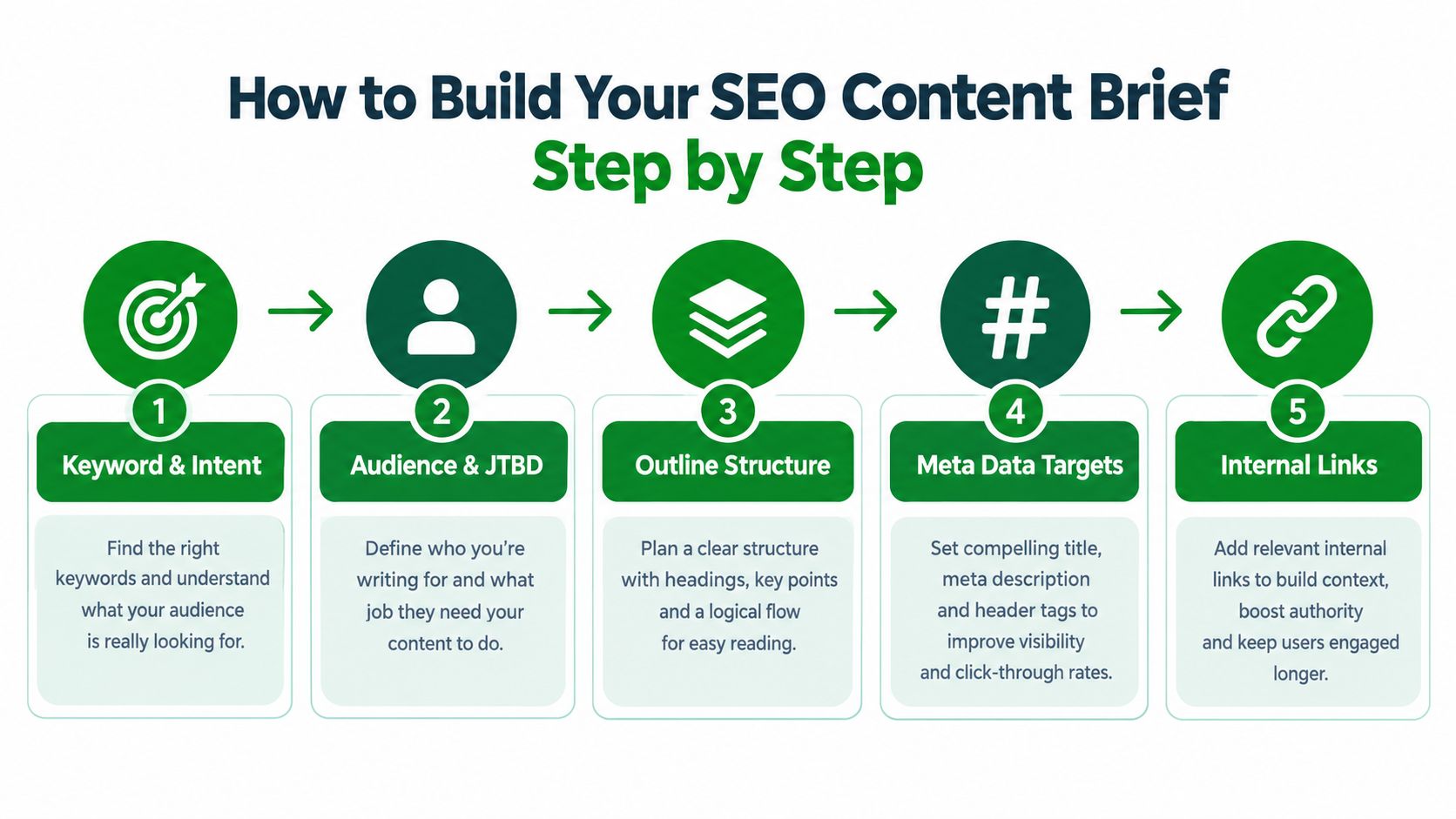
Start with the page's role in the store, not with a list of phrases. A collection page for waterproof jackets and a blog post about choosing a waterproof jacket may use related language, but they serve different intents and shouldn't compete for the same job.
1. Define the target and intent
Write one primary keyword, then add 3 to 8 secondary terms where they clarify the subject. Don't give the writer a long inventory of near-duplicates. The list should support natural coverage, not create a quota.
Record both user intent and observed SERP format. If the results are mostly category pages, a long educational article may not be the right asset. If the query produces guides, comparisons, or question-led answers, the brief should reflect that format.
A weak entry says:
Keyword: waterproof jackets
Intent: SEO traffic
A stronger entry says:
Primary keyword: women's waterproof hiking jackets
Intent: commercial investigation. The reader wants to compare suitable jackets before choosing a product. Create a collection page with concise category guidance, filtering support, and links to relevant products.
2. Describe the reader and job-to-be-done
Name the reader's situation, not just a demographic. “Outdoor shoppers” is too broad. “A shopper preparing for wet-weather day hikes who needs to understand waterproofing, fit, and layering before choosing a jacket” gives the writer useful boundaries.
Then state the job-to-be-done in one sentence. For a blog, it might be “help the reader choose a jacket for a particular activity.” For a product page, it could be “help a qualified shopper confirm that this product matches their intended use.”
3. Set scope and structure
Use a word-count range as a planning constraint, not a ranking target. A collection page needs enough copy to explain the category without pushing products below the buying interface. A blog post may need deeper explanations, examples, and a clear route to related products.
Write the outline as an instruction for each section:
- Opening answer: Resolve the main question quickly.
- Decision criteria: Explain the factors that affect the choice.
- Product or category application: Connect the guidance to the Shopify inventory.
- Questions and objections: Address details that could block a purchase.
- Next action: Send the reader to the most relevant collection, product, or signup.
4. Add metadata, schema, and brand rules
Specify the working title, H1 direction, URL suggestion, meta title, and meta description. The writer can draft these, but an editor should verify that they match the final page and don't duplicate another URL.
Include structured-data guidance appropriate to the page. Product content may need Product and Breadcrumb data. An article may need Article and Breadcrumb data, with FAQ guidance only when the page contains suitable questions and answers. Also define tone, prohibited claims, approved terminology, and the evidence required for product specifications.
5. Document the competitor gap
Review relevant ranking pages and record what they already answer. Then add a gap to fill line that tells the writer what the new page must contribute.
For example, if competing jacket guides explain waterproof ratings but omit care instructions and fit across layers, the brief should require those missing details. Don't ask the writer to paraphrase the competitors. Ask for a more useful answer, supported by the merchant's actual product knowledge.
Finish with internal-link instructions in a simple format:
- Link from: the new article
- Link to: the waterproof jacket collection
- Suggested anchor: women's waterproof hiking jackets
- Reason: move readers from research to relevant products
A live Shopify SEO strategy template can help organize the wider relationship between pages, but the individual brief still needs page-specific decisions.
Before sending the document, add source links, visual requirements, points to avoid, and the final reviewer. The finished brief should let a writer draft without guessing and let an editor assess the draft without reopening the entire research process.
Applying the Brief to Shopify Products and Blogs
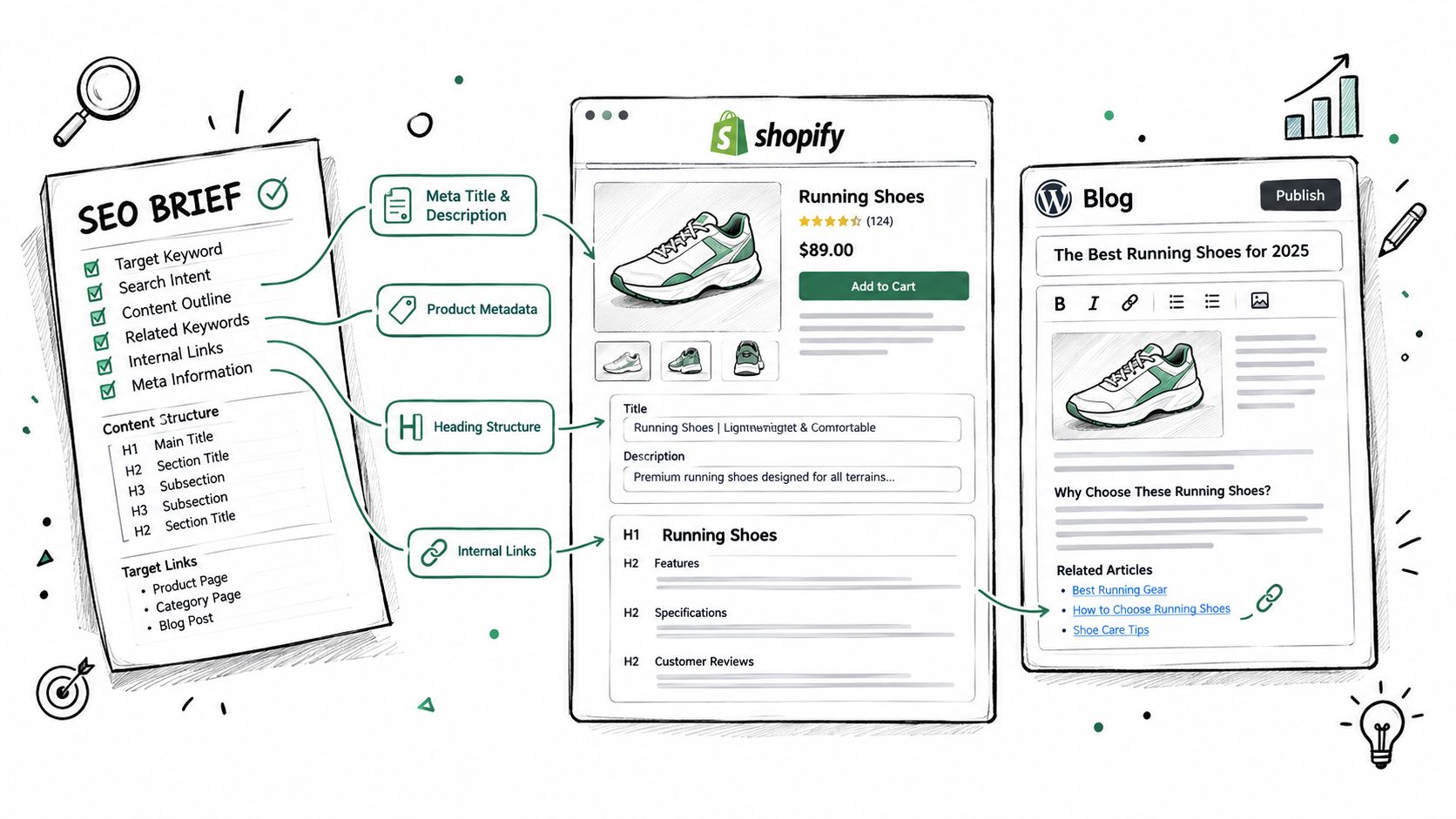
A brief only creates value when the team translates it into the live store. In Shopify admin, the page type determines where the instructions are applied.
For a product, open Products, select the item, and use the product title, description, media, and search-engine listing fields to implement the brief. The product title and description should reflect the approved buyer intent and product facts. The media section needs descriptive alt text, while the related-product and collection relationships should support the internal-link plan where the theme allows it.
For a collection, open Products, Collections, then apply the category H1 direction, introductory copy, metadata, and merchandising logic. Keep the copy subordinate to the collection's shopping purpose. A lengthy editorial introduction that hides the product grid may satisfy a writing brief while damaging the customer experience.
Put blog instructions in the right place
For an article, use Content, Blog posts in Shopify admin. Apply the approved title, body structure, internal links, image alt text, and search-engine listing details there. The blog brief should identify which products or collections deserve a link, where that link belongs, and whether the call to action is educational, commercial, or subscription-focused.
Brand voice belongs in the brief and in the page content, not only in a separate style guide that writers may overlook. Schema guidance belongs with the implementation owner, too. Writers can mark required questions and article details, while the editor or theme configuration should control the final JSON-LD output.
Verify the page after implementation
A Shopify-native SEO workspace can audit products, collections, pages, blog articles, images, and structured data, then place unresolved issues into a review queue. It can also write supported changes through the Shopify Admin API and re-read the live Shopify values before treating a fix as complete. That distinction matters because an optimistic dashboard status doesn't prove that the published store contains the intended title, canonical, heading, alt text, or schema.
For a practical keyword workflow before drafting, use keyword research for Shopify stores to connect search targets with the correct product, collection, or blog URL. After publishing, compare the brief with the live page rather than assuming the CMS saved every field as expected.
The Hidden Pitfall of Keyword-Heavy Briefs
More keyword instructions don't automatically produce a better brief. Many teams document the topic and target phrases but leave the writer to infer the audience, structure, evidence, internal links, and exclusions. That creates drafts that mention the right language while failing to answer the right question.
The survey data cited in SEO Wind's content brief guidance shows this imbalance clearly. Teams most often include the topic at 67.45%, keywords at 64.71%, target audience at 50.29%, and content objectives at 49.71%. By comparison, only about 37% explicitly include search-optimisation instructions, while 35.88% define tone and style, 34.12% define structure, and 31.47% reference other content on the topic.
Those figures don't mean keyword research is unimportant. They show that many briefs stop before the writer receives enough operational guidance.
What a stronger brief adds
A Shopify template should include a separate field for each missing decision:
- Must cover: facts, questions, product attributes, and sections that can't be omitted.
- Must avoid: unsupported claims, duplicate angles, competitor references, and off-brand language.
- Internal-link targets: destination URLs, suitable anchors, and the reason for each link.
- Source notes: approved evidence, required citations, and product information that needs merchant review.
- Competitor gap: the specific question, use case, comparison, or experience the new page handles better.
- Quality checks: metadata, heading hierarchy, canonicals, alt text, structured data, and live-page verification.
This turns a list of keywords into a controlled specification. The writer still has room to produce natural copy, but the page's purpose, boundaries, and acceptance criteria are no longer ambiguous. The recent guidance on SEO content brief strategies also emphasizes the value of a distinct gap-to-fill line, especially when top-ranking pages already cover the obvious points.
QA Checklist Before Publishing Any Shopify Page
Run the finished draft against the brief and the live Shopify page. Don't approve content solely because the editor likes the prose. A page can read well and still contain a duplicated title, an incorrect canonical, or structured data that doesn't match the product.
Use this checklist:
- Search target: Confirm the page owns the intended keyword and isn't duplicating another product, collection, or article.
- Intent and format: Check that the opening and page type match what the searcher is trying to accomplish.
- Metadata: Review the title, meta description, URL, and H1 for accuracy, clarity, and duplication across the catalogue.
- Headings: Confirm the hierarchy is logical and that headings describe real sections rather than repeating keywords.
- Canonical: Verify that the canonical points to the intended primary URL.
- Images: Check that every meaningful image has useful alt text and that decorative images aren't given misleading descriptions.
- Internal links: Test every link, confirm the destination is relevant, and check that important pages aren't isolated.
- Structured data: Validate the JSON-LD type and compare its values with the visible product, article, organisation, breadcrumb, FAQ, or local-business content.
- Content freshness: Review older blog posts and product claims for stale information before linking to them.
- Readability: Remove repetition, unsupported promises, awkward keyword insertions, and paragraphs that don't help the reader decide or act.
For a product-specific implementation reference, use this Shopify product page SEO checklist. Finally, recheck the published URL and its source values. A fix should be considered complete only after the live store reflects the intended change, not merely after an app reports that an action was attempted.
FAQs About the SEO Content Brief Template
How detailed should a brief be for AI search and modern SERPs?
It should specify more than keywords and headings. Include the answer format, source requirements, questions to resolve, information to omit, and the experience or expertise signals the page should demonstrate. Recent 2026 template guidance treats the brief as a publishing specification for human readers and AI systems, which is a more useful standard than a basic checklist.
How is a brief different from an outline?
An outline shows the sequence of sections. A brief adds the page's intent, reader, job-to-be-done, competitor gap, evidence rules, internal links, brand requirements, and QA criteria. The outline tells a writer what to write next. The brief explains what success looks like.
How should large Shopify catalogues use briefs?
Keep one master template, then create page-type versions for products, collections, and blogs. Add fields for canonical ownership, related URLs, product facts, merchandising priorities, and duplication risks. This preserves consistency without forcing every page into the same copy format.
How do you avoid turning the template into bureaucracy?
Make every field actionable. If a field won't change the writing, linking, implementation, or review decision, remove it. A short, completed brief is more useful than a large document filled with generic SEO language.
A reliable workflow is straightforward: assign the right Shopify URL, define its intent, document the reader's task, map the structure and gap, specify links and sources, implement the page, then verify the live result. That process prevents wasted drafts while keeping product, collection, and blog content aligned.
Use RankEngine to audit Shopify pages, manage supported on-page and structured-data fixes, and verify changes against live store values. Start by turning one product, collection, or blog workflow into a completed brief, then use the resulting checklist to standardize the rest of your catalogue.