 RankEngine
A merchant opens Shopify and sees a familiar mess: hundreds of product pages, some with useful titles and descriptions, others sharing boilerplate metadata or carrying details that no longer match the live catalog. A quick fix to one page feels manageable. Finding and correcting the same issue across the whole store is the harder job, and a change that looks right in an audit still needs checking on the actual storefront.
That's why Shopify store SEO works best as repeatable catalog management, not a one-time checklist. The operating rule is simple: identify a pattern, fix it in a controlled batch, then verify that the live pages show the intended result.
Table of Contents
- Why Shopify SEO Works Differently at Catalog Scale
- On-Page Fundamentals That Scale Across Product Pages
- Technical SEO Inside Shopify's Platform Limits
- Structured Data for Products and Variants
- AI-Search Visibility Without Confusing It With Google Rankings
- International SEO and Hreflang After Shopify Markets
- Monitoring, Verification, and a 30-Day Action Plan
Why Shopify SEO Works Differently at Catalog Scale
Take a store with a large catalog: a new collection launches, products have multiple variants, and some older descriptions still use a retired product name. The homepage may look polished while the same metadata or indexing issue is repeated across product and collection pages. The underlying problem isn't one bad URL. It's a catalog pattern that needs a catalog-level fix.
Shopify reported that millions of merchants in more than 175 countries used its platform as of December 31, 2025. The company facilitated $378.4 billion in GMV during 2025, up from $292.3 billion in 2024 and $235.9 billion in 2023. Merchant distribution spanned the United States, Europe, the Middle East and Africa, Asia-Pacific, Australia and China, Canada, and Latin America, as reported in Shopify's 2025 investor filing. That scale makes a practical point for store operators: small technical or metadata errors can recur across many URLs, languages, and markets.
Treat recurring errors as catalog issues
A single missing canonical might be easy to spot. The same incorrect canonical behavior across a product template can affect a far larger set of pages. Likewise, a weak title formula applied to a whole product type creates a repeated quality problem, not a one-off copy issue.
This changes how an SEO team should work. Instead of editing URLs one by one, segment the catalog by template, product type, market, and indexation status. Audit representative URLs, identify the shared cause, fix that cause where possible, then sample the live pages again. Don't assume a successful bulk action proves every page now behaves correctly.
Operating rule: Automate repetitive edits, but keep verification attached to the live URL and the template that produced it.
The same approach applies to discoverability, internal linking, and structured data. A useful overview of how to improve ecommerce organic traffic can help teams connect content, merchandising, and technical work rather than treating them as separate campaigns.
At scale, the core disciplines are unique page metadata, crawlable merchandising, sound canonical and variant behavior, accurate product data, useful internal links, fast templates, and market-appropriate localization. Each fix should have an owner, a sample set, and a verification step.
On-Page Fundamentals That Scale Across Product Pages
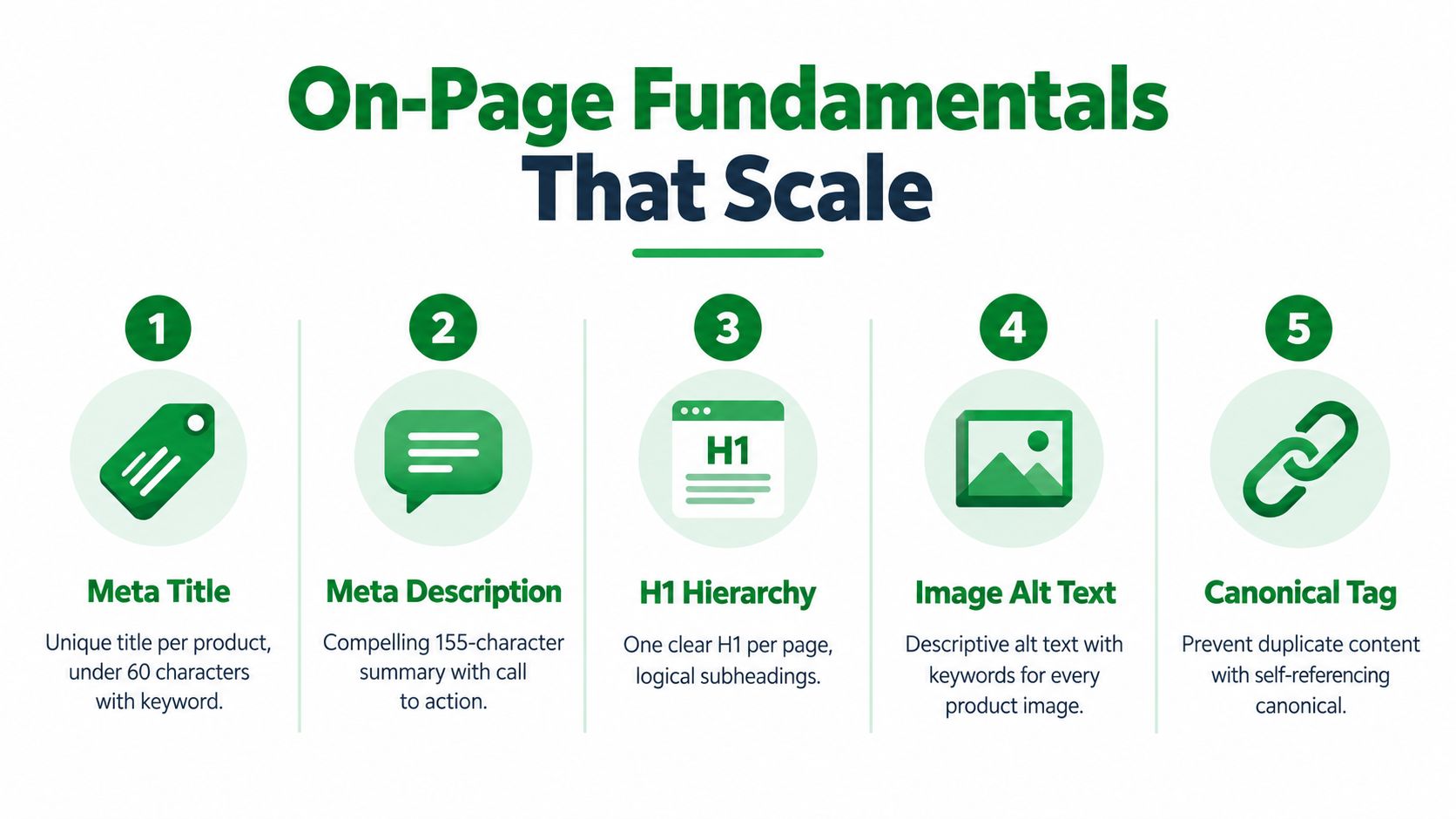
On-page SEO gets messy when a template generates dozens of pages with nearly identical titles. If 80 related SKUs all use “Classic Jacket | Brand,” search engines and shoppers get little help distinguishing color, material, fit, or intended use. The solution isn't to force a keyword into every field. It's to make the page's purpose and product identity clear.
Build page-specific metadata
Use a consistent structure as a starting point, then make sure each page conveys its own value:
- Product titles: Product name, meaningful attribute, and brand where useful. “Classic Rain Jacket, Women's Waterproof Shell” gives more context than a store-wide template.
- Collection titles: Category or use case plus a clear qualifier. Avoid making every collection title a minor variation of the same phrase.
- Blog titles: Put the reader's question or topic first, then add the brand only if it helps recognition.
Meta descriptions should explain what the page offers and why a shopper should click. They don't need to repeat the title word for word. For products, mention differentiating details such as fit, material, or compatibility when those details are accurate and visible on the page.
A Shopify theme commonly renders the product title as the H1. Check the live template rather than adding another heading just to include a target phrase. Use subheadings to organize product information, not to create an artificial ladder of keywords.
Make images and canonical signals useful
Alt text should describe the image for someone who can't see it. “Navy waterproof jacket with hood, front view” is more helpful than a string of search terms. For a product gallery, describe meaningful differences between images rather than repeating the same generic label.
Canonicals should reflect the page you intend search engines to treat as the primary version. Review collection filters, variant URLs, and duplicate product routes carefully. Internal links matter too: collection pages should connect shoppers and crawlers to the products that matter, while product pages can link to relevant guides or complementary items.
For teams improving descriptions, a practical guide to persuasive product copy can help turn product facts into clear, shopper-focused language. Once the rules are agreed, batch editing through Shopify's Admin API can reduce spreadsheet rework, but only if the team checks the saved values and rendered page afterward.
Technical SEO Inside Shopify's Platform Limits
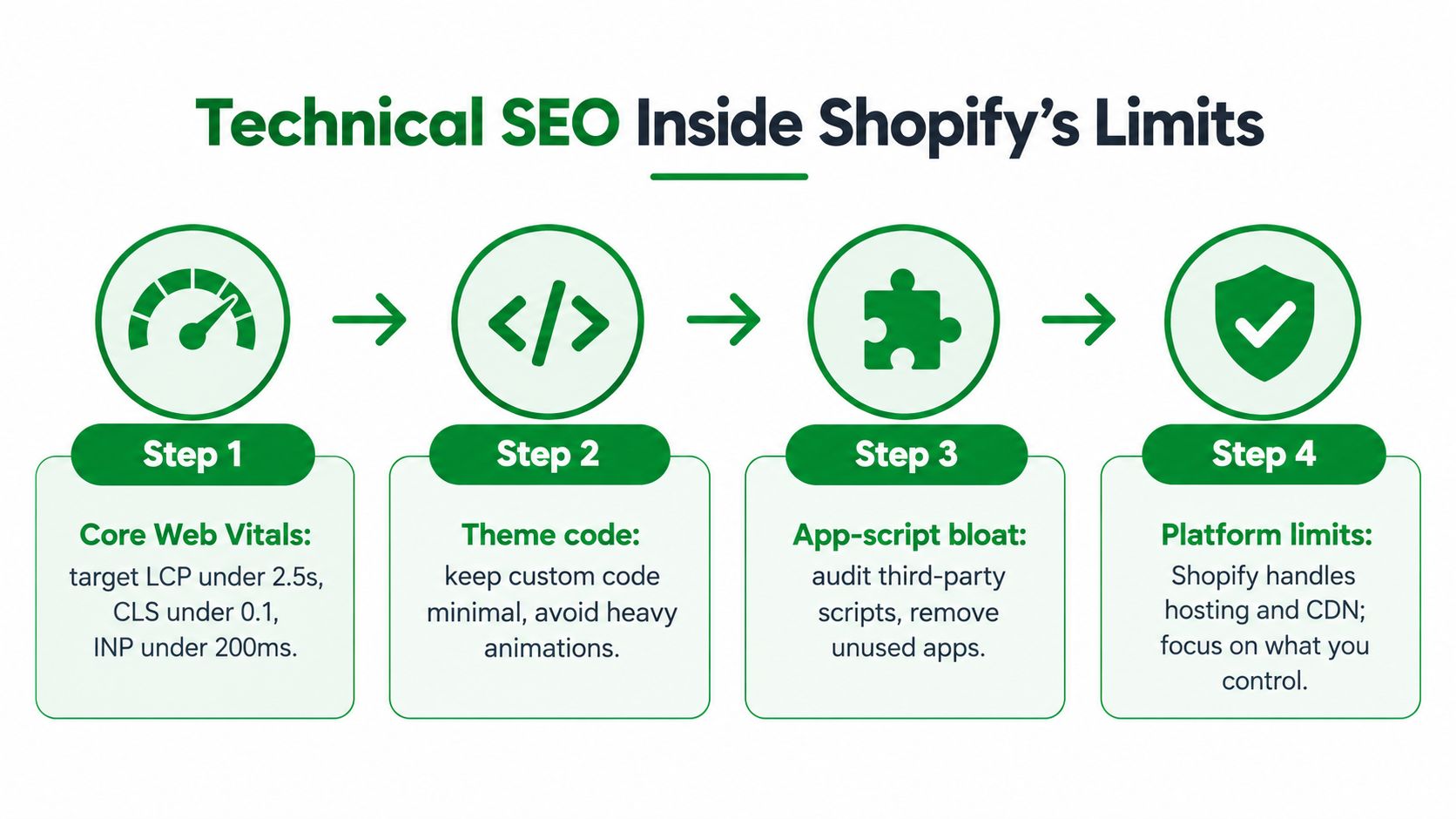
Shopify handles important infrastructure, but merchants still control many of the choices that affect how quickly a storefront renders and how search engines interpret it. A theme can accumulate custom scripts, apps can inject third-party code, and large product images can slow down the page. The practical work is to tune the parts the team can change and measure the result on real templates.
Core Web Vitals give teams concrete performance targets: Largest Contentful Paint (LCP) at 2.5 seconds or less, Interaction to Next Paint (INP) below 200 milliseconds, and Cumulative Layout Shift (CLS) below 0.1. Google's mobile research found that bounce probability rises 32% when load time grows from one second to three seconds, and 90% when it grows from one second to five seconds. Portent's analysis of 94 million page views across 10 ecommerce websites reported conversion rates declining by approximately 4.42% per additional second between zero and five seconds. These findings and thresholds are summarized in this ecommerce technical SEO checklist.
Tune the storefront you control
Start with the theme. Remove unused code and review custom animation or tracking scripts that delay rendering or interaction. Compress and resize product imagery to fit its display area, and check whether apps still in use justify the code they add. Test key templates on mobile, since a product page that performs well on a desktop connection can still feel slow on a phone.
Shopify exposes some crawl-control decisions through platform and theme settings. Use the robots.txt.liquid template only when there's a clear reason to adjust crawler access, and be cautious with theme-level indexing rules. A misapplied rule can hide important pages rather than solve a crawl issue.
Keep redirects and errors operational
When a URL changes, use Shopify's URL redirect list to send the old address to the correct destination. A redirect in theme code isn't a dependable substitute for a platform-level redirect: the request needs to resolve correctly before the theme renders. Monitor 404s, distinguish retired URLs from temporary errors, and redirect only when a relevant destination exists.
A small team can maintain a weekly routine: check Search Console coverage and key landing pages, inspect recent 404s and redirects, test representative product and collection templates for speed, and review recent app or theme changes. For canonical behavior, use this Shopify canonical tags guide as a focused reference, then confirm the live output.
Structured Data for Products and Variants
Product schema can help search engines interpret product details, but adding JSON-LD doesn't guarantee enhanced search results. The markup has to represent visible, accurate information, and variant-heavy catalogs need to describe both the individual offers and their relationships.
Google's product guidance supports a two-layer approach. First, provide standard Product structured data for each offer. Then use Schema.org ProductGroup to express how related products vary, with productGroupID, variesBy, and hasVariant. The group needs a stable identifier, and each variant needs its own identifier, such as an SKU or GTIN. Review the current requirements in Google's product structured data documentation.
Make variants accessible, not just selectable
A common Shopify mistake is assuming one canonical product URL and a JavaScript-only option selector are enough. A shopper may be able to click a color swatch, but a crawler still needs to understand the purchasable variant and reach its state directly. Google's guidance calls for variants to be preselectable through distinct URLs, such as query parameters, and for pages to remain accessible to crawling and rendering.
Check that the product page visibly presents the same price, availability, and variant information as the structured data. Don't mark up a variant as available if the storefront shows it as unavailable. A Merchant Center feed can complement on-page structured data, but neither replaces accurate product information on the site.
Roll out in controlled stages
Bulk-injecting schema and assuming it worked is risky. A validation error or incorrect relationship can undermine eligibility, while a successful deployment can still differ from what the live page renders. Use a staged release:
- Validate representative JSON-LD in Google's Rich Results Test.
- Deploy to a small sample of product URLs.
- Inspect those URLs in Search Console and compare the live page with its markup.
- Expand deployment only after the sample behaves as intended, then submit the sitemap for discovery.
Keep a record of the tested templates and identifiers. If the catalog or theme changes, retest the affected page types. A deeper Shopify schema markup guide can support implementation, but the decisive check is still whether the live product page and structured data agree.
AI-Search Visibility Without Confusing It With Google Rankings
A file intended for AI crawlers isn't a measurement strategy. Merchants need to know which assistants send visitors, which store pages are cited or used as landing pages, and whether those visits generate commercial value. Treating AI visibility as a separate channel makes it easier to spot what's working without mislabeling conventional Google rankings.

Shopify reported that, in Q1 2026, AI-chatbot referral sessions to its stores grew more than eightfold year over year. AI-referred visitors converted at nearly 50% higher rates than organic visitors and had 14% higher average order values. More than half of AI-referred sessions began on product-detail pages, compared with about 20% of organic sessions. These figures come from Shopify's AI search insights, and they point to a different landing-page pattern, not proof that AI referrals have replaced organic search.
Separate the reporting
Build a dashboard that keeps organic search and AI referrals in separate views. For AI referrals, break results down by assistant where analytics can identify it, then track the landing page, conversion rate, and revenue per session. Record whether the visitor entered on a product detail page, collection, or editorial page, and compare the experience against the product information the assistant could have accessed.
Google says there's no special AI-only schema or required machine-readable file for inclusion in its AI features. That makes accurate, crawlable product information and reliable site fundamentals more defensible priorities than publishing an llms.txt file and calling the job done. For a useful comparison of AEO versus SEO, focus on how visibility is measured and where the visit lands, not just what files exist.
AI visibility is a reporting question as much as a publishing question. Keep the referral source, landing page, and commercial outcome connected.
A practical channel split should show organic search alongside tracked AI platforms, then offer an assistant-by-assistant view. Shopify's reporting indicates that organic search still sends more traffic than tracked AI platforms combined, so abandoning Google SEO would be a poor trade. Maintain both channels with accurate first-party catalog data, crawlable pages, strong internal links, and analytics that distinguish assistant referrals from organic visits.
For a workflow that brings AI-search measurement into the wider store audit, see AI search optimization.
Here's a short video to add context on how search visibility is changing:
International SEO and Hreflang After Shopify Markets
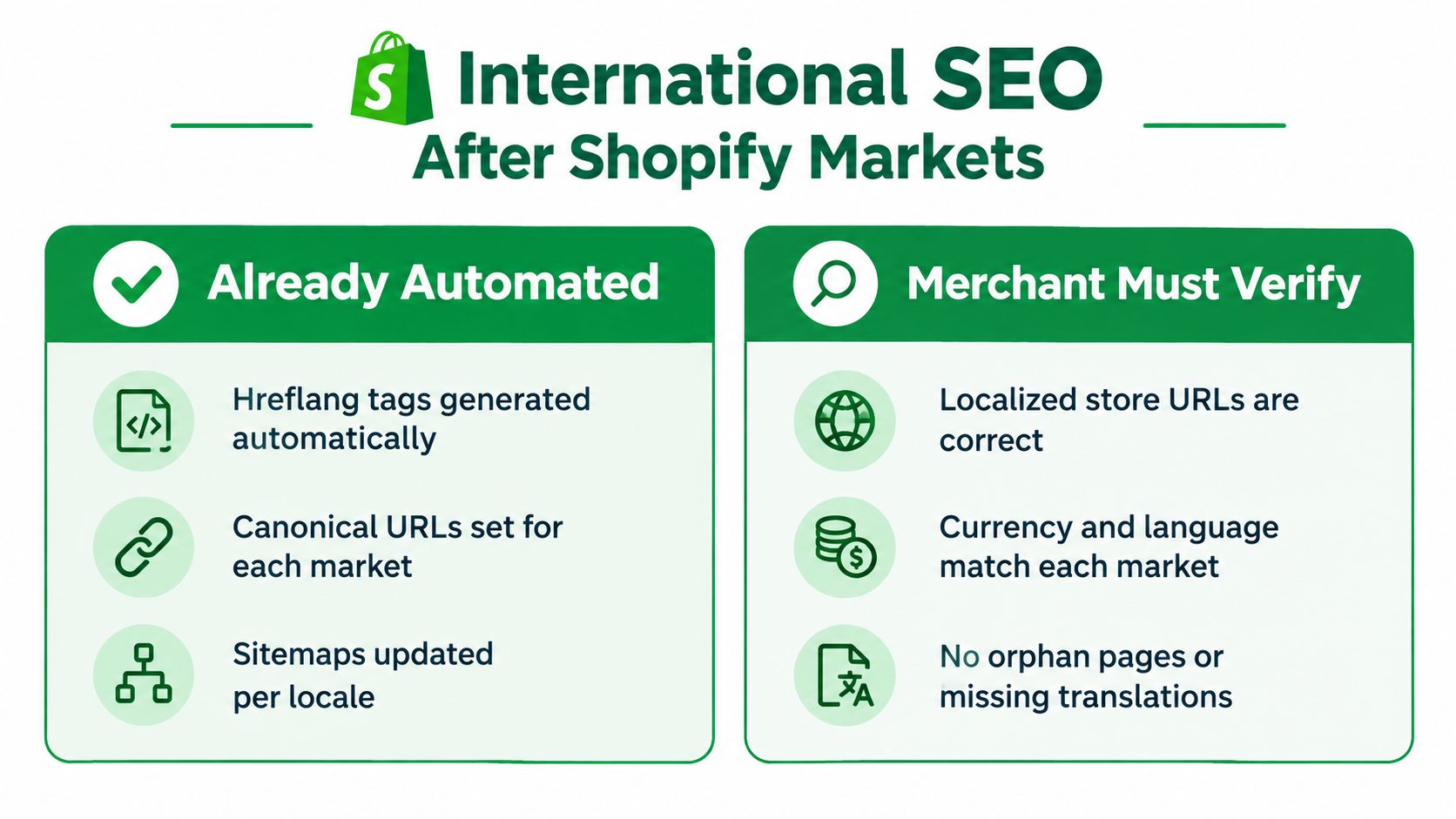
Shopify Markets can automate important parts of international SEO, including hreflang tags, canonical URLs, sitemaps, and crawler access when markets, domains, languages, and localized content are configured. But technically generated tags don't tell you whether a translated product page makes sense to someone shopping in that market.
Audit the full locale, not just the tag
Start with a product or collection that should be available across markets. For each locale, check whether the intended URL is indexable, uses the correct canonical, appears in the sitemap, and has hreflang return links to the other versions. Then inspect the page as a shopper would: does the title use local terminology, does the description explain the product naturally, and do currency and availability match the market?
Shopify's own Markets SEO guidance advises merchants to avoid identical content across domains without correct hreflang implementation and to verify that published languages appear in sitemaps. Use that as a technical baseline, not as proof that every market page is commercially ready.
A locale can pass a crawler check and still fail a customer. Machine-translated product names may sound unnatural, variant attributes may use unfamiliar terms, or internal links may send visitors back to another language. Structured product data also needs to reflect the localized page's actual product, price, and availability.
Distinguish technical health from market quality
Use two separate verdicts in the audit. The technical verdict asks whether the URL, canonical, hreflang, and sitemap relationships are correct. The commercial verdict asks whether the page helps a shopper in that market understand and buy the product.
- Technical checks: Confirm indexable URLs, canonical targets, hreflang return links, sitemap inclusion, and crawl access.
- Content checks: Review translated titles, descriptions, collection copy, and variant labels for clarity and local intent.
- Catalog checks: Match currency, price, stock status, and structured product data to the selected market.
- Discovery checks: Follow internal links within each locale and flag orphaned pages or links that switch language unexpectedly.
Shopify Markets can reduce implementation errors, but automation can also make weak localization look complete at a glance. A sound international SEO audit verifies both the machinery and the shopping experience.
Monitoring, Verification, and a 30-Day Action Plan
A useful SEO operating rhythm separates quick monitoring from decisions that need a person. Check key rankings, indexation, Search Console alerts, and new errors regularly. Review image and speed issues, backlink or competitor movement, and any manual-review queue on a weekly basis. Each month, compare landing-page performance and revisit the templates or markets that changed.
Put the work on a calendar
- Days 1–7: Audit product, collection, and blog templates. Record recurring metadata, canonical, crawl, and schema issues.
- Days 8–14: Fix the highest-priority shared template problem. Test a representative sample of live URLs.
- Days 15–21: Review product variants, structured data, speed, and localization on the affected page types.
- Days 22–30: Check indexation and landing-page outcomes, resolve new errors, and schedule the next batch.
For any automated change, save a restore point and confirm the live Shopify value after the update. A dashboard that reports success before checking the storefront can hide a failed write or an unexpected theme result. RankEngine is one option for auditing Shopify pages, applying supported fixes through the Admin API, and verifying those changes against live store values.
Short FAQ
How often should I re-audit? Check changes and errors routinely, then run a broader review whenever a theme, catalog structure, or market setup changes.
Do duplicate variants hurt SEO? Variants need clear identifiers and relationships. Review their URLs, canonicals, and structured data rather than assuming that every variant must become a separate indexable page.
What should I do after a theme redesign? Recheck rendered headings, metadata, canonicals, structured data, internal links, crawl rules, and mobile performance on representative templates before treating the redesign as complete.
RankEngine audits Shopify products, collections, pages, images, and schema, and supports verified fixes for on-page metadata, structured data, and technical controls. If you want a workflow that checks each change against the live store instead of trusting an optimistic status, visit RankEngine to see how it fits your Shopify SEO process.