 RankEngine
On-page SEO optimization is the practice of improving everything on a page, including titles, descriptions, headings, content, images, and structured data, so search engines and AI systems can understand, rank, and cite it. In a study of 953,276 pages ranking in Google's top 10, 7.4% had no title tag, while Google rewrote title tags 33.4% of the time.
You can have excellent products, polished photography, and a Shopify theme that looks ready for a major campaign, yet still struggle to appear in search. A customer searches for “linen summer shirt,” and a thinner competitor shows up above your carefully made collection. Your store isn't necessarily failing because the products are weak. Search engines may lack clear, consistent signals about what each page offers and which searches it should answer.
That's the practical meaning of what is on-page SEO optimization. You improve the information search engines can read directly on the page, then make sure the underlying markup, links, and page relationships support the same message. For a Shopify merchant, that means treating product pages, collections, articles, images, and templates as parts of one searchable catalog.
Table of Contents
- Why Your Great Products Still Get No Search Traffic
- On-Page SEO Explained for Store Owners
- The Core On-Page Elements That Drive Rankings
- Structured Data and Schema Without the Hype
- How AI Answer Engines Change On-Page Optimization
- Common On-Page Issues in Shopify Stores and How to Prioritize Fixes
- Your First Week of On-Page Optimization
Why Your Great Products Still Get No Search Traffic
Maya runs a Shopify store selling small-batch ceramic tableware. Her product photos are beautiful, her descriptions explain how each piece is made, and customers who find the store tend to browse several products. Yet her “handmade ceramic mugs” collection barely appears for relevant searches.
The problem becomes obvious after looking at the page title. Shopify has generated the same title pattern for several collections, the H1 says only “Mugs,” and the product descriptions use different terms for similar items without explaining the collection's purpose. Search engines see attractive pages, but they don't receive a clean answer to a basic question: what exactly does this page help a shopper find?
On-page SEO gives them that answer. It means optimizing the visible and machine-readable elements on the page itself, from the title tag and headings to the written content, images, internal links, canonical signals, and structured data. The aim is to help traditional search engines interpret relevance and help AI answer engines identify clear, trustworthy information they may use in a response.
The missing signal is often clarity
A collection called “Mugs” could sell travel mugs, espresso cups, oversized coffee mugs, or handmade stoneware. A stronger page might use a title such as “Handmade Ceramic Mugs | Stoneware Coffee Cups,” an H1 that matches the collection's intent, useful introductory copy, descriptive product links, and images with accurate alt text.
That change doesn't guarantee a ranking. On-page SEO can't create demand for a product, replace a strong reputation, or make an unsuitable page rank for an unrelated query. It does make the page easier to interpret, compare, crawl, and present.
Practical rule: Before asking whether a page has enough keywords, ask whether a new shopper could identify its purpose in a few seconds.
This guide focuses on the decisions that matter most for Shopify catalogs. You'll learn how on-page elements support classic Google results, where structured data helps without the hype, how AI answer engines change the priorities, and how to turn a large catalog into a manageable fix queue.
On-Page SEO Explained for Store Owners
Think of a physical shop on a busy street. The interior design may look excellent, but visitors still need a sign outside, clear aisle labels, readable prices, product categories, and directions to the checkout. On-page SEO is the digital equivalent of that signage and labeling. It helps shoppers and automated systems understand what each page contains and how the pages fit together.
A product page for “organic cotton bath towel” should identify the product clearly in its title, heading, description, image text, links, and structured data. If one element says “bath towel,” another says “spa textile,” and the markup describes a different product, the page sends mixed signals. Search engines can still interpret it, but the store owner has made the job harder.
Three kinds of SEO work
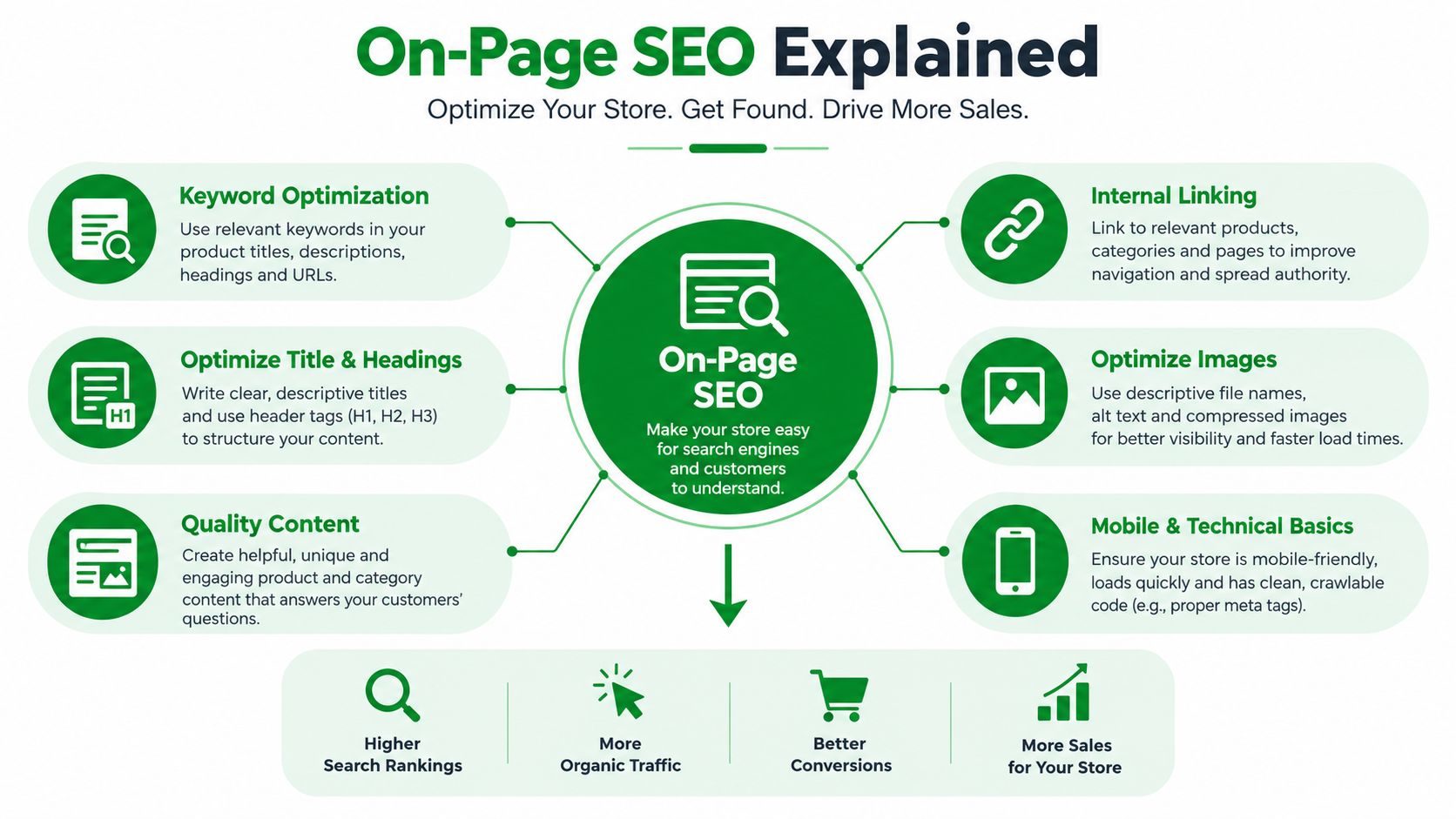
On-page SEO covers the content and signals you can edit on individual pages. That includes title tags, meta descriptions, headings, copy, URLs, images, alt text, internal links, and structured data.
Off-page SEO happens outside your store. Backlinks, brand mentions, digital public relations, and relationships with other websites can influence how much external credibility your pages have. You can't directly control whether another site chooses to mention or link to your store.
Technical SEO concerns the infrastructure that lets search engines discover, render, and index your content. Crawlability, robots directives, XML sitemaps, redirects, canonical links, mobile rendering, and page speed belong here. The categories overlap. A canonical tag appears in the page code, for example, but it also controls how search engines interpret duplicate URLs.
Moz groups on-page optimization with technical inputs such as titles, headings, alt text, internal links, structured data, canonicals, robots directives, sitemaps, mobile responsiveness, and speed. Its practical guidance describes roughly 3 seconds as an ideal loading benchmark for fast pages, a recommendation you can review in its on-page SEO factors guide.
Why Shopify templates deserve attention
On a small site, you might edit pages one by one. A Shopify catalog works differently. One weak product template can repeat the same missing heading, generic description, or incomplete schema across a large set of products. Fixing the template or its data rules can improve consistency across the page graph, while a careless bulk edit can spread the same error just as widely.
You can explain the term to a colleague this way:
On-page SEO is the work of making each webpage clear and useful for people, search engines, and machine systems by improving the content and signals on that page.
That definition keeps the focus where it belongs. You control the page, but you don't control the ranking outcome.
The Core On-Page Elements That Drive Rankings
A Shopify product page has two audiences at once. A customer wants to know whether the item fits their needs, while a search engine needs enough consistent context to match the page with a relevant query. The same elements can serve both audiences, but they do different jobs.
Title tags remain one of the most evidence-backed on-page elements because they shape how users and search engines interpret page relevance. The large Ahrefs title tag study found that Google frequently changes the title shown in search results, particularly when the original title is too long or poorly aligned with the page. The practical lesson isn't to chase a perfect character count. It's to make the title, H1, product content, and search intent agree.
What each element does
- Title tag: Identifies the page in browser tabs and search results. For a product, “Waterproof Hiking Backpack, 30L | North Ridge” is more useful than “Product | Store Name.”
- Meta description: Gives searchers a concise reason to choose the result. It may not control ranking, and Google can replace it, but a clear summary can make the snippet more persuasive.
- H1 and subheadings: Create the visible hierarchy. A collection H1 such as “Women's Waterproof Hiking Jackets” is clearer than a decorative heading that says only “Explore.”
- Body content: Explains the product, collection, use case, materials, sizing, compatibility, or buying considerations. Use the language customers use naturally, rather than repeating one phrase mechanically.
- Images and alt text: Help users understand visual content and provide text for assistive technologies and situations where an image can't load. “Navy waterproof hiking jacket with sealed seams” describes more than “jacket image.”
- Internal links: Connect related pages and clarify relationships. A collection can link to a sizing guide, a material guide, and relevant subcollections using descriptive anchor text.
A page about “vegan leather tote bags” shouldn't rely only on a product name. It can explain capacity, closure type, care, laptop fit, and related styles. Those details help shoppers make a decision and give search systems richer context.
| Element | What It Signals | Common Shopify Mistake |
|---|---|---|
| Title tag | The page topic and search-result identity | Reusing a generic template title across products |
| Meta description | A concise summary and click reason | Leaving descriptions empty or copying the first product sentence |
| H1 | The primary visible page subject | Using the brand slogan instead of the product or collection topic |
| Body content | Relevance, context, and usefulness | Publishing thin descriptions that differ only by color |
| Image alt text | The subject and purpose of an informative image | Using filenames or stuffing a keyword into every image |
| Internal links | Relationships, hierarchy, and discovery paths | Linking with vague text such as “learn more” |
| URL and canonical | The preferred page identity | Allowing variants or filtered URLs to compete with the main page |
The strongest page isn't the one with the most repeated keywords. It's the one where the title promises something, the H1 confirms it, the copy delivers it, and the supporting elements remove ambiguity.
Structured Data and Schema Without the Hype
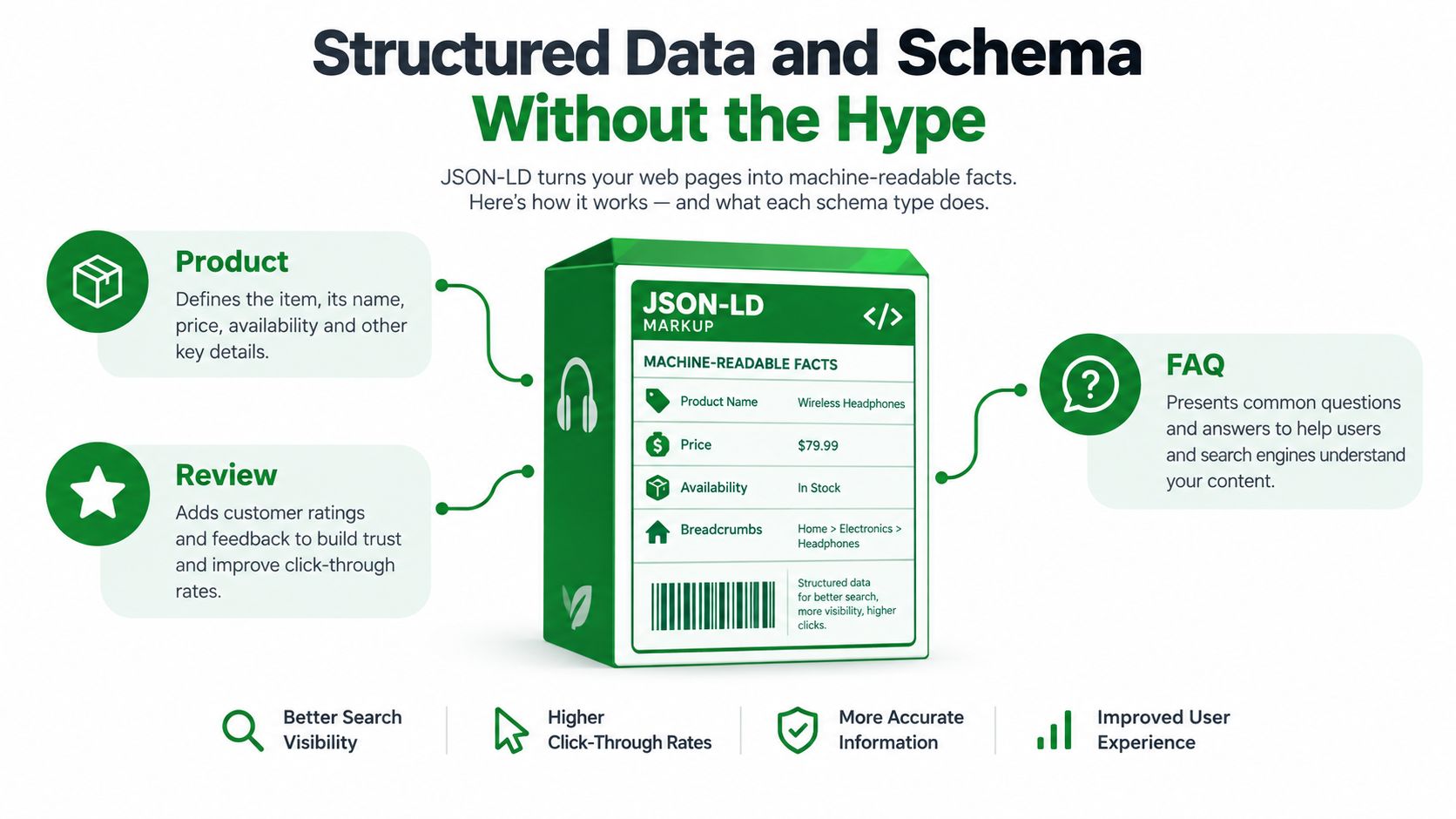
Structured data works like a nutrition label for a webpage. The visible product page might show a name, price, availability, review information, and breadcrumbs. JSON-LD expresses those facts in a format search engines can parse more consistently.
For ecommerce, Product schema can describe a product and its offer details. Breadcrumb schema can clarify where the page sits in the store hierarchy. Organization schema can identify the business, while Article, FAQ, and LocalBusiness markup can describe other page types when the visible content supports them.
What schema can and can't do
Structured data can make a page eligible for enhanced search presentation. It doesn't guarantee that Google will show a rich result, and it isn't a magic ranking switch. Independent testing discussed by CMSWire's analysis of schema testing found no statistically confident ranking lift from removing schema across traditional search engines, nor a meaningful citation lift in AI systems.
That distinction matters for merchants. Schema is mainly about eligibility, presentation, and machine readability, not a guaranteed position increase. A valid Product entity can help a search engine interpret product facts, but it can't compensate for an irrelevant page, poor content, inaccessible HTML, or a mismatch between markup and what shoppers see.
A 2026 technical SEO roundup reported that 58% of search result pages contain at least one rich result, and that websites using structured data see an average 40% higher click-through rate than pages without markup, as reported by Searchlab's technical SEO statistics. Treat those figures as evidence of the presentation opportunity, not as a promise that every Shopify store will receive the same outcome.
Build a validation habit
For a product page, check four things:
- The product name, price, availability, and review information are visible and accurate.
- The JSON-LD describes the same product and offer.
- The canonical URL points to the page you want indexed.
- Internal links and breadcrumbs lead to the same product and collection relationship.
A schema markup generator tool can help you create a starting point when manual JSON-LD is unfamiliar. Shopify teams can also review implementation details in this guide to Shopify schema markup.
Schema should therefore sit inside a maintenance pipeline. Validate it after theme changes, product-data updates, app installations, and template edits. Missing or invalid markup isn't always a ranking disaster, but it can remove eligibility for useful search features and leave machine systems with less reliable context.
How AI Answer Engines Change On-Page Optimization
A shopper may search Google for “best running shoes for flat feet,” or ask an AI assistant to recommend options for a specific use case. The second experience may produce a direct answer, a short list, or citations without sending the shopper through a traditional results page.
That shift changes the measurement. Classic SEO emphasizes rankings, impressions, clicks, and visits. AI-search readiness adds visibility, mention frequency, source selection, and citation quality. Search-experience optimization is broader than inserting a keyword into a title.
Separate the signals by job
Some on-page elements help both environments. Clear headings, factual product information, concise answers, descriptive links, accessible HTML, and consistent entities give Google and AI systems material they can interpret. A product page that clearly states dimensions, materials, compatibility, care instructions, and availability is easier for a shopper to evaluate and easier for a machine to summarize.
Other controls affect discoverability more directly than citation likelihood:
- Accessible content: Important product facts should exist in crawlable page content, not only inside a visual widget or an interaction that a crawler can't access.
- Machine-readable entities: Product, Organization, Article, and Breadcrumb JSON-LD can reinforce what the page represents, but they don't guarantee an AI mention.
- Agent access: Review crawler policies and agent-ready files such as
llms.txtwhere appropriate. These controls help communicate what automated systems may access, but access alone doesn't make a page authoritative. - Self-contained sections: Put the answer close to the heading that introduces it. AI systems often need to extract a passage without the surrounding page context.
- Consistent facts: Keep price, availability, product names, and category relationships aligned across visible content, structured data, feeds, and internal links.
The evolution of search describes the movement from a keyword-centric model toward broader search experiences that include AI answers and zero-click interactions. That doesn't make classic SEO obsolete. Google results remain an important discovery layer, and AI systems may use conventional search data when selecting sources.
Schema can make facts easier to parse. It can't make a weak page worth citing.
Traditional on-page tactics don't translate automatically into AI citations. Adding a keyword to a title may improve topical clarity for a Google result, while a useful product comparison, transparent brand information, and accessible factual content may do more to support an AI answer. Split the work rather than choosing one channel: preserve strong fundamentals for classic SERPs, then make the content clear, extractable, and accessible for answer engines.
Common On-Page Issues in Shopify Stores and How to Prioritize Fixes
A catalog audit can produce a long list. Fixing items in the order they appear in a dashboard wastes time, especially when a template issue affects many products. Use an impact-first queue and verify every change on the live store.
1. Standardize page identity first
Start with missing and duplicated title tags, meta descriptions, and H1s across products, collections, pages, and articles. A reusable template is useful, but it needs meaningful variables, such as product type, material, audience, or collection topic. Don't force every product into the same wording when the products serve different searches.
Check for pages that compete with one another. Two collections targeting the same intent may need clearer differentiation, stronger internal linking, or a deliberate canonical decision. A useful guide to SEO mistakes to avoid can help your team review common sources of confusion before making bulk edits.
2. Repair structured data by page type
Next, inspect Product, Breadcrumb, Article, Organization, FAQ, and LocalBusiness markup where relevant. Remove markup that describes content users can't see, correct mismatched prices or availability, and test the rendered page after theme or app changes.
A product template may appear correct in Shopify admin while the live theme outputs duplicate Product entities or omits required offer information. Mark the issue complete only after checking the actual HTML or rendered result.
3. Close image and performance gaps
Review missing alt text on informative images, oversized uploads, and repeated filenames. Write alt text for the image's purpose, not for a list of target phrases. For a collection banner, describe the scene or products shown. For a product image, identify the item and meaningful visual details.
Page speed also deserves a separate check because large images, third-party scripts, and blocking assets can affect usability and rendering. Use this checklist for site speed and crawl issues when the audit shows pages that are slow, difficult to render, or inconsistently accessible.
4. Clean the page graph
Review canonical tags, redirects, 404 responses, sitemap inclusion, robots directives, breadcrumbs, and internal links. A discontinued product shouldn't leave shoppers at a dead end, while a filtered collection shouldn't become the preferred version of the main category.
For each fix, record the original value, the proposed value, the URL, and the verification result. Keep restore points before bulk changes, and send ambiguous cases to a human reviewer. Human judgment matters when a product has multiple legitimate use cases, when two collections overlap commercially, or when a redirect could remove a valuable customer path.
The working principle is simple: a dashboard status isn't proof of completion. Open the live page, inspect the output, and confirm that the page now says what you intended.
Your First Week of On-Page Optimization
Start with an audit, not a bulk rewrite. Export or review the products, collections, pages, articles, images, headings, canonicals, links, and structured data that shape your store's searchable page graph.
Then work through a focused sequence:
- Identify missing, duplicate, or misleading titles, descriptions, and H1s.
- Fix the highest-impact templates and representative pages before expanding the change.
- Validate Product and Breadcrumb markup on live product and collection pages.
- Review image alt text, oversized assets, redirects, canonicals, and internal links.
- Check whether important content is accessible to relevant crawlers and whether agent-ready files need attention.
- Recheck every completed fix against the live store and record what changed.
The mental model is straightforward: signals on the page, validation over optimism, and presentation over promises. On-page SEO isn't a one-time polish pass because products change, inventory changes, apps change templates, and search systems change how they present information.
A modest first audit beats a sweeping unverified edit. Once you know which issues affect the most pages, each confirmed fix becomes a repeatable improvement for the rest of the catalog.
RankEngine audits Shopify products, collections, pages, articles, images, headings, canonicals, links, and structured data, then supports verified fixes and monitoring against the live store. Use the RankEngine workspace to turn your first on-page audit into a prioritized, reviewable fix queue.