 RankEngine
You've run the checks, opened the warning reports, and started fixing missing descriptions. Yet an important product still isn't appearing where you expect it, a shopping listing shows an outdated price, and nobody can explain why the dashboard says the issue is resolved. You don't need another unfiltered checklist. You need an ecommerce SEO audit that connects each finding to the page customers and search systems receive.
Table of Contents
- Why Shopify SEO Audits Fail
- Prepare the Audit Workspace
- Audit Crawlability and Indexing
- Review Shopify On-Page Elements
- Reconcile Structured Data and Product Feeds
- Audit Images and Commercial Content
- Prioritize and Verify Every Remediation
Why Shopify SEO Audits Fail
Consider a hypothetical Shopify catalog where product titles look consistent, descriptions are populated, and an app reports valid schema. Open a product, though, and the selected variant's price differs from its structured data. Meanwhile, a collection links through an outdated URL, and a discontinued item remains in the team's optimization queue.
The mistake isn't necessarily the tool. It's treating independent checks as proof that the store works correctly. A metadata field can be populated while the wrong template displays it. A schema object can pass validation while describing an offer the merchant no longer sells.
Warnings Aren't Verified Defects
A useful finding needs an observed state, an expected state, and a business consequence. A duplicate title warning deserves investigation, but it doesn't automatically deserve priority over an inaccessible product page.
Ask what the warning proves:
- Observed evidence: What did the crawler, Shopify record, or live page return?
- Merchant intent: Should this URL attract search traffic, consolidate elsewhere, or remain unavailable?
- Commercial consequence: Does the issue affect discovery, purchase information, or merely presentation?
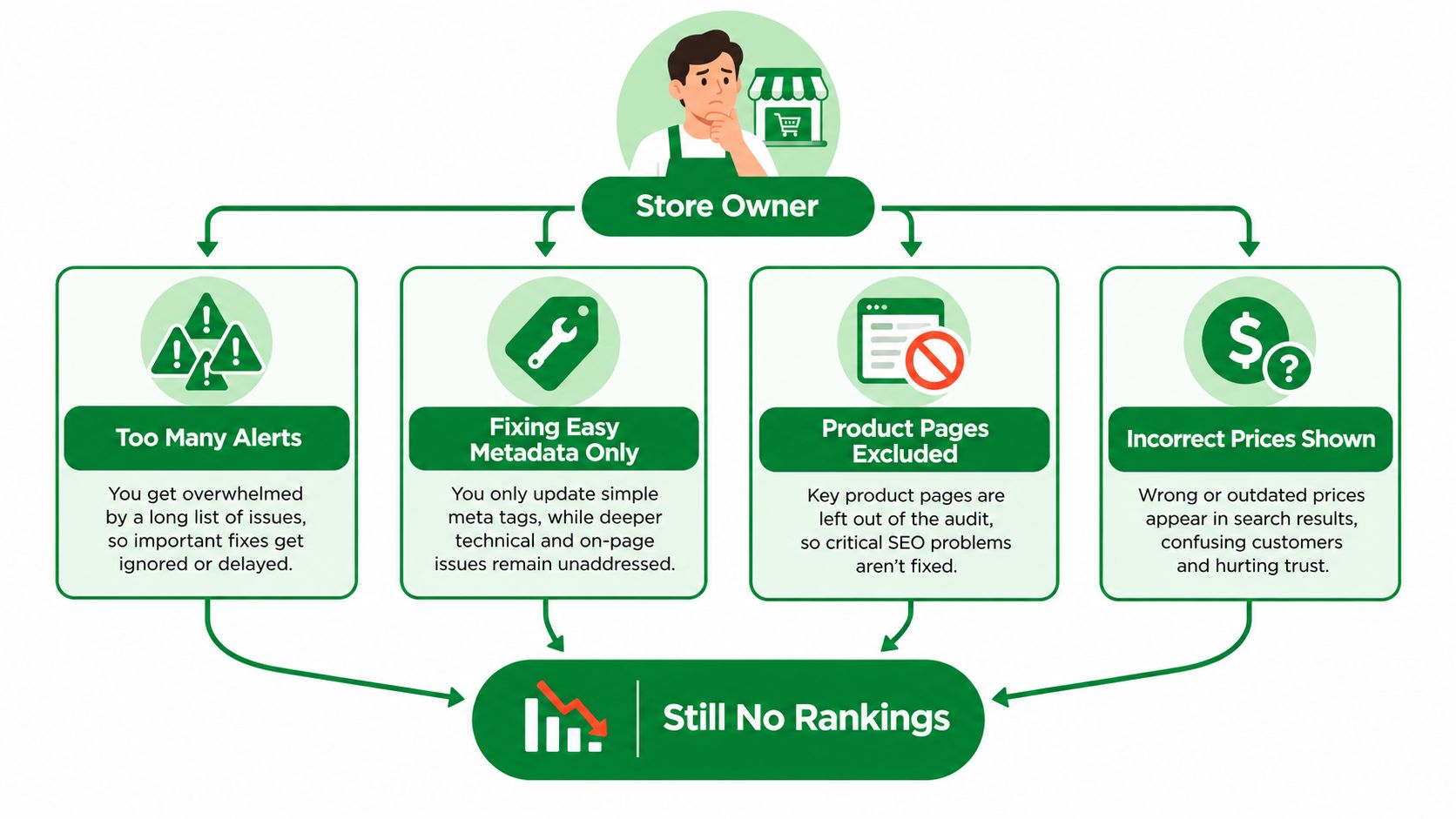
The failure pattern is easier to recognize when you separate report volume from meaningful action.
Audit Relationships, Not Isolated Fields
Review page types and their dependencies: Shopify records, templates, canonical destinations, storefront output, and commerce data. Google's ecommerce SEO guidance supports this connected approach, including matching structured data to visible information and supplying it in server-returned HTML alongside Merchant Center data.
For broader commercial context, Up North Media's guide to boost revenue with technical SEO is a useful companion to the implementation work.
A small store can maintain this process in a shared worksheet. A Shopify Plus team may need separate owners for themes, feeds, and regional content. Either way, completion should mean the intended change has been confirmed on the storefront, not just saved in an editor.
Practical rule: Don't accept a warning as a diagnosis or a successful save as proof of remediation.
Prepare the Audit Workspace
Start with access and ownership, not a scan. Confirm who can inspect Shopify content, publish theme changes, review Search Console, and manage Merchant Center. Record who owns app configuration and who can approve merchandising decisions.
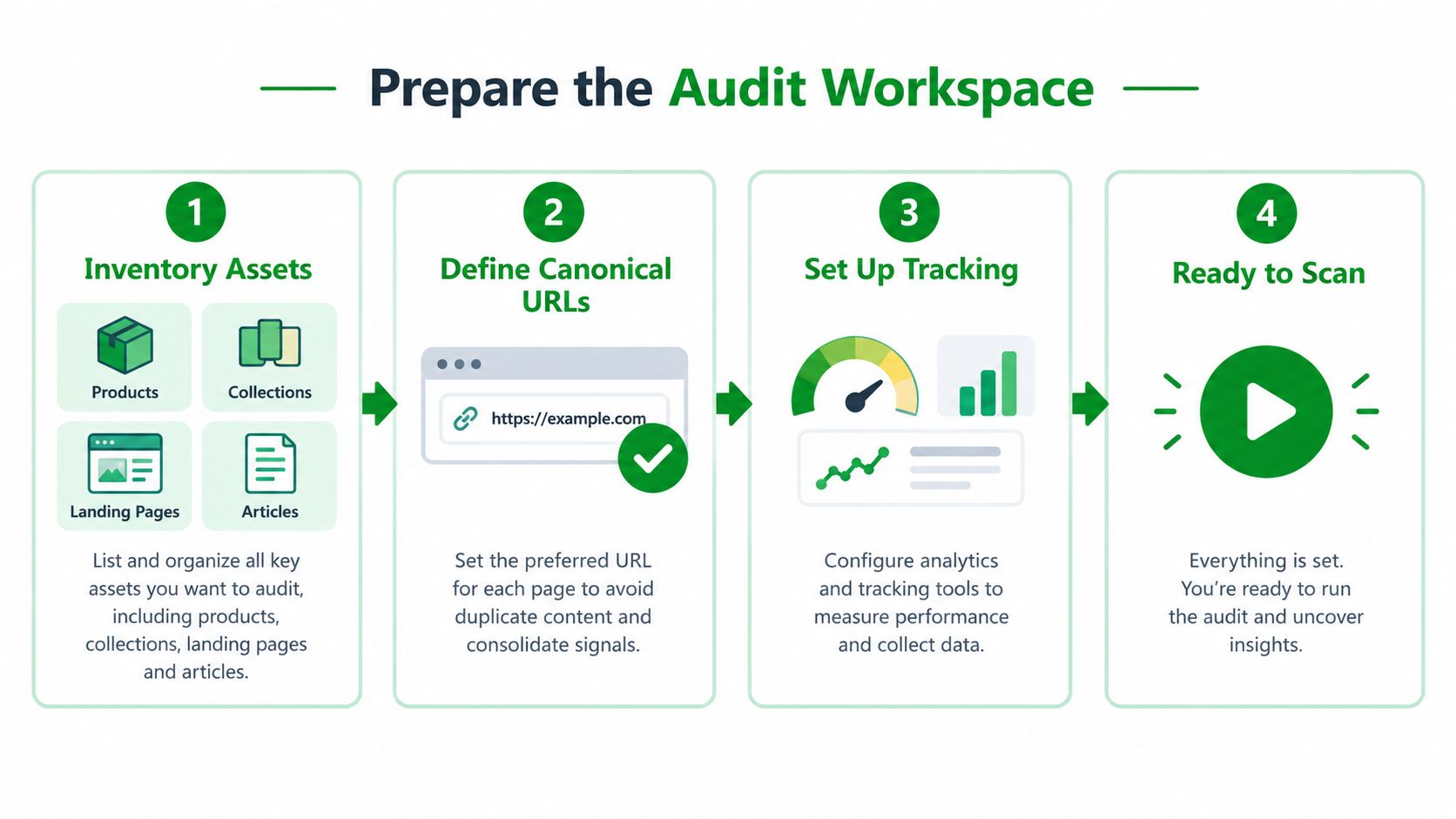
Use the preparation sequence below to keep discovery separate from changes.
Build a Page-Type Inventory
Export or list products, collections, landing pages, and articles separately. Assign each URL an intended canonical destination and note whether it should be searchable. Don't assume every published page has the same purpose.
Choose representative samples rather than inspecting only bestsellers:
- Commercially important pages: Include products and collections the merchant identifies as revenue priorities.
- Long-tail coverage: Include less prominent products, unusual variants, and older content.
- Template exceptions: Include alternate layouts, translated pages, and app-dependent content.
- Lifecycle cases: Include temporarily unavailable items, replacements, and retired campaigns.
Record the active theme, relevant app integrations, redirect ownership, and feed provider. These details help an implementer locate the source of a defect instead of repeatedly editing the visible symptom.
Preserve Evidence Before Editing
Save baseline exports, relevant screenshots, and the HTML used to diagnose the problem. Inspect both the initial server response and the browser-rendered page. The server-HTML requirement noted earlier makes that distinction particularly important when product information depends on scripts.
Use a single evidence record throughout the work:
| Field | What to record |
|---|---|
| URL and page type | Exact affected address and template |
| Observed issue | Returned value, directive, or behavior |
| Expected state | Merchant-approved outcome |
| Owner and priority | Responsible person and reason for urgency |
| Fix status | Proposed, approved, deployed, or awaiting verification |
| Verification date | When the live result was checked |
Keep deployment and verification as separate statuses. Otherwise, a developer's completed ticket can hide a storefront result that still needs investigation.
For a supplementary walkthrough, use the embedded video alongside your own store evidence.
Don't let setup become an administrative project. The workspace only needs enough detail for another person to reproduce the finding, understand the intended outcome, and safely continue the work.
Audit Crawlability and Indexing
Follow the route from crawler access to the intended canonical page. Don't jump from an exclusion label directly to a fix. Diagnose whether the page is blocked, unavailable, intentionally consolidated, or outside the crawler's discovered inventory.
Use the distinction between crawling, indexing, and ranking to keep those outcomes separate. Permission to crawl isn't evidence of indexing, and indexing isn't evidence that a page satisfies the intended search.
Trace the Live URL Path
Request the affected URL and inspect its response. If it redirects, follow the destination and inspect that page's canonical rather than assuming the first redirect settles the issue.
Work through the evidence in dependency order:
- Access rules: Inspect robots rules affecting the specific path and relevant crawler.
- Response behavior: Identify successful pages, redirects, missing-page responses, and server failures.
- Indexability directives: Read the returned directives and check whether they match merchant intent.
- Canonical destination: Confirm that the target resolves and represents the content you intend to consolidate.
- Discovery paths: Compare sitemap entries and internal links with the desired canonical inventory.
For a missing product page, ask whether the product is still sold before restoring it. For a retired campaign, ask whether a relevant replacement exists before redirecting it. Sending unrelated retired URLs to a broad destination may tidy a report without creating a useful customer journey.
Interpret Findings by Page Type
The same warning can justify different actions depending on the template and purpose.
| Scenario | Diagnostic question | Recommended response |
|---|---|---|
| Product absent from the crawl | Is it published and intended for discovery? | Compare Shopify publication state with storefront access and links |
| Collection points elsewhere | Is consolidation intentional? | Confirm that the destination serves the same buying need |
| Campaign page is unavailable | Has the campaign ended? | Ask the merchant whether to retire or replace it |
| Article has no incoming links | Is it still useful and current? | Review editorial value before restoring discovery paths |
Inspect essential text and links in the returned HTML as well as the rendered browser view. A customer-visible navigation element doesn't settle what the initial response contains.
Shopify inventory should supplement the crawler's view. Compare published records against discovered URLs to investigate orphan candidates, then verify whether they lack useful internal links. A crawler's absence report alone doesn't explain why a page is missing.
Treat a blocked important product, an intentional duplicate, and an obsolete campaign as different operational decisions, not interchangeable SEO errors.
After changing a redirect, access rule, or canonical, request the full path again. Record the final destination, its response, and its directives together. That evidence distinguishes a repaired route from a change that only moved the conflict elsewhere.
Review Shopify On-Page Elements
A product page should explain an item. A collection should help shoppers choose among items. A buying guide should answer a question, while a campaign landing page should make its offer and conditions clear.
Audit each template against that purpose rather than imposing identical copy requirements. A concise product with complete specifications may need less rewriting than a lengthy collection introduction that says nothing useful about the assortment.
Compare Intent Before Rewriting
Review titles, descriptions, visible headings, and body copy together. Ask whether they describe the same offer and whether the page fulfills the promise made by its title.
| Page type | Useful emphasis | Weak alternative |
|---|---|---|
| Product | Identity, distinguishing features, compatibility, purchase details | Generic brand language reused across unrelated items |
| Collection | Assortment, selection criteria, meaningful subcategories | Repetition of the collection name |
| Landing page | Specific offer, audience, exclusions, next action | Campaign wording that no longer matches the offer |
| Article | Direct answers, logical headings, relevant shopping context | A rewritten product description presented as advice |
Keep intentional consistency where it helps. A brand suffix in titles isn't the same problem as unrelated products sharing an indistinguishable title. Don't rewrite a functioning naming convention merely to remove every duplicate fragment.
Check the H1 in the actual template output. Compare it with the title field and page content, then investigate unexpected headings from app blocks or alternate layouts. The recommendation should identify the responsible source, not just request “better headings.”
Choose the Right Remediation
A missing description is usually an editing task. Competing pages require a decision about purpose and ownership.
- Rewrite for distinct intent: Keep separate pages when they answer different buying needs.
- Consolidate equivalent content: Consider merging pages when the merchant can't identify a useful distinction.
- Preserve purposeful templates: Retain shared wording where it communicates accurate, necessary information.
- Retire stale promises: Update ended promotions and obsolete claims before polishing their metadata.
Review internal links in context. An article about garment care should lead readers to relevant care information or products, not an arbitrary collection selected solely to add a link.
For image alt text, record coverage and obvious mismatches during this pass, then handle the actual visual review with the image workflow below. Avoid approving bulk descriptions without seeing what the images depict.
Finish each page review by comparing its visible promise with its canonical purpose and commercial data. A title promoting a specific variant shouldn't send the audit in a different direction from the item the page presents. On-page clarity means agreement, not just populated fields.
Reconcile Structured Data and Product Feeds
Valid JSON-LD answers a syntax question. An ecommerce SEO audit also needs to answer a commercial one: does every representation describe the same purchasable item?
Google recommends combining page structured data with Merchant Center information to help verify product details and maximize eligibility. Its product-data guidance also distinguishes eligibility from guaranteed display, so a successful validation result isn't a promise of rich results.
Compare the Same Product and Variant
Start with a representative product and identify the exact variant under review. Capture its visible price, currency, availability, identifiers, shipping information, return information, and any displayed reviews. Compare those values with the Product object, its nested Offer, and the corresponding Merchant Center item.
Use this Shopify schema markup guide as implementation context, but keep the evidence attached to the actual storefront output.
Check SKU or GTIN consistency without inventing missing identifiers. If the storefront defaults to one variant while the feed record represents another, document that distinction before labeling the values incorrect. The comparison must be like for like.
Also inspect how many integrations produce Product entities. A theme, review integration, and SEO app may each contribute markup. When entities conflict, identify ownership and dependencies before disabling anything.
Product Data Mismatch Triage
| Finding | What to compare | Priority signal |
|---|---|---|
| Stale price | Visible selected-variant price, Offer price, feed price | High when the same offer has conflicting purchase information |
| Incorrect availability | Storefront purchasing state, Offer availability, feed status | High when an unavailable item appears purchasable |
| Identifier conflict | Variant record, SKU or GTIN in markup, corresponding feed item | High when records refer to different items |
| Duplicate Product entities | Every markup producer and its values | Systemic when the shared integration repeats the conflict |
| Shipping or returns mismatch | Visible policy, structured values, feed settings | Escalate when eligibility or customer expectations are affected |
| Missing optional detail | Applicable requirements and available authoritative data | Lower when accuracy and eligibility remain intact |
The useful distinction is severity versus scope. An isolated stale price needs correction, while a shared mapping defect needs a source-level fix and broader inspection. Don't spend the audit budget filling optional fields while a template publishes commercially inaccurate offers.
For feed ownership and maintenance planning, Come Together Media LLC's expert product feed strategies for 2026 provide a companion resource. Apply any recommendation against your catalog's actual mapping and approval process.
Verification standard: A green schema test doesn't resolve a disagreement between the item shown, the offer described, and the feed submitted.
When reviewing shipping, returns, or reviews, don't insert convenient defaults just to satisfy a validator. Obtain the merchant-approved information and determine where it should be maintained.
Once the responsible mapping or integration changes, compare a fresh storefront response with the updated feed record. If either side remains stale, keep the reconciliation open and name the unresolved dependency. Markup validity and product-data accuracy belong in separate evidence fields.
Audit Images and Commercial Content
Open a product gallery and compare the images with the selected item. Does the color match? Can a shopper read the dimensions? Does a specification appear only inside a graphic, with no equivalent explanation nearby?
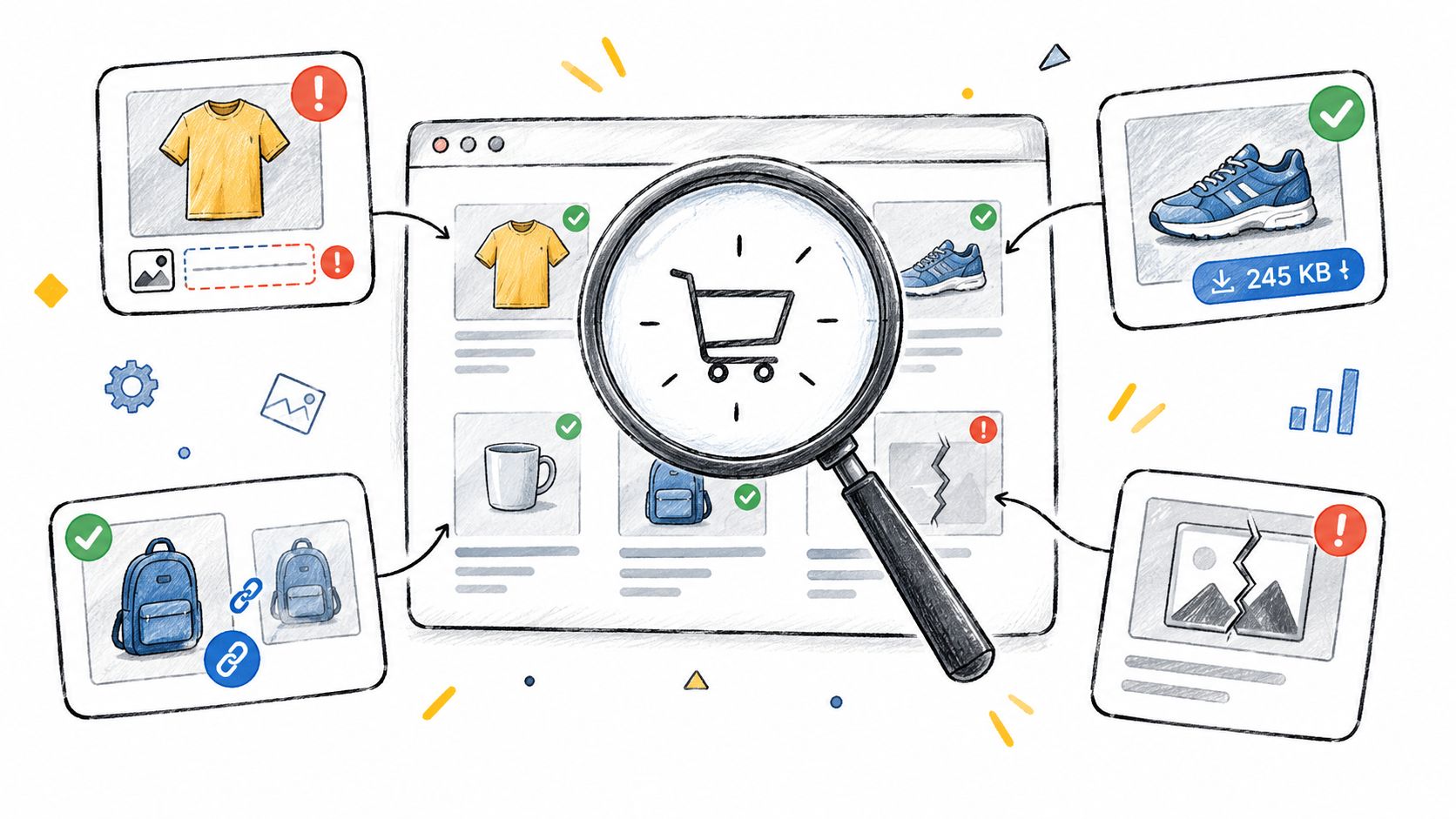
Use the visual inspection below as a reminder to check the customer-facing asset, not just its database field.
Inspect Assets in Their Page Context
Check alt-text coverage, compression status, file size, duplication, and rendering together. A smaller image isn't a successful fix if shoppers can no longer inspect an important detail. Equally, an excellent source photograph doesn't help when the page renders the wrong variant.
Use this website image optimization guide to organize asset-level checks, then apply merchant-specific quality requirements.
Build a sample that includes commercially important products, long-tail variants, collections, and alternate templates. Within each sample, inspect the main image and supporting visuals rather than approving the entire gallery from its first asset.
- Describe the actual visual: Write alt text that reflects the image instead of repeating promotional keywords.
- Preserve useful detail: Review compressed output before replacing the original.
- Check nearby information: Make specifications available as readable content rather than relying on graphics alone.
- Investigate repetition: Distinguish intentionally reused brand assets from accidental duplicate product imagery.
Keep Merchandising Decisions Manual
Review descriptions for missing specifications, unsupported claims, copied manufacturer language, and unclear purchase details. Don't define thin content by length alone. Ask whether the page answers the questions a shopper needs resolved before choosing that item.
Suppose a garment description promises universal compatibility while the specification table lists restrictions. The appropriate fix is merchant clarification, not an automated rewrite that makes the claim sound more persuasive.
Place ambiguous claims, product emphasis, and competing collection purposes in a manual review queue. Assign a merchandiser or product owner who can confirm the underlying facts.
Batch work only after establishing a reliable pattern. An approved alt-text convention can support standardized edits; choosing which product deserves prominence requires judgment. Preserve the original values and review representative live outputs before expanding a batch.
For collections with overlapping intent, ask what each assortment helps a customer choose. If the answer is indistinguishable, investigate consolidation rather than manufacturing extra copy to make the pages appear different.
Prioritize and Verify Every Remediation
Your audit backlog should explain what to fix, why it matters, who owns it, and what proves success. Don't sort the work solely by warning count or implementation convenience.
Use indexability, product eligibility, commercial accuracy, affected page importance, and template-wide scope as decision criteria. Then consider dependencies. Correcting an upstream product mapping may be necessary before editing the storefront markup that uses it.
Turn Findings Into Deployable Work
Separate standardized changes from decisions requiring approval. A confirmed metadata pattern may be suitable for a controlled batch. A replacement destination, policy statement, or product claim needs an accountable merchant decision.
Organize implementation around the source of the issue:
- Content fields: Update approved titles, descriptions, and product information in the appropriate Shopify records.
- Theme output: Route template and markup changes through the team's theme review process.
- App configuration: Identify the responsible integration and check for competing output.
- Feed mapping: Assign corrections to the person managing commerce data, not just the person editing pages.
- Access and routing: Coordinate robots and redirect changes with the owners of affected destinations.
Keep restore information with the change record. Limit the first deployment to a reviewable batch, inspect the result, and expand only when the expected pattern holds.
For merchants selling across channels, Online Brand Growth's guide to fix Amazon catalog issues is a relevant operational companion. Keep marketplace remediation distinct from Shopify work so a completed task in one channel doesn't close an unresolved issue in another.
Verify the Storefront and Monitor Change
Re-fetch the affected live page after deployment. Compare the response with the acceptance criteria, inspect the rendered result, and check related destinations or data records where the fix depends on them. Record unresolved conflicts explicitly rather than attaching a general success label.
Use event-driven checks after theme releases, app changes, feed updates, redirect work, and crawler-control changes. Add a recurring sample review of important templates so the process doesn't depend entirely on someone remembering a past defect.
Answer-engine readiness needs its own evidence. The changing shopping experiences discussed in Search Engine Journal's ecommerce search coverage make it worth testing buyer questions rather than assuming conventional audit results describe AI visibility.
Test representative questions in ChatGPT, Gemini, Claude, and Perplexity across the markets you serve. Record the question, observed answer, citations, factual errors, and date. Investigate crawler access and whether authoritative product facts are extractable, but don't assume a wrong answer proves a robots problem or that an additional file guarantees inclusion.
Keep that monitoring separate from conventional indexing checks. A completed ecommerce SEO audit doesn't prove every warning has disappeared or every search system will display your products. It proves that each closed action meets a defined requirement on the live store, with evidence another operator can reproduce.
RankEngine offers Shopify SEO auditing, supported fixes, and answer-engine readiness monitoring in one workspace, with live-store verification before supported changes are marked complete. Visit RankEngine to organize your findings by impact, apply approved fixes, and confirm what your storefront returns.