 RankEngine
A store owner updates product descriptions, checks the theme's SEO settings, and sees the products loading normally. Paid ads are bringing shoppers in, but organic traffic stays flat. The problem may not be the products or the copy. Search engines might be finding the wrong URLs, choosing different canonical pages, or struggling with slow product templates.
Shopify technical SEO is the work beneath the storefront: helping search engines discover, interpret, and serve the right pages. Shopify handles useful foundations, including sitemaps and canonical tags, but those defaults don't prove that a catalog is crawlable, indexable, or performing well. The difference between a store that builds durable organic visibility and one that stalls often comes down to whether its owners verify what's live, not just what a dashboard says should be live.
Table of Contents
- Why Your Shopify Store Is Not Ranking Despite Good Products
- Crawl and Index Control in Shopify
- Structured Data That Earns Rich Results
- Canonicalization and Redirect Strategy
- Performance, Core Web Vitals, and Template-Level Optimization
- Hreflang and Multi-Market SEO
- How RankEngine Audits, Fixes, and Verifies Every Change
- Your Shopify Technical SEO Action Plan
Why Your Shopify Store Is Not Ranking Despite Good Products
A merchant launches a strong product line, writes useful descriptions, and organizes products into collections. The storefront looks polished, orders come from ads, and the Shopify admin shows no obvious warning. Yet the collection pages aren't attracting organic visits, and some product pages don't appear when shoppers search for them.
That's a familiar situation because technical problems aren't always visible to shoppers. A page can load in a browser while a search engine encounters a conflicting canonical, a blocked crawl path, a poor mobile experience, or a version of the URL that duplicates another page. Adding more copy won't resolve those structural signals.
Technical SEO isn't a shortcut around relevant products and helpful content. It's the layer that lets search engines reach those assets, understand which version matters, and assess whether the pages work well for visitors. When that layer is unreliable, a store can spend time improving pages that search engines can't consistently process.
A useful diagnosis asks what the storefront returns, not what the team expects it to return. Does the live sitemap list the intended pages? Do canonical tags point to the right URLs? Are product details represented clearly in structured data? Do real visitors experience slow loading, delayed interactions, or shifting layouts? And after a fix, does the live page reflect the change?
This guide works through those checks in practical order: crawl and index controls, structured data, canonicalization and redirects, performance, multi-market signals, and verification. It's relevant whether you manage a focused catalog or a store with many templates and markets. The larger the catalog, the more important it is to replace one-off checks with repeatable monitoring.
Crawl and Index Control in Shopify
Think of a search engine as a library. Crawling is the librarian reaching a page and examining it. Indexing is deciding whether that page deserves a card in the catalog. A page can be reachable without being indexed, and a sitemap entry doesn't force a search engine to keep a page in its library.
Shopify automatically creates and updates XML sitemaps for products, collections, pages, and blog content. It also provides default robots.txt rules that restrict areas such as cart, checkout, internal search, and selected filtered-collection URLs. Those defaults reduce common crawl problems, but they don't confirm that every important page is eligible for search or that every low-value URL has been handled properly. Shopify's technical SEO guidance for ecommerce explains these platform controls and their limits.
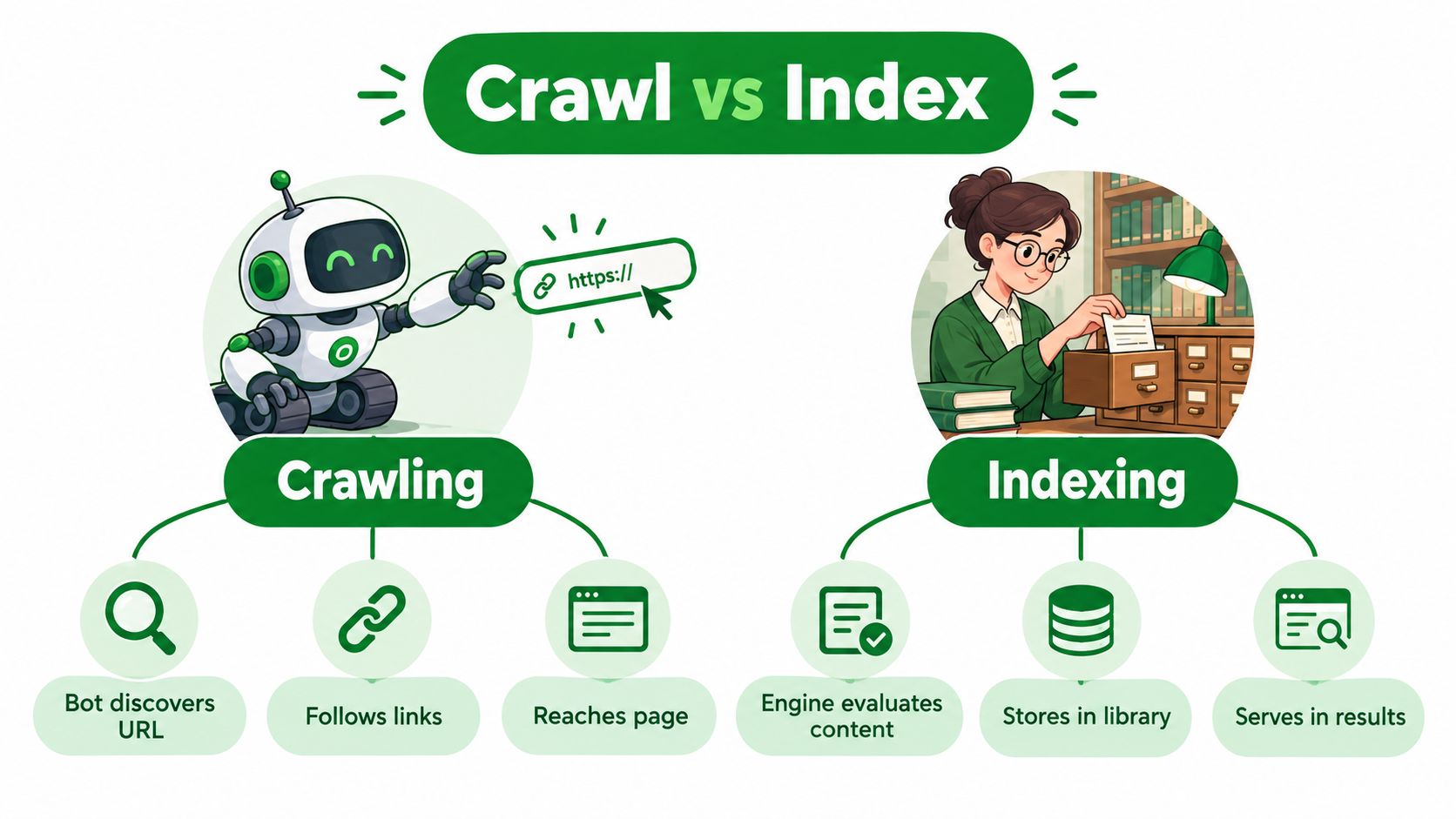
Match each control to the URL's problem
Use the control that addresses the actual issue:
- Sitemap: Helps search engines discover URLs. Audit it against the pages you intend them to process.
- Robots.txt: Communicates which URLs compliant crawlers may request. It doesn't remove a URL from search by itself.
- Canonical tag: Signals which preferred URL should represent duplicate or near-duplicate pages.
- Noindex directive: Tells search engines that can crawl the page not to include it in their index.
Blocking a URL can backfire if the goal is to remove it from results. When crawling is disallowed, Google may be unable to see a page-level noindex directive, while an already discovered URL can remain indexed. Shopify's default rules suit many stores, but filtered URLs, app-generated paths, and custom configurations still need review. A practical explanation of the distinction is available in this Shopify robots.txt guide.
For a large catalog, compare the live sitemap with canonical targets, page status codes, noindex directives, and index-status data. If a product is consolidated but remains in the sitemap, or a URL points canonically elsewhere while returning an unexpected response, the signals may conflict. Check the rendered page and its HTTP response, not just the settings screen.
Structured Data That Earns Rich Results
Structured data gives search engines a machine-readable account of what a page contains. On a Shopify product page, that can clarify the product, price, availability, and other details. Google says Product markup can make pages eligible for product snippets, and product information may also appear in Google Images and Google Lens. Eligibility is not a promise of enhanced display. Google decides what to show.
It's useful to distinguish product snippets from merchant listings. Product snippets apply to pages where visitors can't directly buy the product. Merchant-listing experiences are designed for purchasable products and can expose additional commerce details, such as shipping, returns, and variants, when eligible. Google recommends using on-page Product structured data alongside a Google Merchant Center feed where feasible. The feed and page markup offer complementary sources for understanding product information, as described in Google's Product structured data documentation.
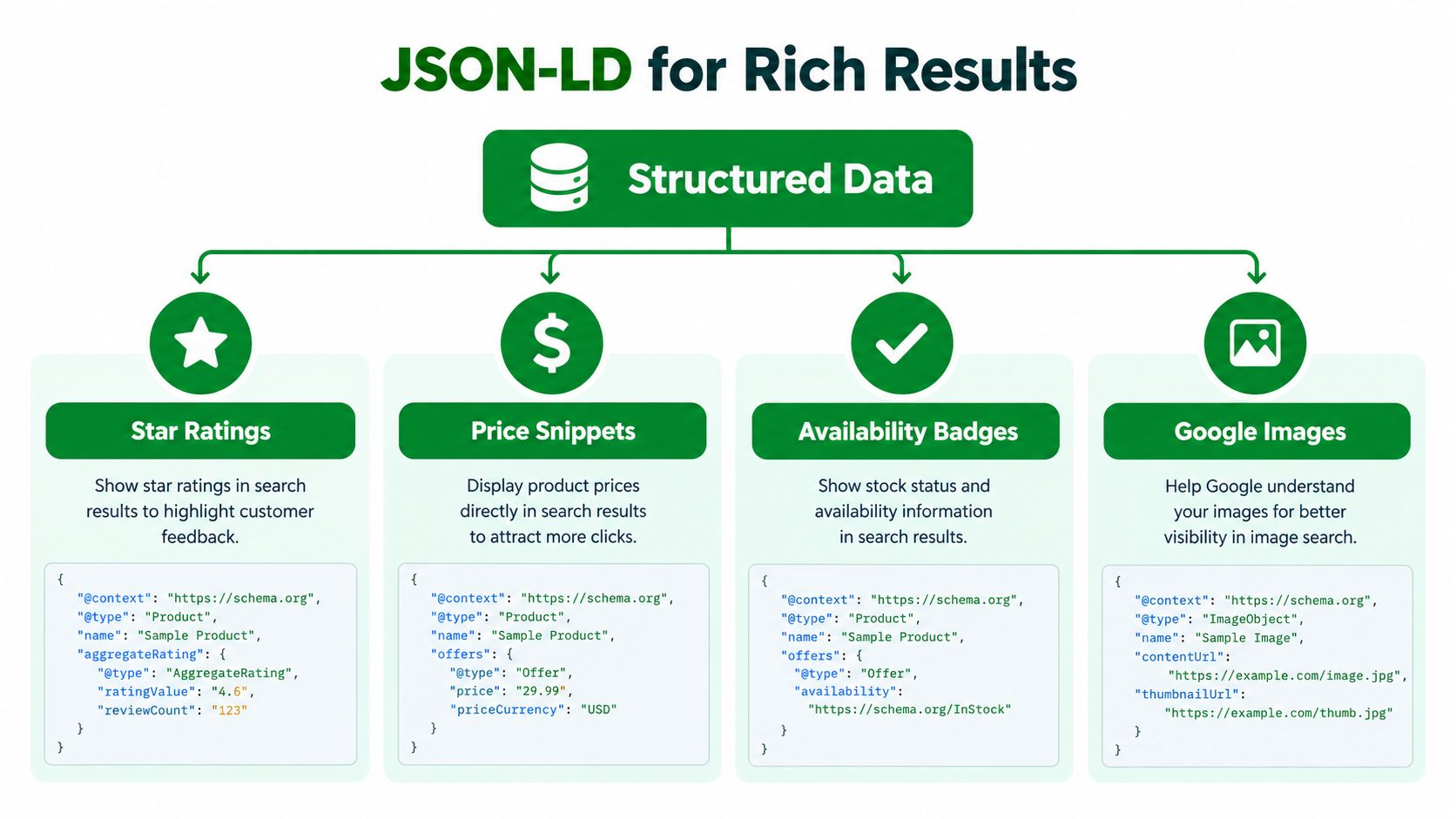
Start with the page type, then validate the output
For a commerce store, review these types where they fit the page:
- Product and Offer describe a product and its purchase details. Check the relationships between product URLs, prices, and availability.
- AggregateRating represents aggregated review information. Confirm that the markup reflects content customers can see on the page.
- BreadcrumbList and Organization describe page hierarchy and the business behind the store.
- Article, FAQ, and LocalBusiness may be relevant to blog posts, eligible question-and-answer content, and retailers with physical locations.
Those are not boxes to tick everywhere. Markup should match visible, accurate page content and the intended page type. In particular, product templates need testing across variants and markets: a theme change or a different currency or availability state can leave the structured data inconsistent with what shoppers see.
Validate representative pages after theme or app changes, then check the live output across relevant templates. A schema checker reporting valid syntax doesn't establish that the data is accurate, complete, or eligible for a rich result. For a practical overview of implementation and validation, see this Shopify schema markup guide.
Canonicalization and Redirect Strategy
Shopify adds canonical tags to help consolidate duplicate or near-duplicate URLs. That's a useful default, not a guarantee that every URL variant in a customized store points where it should. Filters, product paths, tracking parameters, markets, and app behavior can create URLs that need deliberate review.
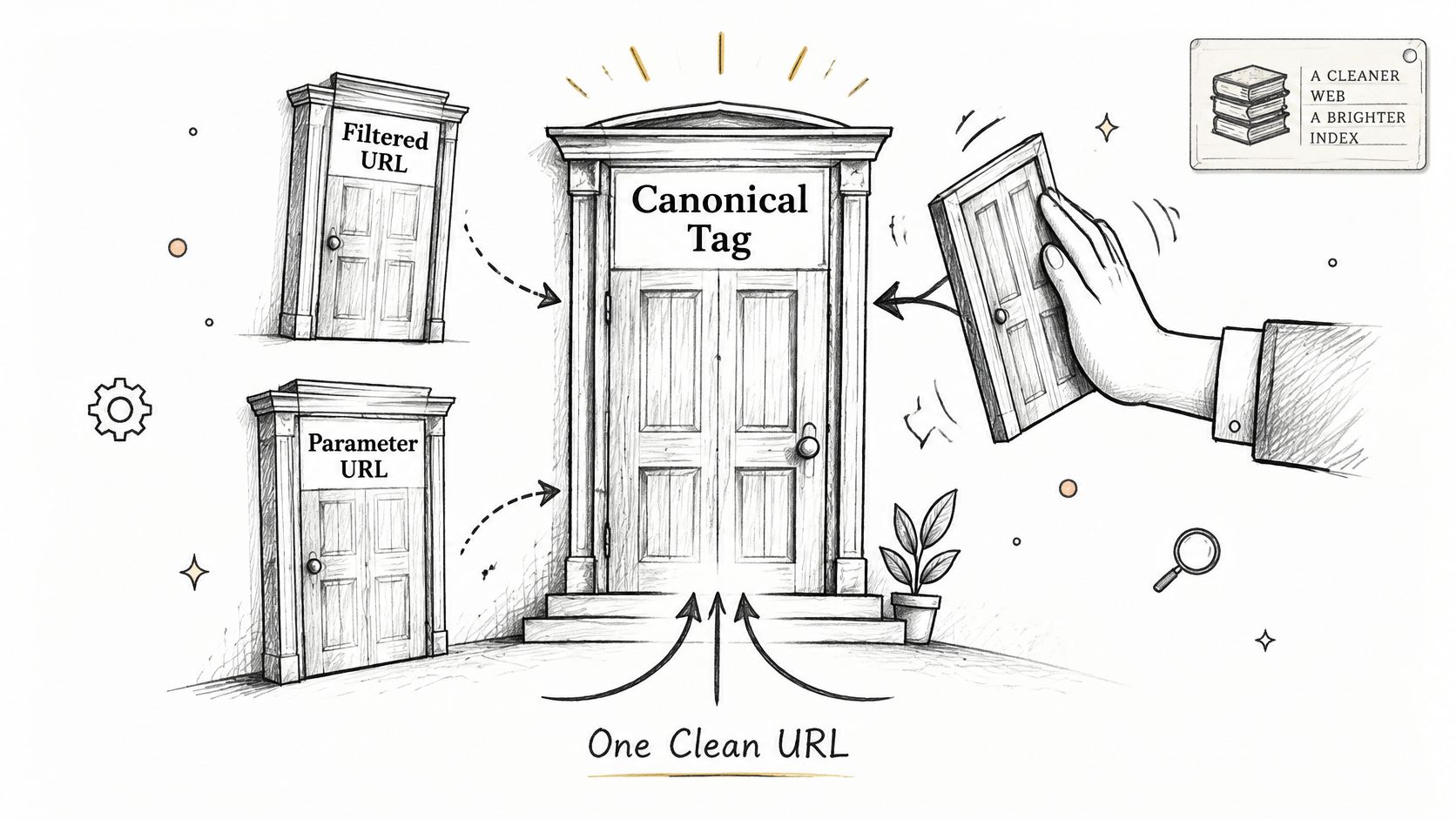
Choose the signal that matches the page's future
Use a canonical when a duplicate or closely related page should remain accessible, but you want search engines to consolidate signals toward a preferred version. For example, if a product can be reached through multiple paths, inspect the live canonical and confirm it points to the intended product URL.
Use a 301 redirect when a page has moved or an old URL has a relevant replacement. Redirect an obsolete product to a suitable successor or collection only when that destination helps visitors. If a page should disappear and has no relevant replacement, a genuine 404 or 410 response can be more accurate than sending visitors to an unrelated page.
Use noindex when a page needs to remain accessible to visitors but shouldn't appear in search results. This is different from blocking it in robots.txt: a crawler must be able to access the page to see its noindex instruction. Shopify's generated sitemap and canonical behavior reduce baseline duplication risk, but they don't substitute for checking the specific URL's response and directives.
Practical rule: Pick the response based on whether the URL is a duplicate, moved, obsolete, or useful to visitors but unsuitable for search. Don't use one control to imitate another.
After making a change, request the old URL and inspect what it returns. An admin screen or automation log can report a redirect as applied even when the live URL still serves the old content or points through an unintended chain. Re-read the live store before calling the issue resolved. For a broader view of how technical issues fit into an audit, consult this plain-English SEO audit guide.
A visual explanation of canonical signals can help teams discuss URL choices before changing templates. The video below offers another way to think through the relationship between duplicate addresses and preferred URLs.
Performance, Core Web Vitals, and Template-Level Optimization
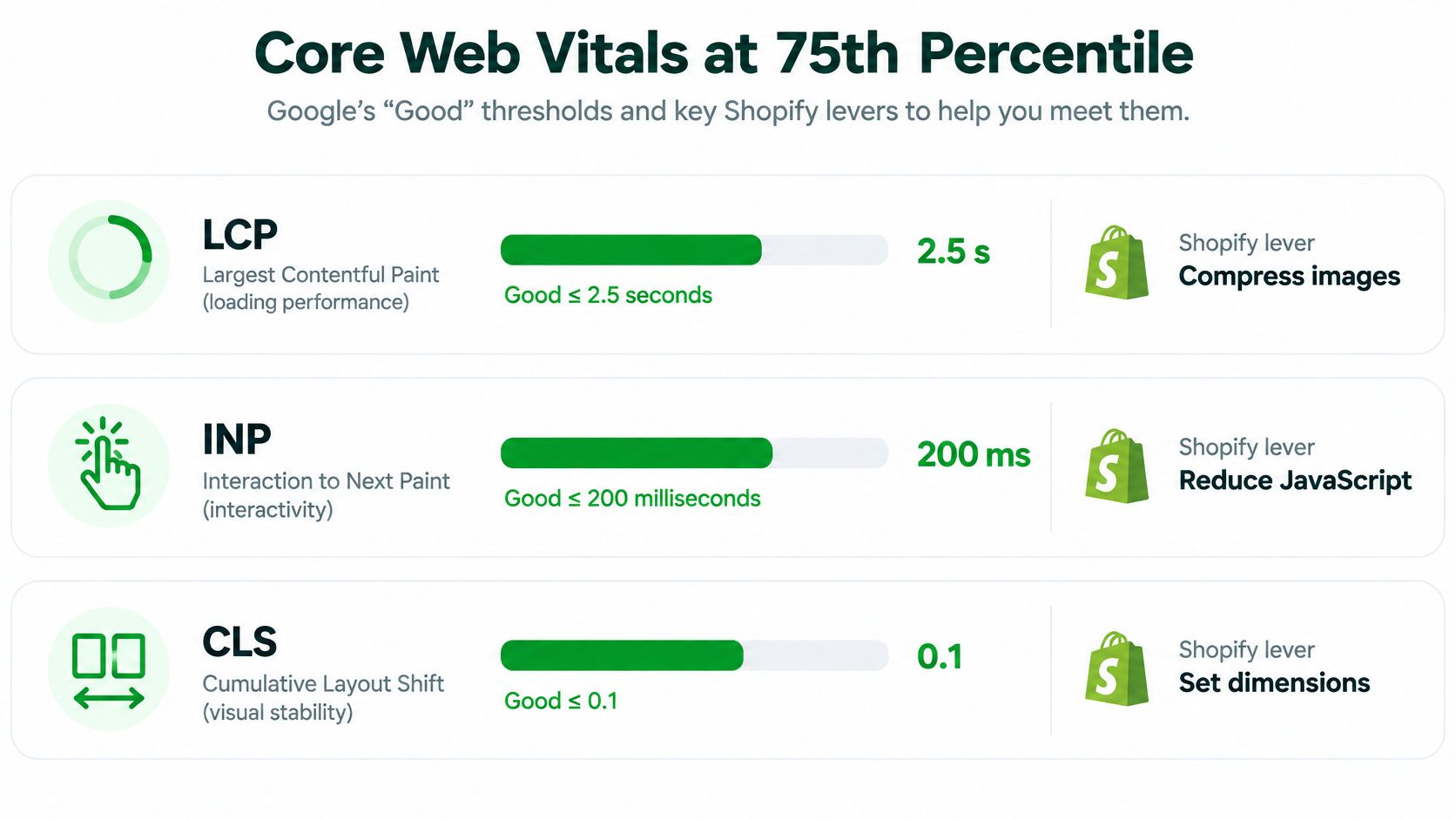
A single speed test can make a store look healthy while real shoppers encounter a sluggish product gallery or a jumpy collection page. Google's Core Web Vitals provide measurable targets based on real-user visits: at the 75th percentile, a page experience is “Good” when LCP is 2.5 seconds or less, INP is 200 milliseconds or less, and CLS is 0.1 or less. These thresholds and metric definitions are documented in Google's Core Web Vitals guidance.
Diagnose the template and the cause
LCP measures how quickly the largest visible element renders. On a Shopify storefront, that's often a hero banner, product image, or major text block. Oversized above-the-fold images, render-blocking CSS, and delayed responses can all contribute. Compress and correctly dimension prominent images, and be cautious about lazy-loading the image that should load first.
INP measures responsiveness across clicks, taps, and keyboard interactions during a visit. Excessive theme JavaScript, third-party app scripts, and long tasks on the main thread can delay feedback. Remove unused app scripts and defer noncritical JavaScript, then test interactions such as opening a menu or changing a product option.
CLS tracks unexpected movement of page elements. Images without reserved dimensions, late-loading promotional banners, fonts, and app blocks can all shift content as a page loads. Reserve space for dynamic blocks and set image dimensions in the theme.
Don't rely on a store-wide average. Segment field data by homepage, collection, product, and blog templates, then compare the relevant pages on mobile. A lab test can help pinpoint a regression after a theme or app change, but it doesn't establish how real visitors experience the full store. A Shopify speed optimization resource can help teams organize that work around storefront changes.
When theme development or app integrations require specialist support, a provider such as Cleffex Digital's custom Shopify store solutions may be useful for assessing implementation choices alongside performance requirements. The important point is to keep the test tied to the live template, not just a clean test page.
Hreflang and Multi-Market SEO
A Shopify store can serve different audiences through market-specific domains or paths, translated content, and localized currency. Those choices help shoppers, but search engines still need clear signals about which page is intended for which audience. Hreflang connects alternate language or regional versions so search engines can select a suitable version for a searcher.
Start by checking the live pages rather than assuming that a market setting has produced a complete international setup. Confirm that each localized page references itself and its intended alternates, that reciprocal references are consistent, and that each international page's canonical points to the correct localized URL. If an English page in one market canonicalizes to a different market's page, it can undermine the separation you intended.
Translated content should be appropriate for its audience. A currency selector alone doesn't make a page a distinct language or regional version, and translating text without checking the associated URLs and canonical relationships can leave search engines with mixed signals. For stores using an x-default alternative, verify that it points to the intended fallback page rather than an arbitrary market.
Shopify's market configuration is part of the setup, not proof that every page-level signal is correct. Review a sample of localized product and collection pages, then look for missing alternates, mismatched language codes, and canonical tags pointing across markets. RankEngine's multi-language SEO support can flag missing or inconsistent hreflang across a catalog, but the final check should still reflect the live URLs and the store's actual market strategy.
How RankEngine Audits, Fixes, and Verifies Every Change
An SEO workflow should connect the diagnosis to the live change and then confirm the result. A crawl can reveal what a bot encounters, but relying only on crawling can leave gaps when a page is blocked or scripts fail to render. Reading Shopify data through the Admin API first offers another view of products, pages, and configuration, which teams can compare with what the storefront returns.
RankEngine brings those checks into a Shopify-focused workspace. It audits products, collections, pages, blog articles, images, and schema; supports structured data for Product, Article, Organization, Breadcrumb, FAQ, and LocalBusiness; and provides supported fixes for metadata, headings, canonicals, alt text, and structured data. Its controls also include redirect and 404 detection, image optimization insights, and autopilot rules with restore points and undo where safe.
The differentiator to scrutinize in any SEO tool is not how many issues it lists. It's whether the tool rechecks the live value after making a change. RankEngine re-reads supported changes against the live store before marking them complete, so a status can reflect the storefront rather than an optimistic operation log. Ask any vendor what happens when a write fails, how it confirms a canonical or redirect, and whether a merchant can review changes before automation applies them.
The same audit-fix-verify-monitor loop applies to performance recommendations, index controls, and international signals. RankEngine also supports AI-search readiness files such as llms.txt and agent.json, plus visibility tracking across ChatGPT, Claude, Gemini, and Perplexity. These are tools for operational visibility, not guarantees of discovery or ranking.
A useful audit should also leave a clear manual-review queue. Some decisions, such as whether an obsolete product should redirect to a replacement or return a not-found response, need business context. Automation can surface the choice and apply a supported change, but a merchant should retain control when relevance is a judgment call.
Your Shopify Technical SEO Action Plan
Make the work cumulative. Start with evidence about the live store, fix the highest-impact structural gaps, then monitor whether the corrections persist.
Days 1–30: Audit what search engines can reach
- Inventory URLs: Crawl the storefront and compare the live sitemap with canonical targets, status codes, and index directives.
- Find broken paths: Flag broken redirects, unexpected 404s, and important URLs that aren't linked or represented as expected.
- Segment performance: Review Core Web Vitals by homepage, collection, product, and blog template, including mobile field data.
- Record the baseline: Save representative page outputs so the team can compare live changes against what was present before.
Days 31–60: Fix the underlying templates
- Validate structured data: Check Product and Offer data, and deploy BreadcrumbList where it accurately represents the page structure.
- Resolve URL conflicts: Correct canonicals, redirect moved pages, and return genuine not-found responses for obsolete pages without suitable replacements.
- Standardize page patterns: Improve title and description templates without making every product page read alike.
- Review markets and assets: Validate hreflang for active markets, and compress or replace oversized images that delay important content.
Days 61–90: Monitor and maintain
- Connect search data: Sync Google Search Console and review indexing and performance reports.
- Track discovery: Configure Bing or IndexNow submission where appropriate, and monitor ranking and AI-visibility reporting.
- Schedule reviews: Re-audit after significant theme, app, catalog, or market changes, then establish a regular review cadence.
| Control | Shopify Default | Common Failure | Verification Signal |
|---|---|---|---|
| Sitemaps | Generated and updated for store content | Stale or conflicting URLs remain in the submitted inventory | Compare sitemap URLs with canonicals, status, and index data |
| Robots.txt | Restricts common low-value areas | Blocking is mistaken for deindexing | Inspect robots rules and search-visible outcomes |
| Canonicals | Added to help consolidate duplicates | Theme, app, filter, or market behavior points to the wrong URL | Read the canonical on the live page |
| Structured data | Product information can be marked up | Markup is invalid, incomplete, or inconsistent with visible content | Validate rendered JSON-LD on relevant templates |
| Core Web Vitals | Performance infrastructure is provided by Shopify | Heavy scripts, images, or unstable blocks affect real visits | Review field data by template and device |
| Redirects | Merchant-configured for moved or retired URLs | Redirect points to an irrelevant page or doesn't work live | Request the old URL and check its response and destination |
Three mistakes repeatedly undermine the plan: treating robots.txt as an indexation command, trusting an “applied” status without checking the live URL, and applying a store-wide fix when only one template needs attention.
How often should I re-audit? Recheck after meaningful changes to themes, apps, catalog structure, or markets, and establish a recurring audit schedule that suits the pace of store changes.
Does Shopify Plus change the technical SEO picture? The same fundamentals still apply. More customization can make live verification and template-level testing more important, not less.
What if a page is indexed but shouldn't be? First identify whether it's a duplicate, obsolete, or still useful to visitors. Choose the appropriate canonical, redirect, removal response, or noindex, then make sure crawling isn't blocked from seeing the directive and verify the result.
RankEngine audits Shopify storefront data, supports technical SEO fixes, and re-reads supported changes against the live store before marking them complete. If you want a single workspace for those checks and ongoing monitoring, visit RankEngine.