 RankEngine
A Shopify store can look perfectly healthy while its search enhancements degrade. A theme update changes a product template, an app adds a second review block, or a merchandising team edits prices across markets. The storefront still loads, products remain indexable, and customers can still buy. Yet Google may stop using the machine-readable signals that support product details, breadcrumbs, or other search features.
That's why structured data management needs to be treated as an operating discipline, not a one-time JSON-LD installation. The work involves authoring markup, connecting it to trusted Shopify data, validating it against search requirements, monitoring changes, and repairing failures before they spread across a catalog.
Table of Contents
- When Rich Results Quietly Disappear
- What Structured Data Management Actually Means
- The Six Schema Types That Matter for Shopify
- Writing JSON-LD That Survives Real Catalogs
- Why More Schema Is Not Always Better
- How RankEngine Automates and Verifies Schema
- Validation, Troubleshooting, and the Post-FAQ World
- A Practical Checklist and the Road Ahead
When Rich Results Quietly Disappear
A 2,000-SKU apparel merchant noticed the problem after a theme upgrade. Product rich results had been visible across important queries, then the Search Console enhancement report began showing a sharp decline in eligible product pages. The first assumptions were familiar: perhaps Google had applied a penalty, perhaps the products had fallen out of the index, or perhaps a feed change had affected eligibility.
The actual cause was less dramatic and more operational. The upgrade replaced the old product.liquid template with an Online Store 2.0 section, but the new product template didn't carry the JSON-LD block forward. The pages rendered normally. Product names, prices, images, and purchase controls were visible to shoppers. The structured data stopped being emitted.
Practical rule: Treat every theme deployment as a schema deployment until you've proved otherwise.
This is the failure mode many teams miss. They install schema once, confirm that a test page passes, and then mentally close the project. Shopify catalogs don't stay still. Themes change, review apps inject their own markup, products gain or lose variants, inventory changes, markets introduce different currencies, and collection URLs are reorganized. Each event can alter the data or the template that produces the markup.
The broader shift toward machine-readable discovery makes that operational gap more important. Google, Bing, and Yahoo launched Schema.org on June 2, 2011, creating a shared vocabulary for structured data on web pages, as documented in the history of Schema.org and its adoption. By 2016, the cited research found Schema.org markup on 31.3% of pages, compared with 22% one year earlier, showing how quickly the practice moved into mainstream publishing.
A growth team also needs to connect schema work with broader discovery planning, including its strategy for growth teams. The practical lesson is simple: rich results aren't a permanent property of a store. They're an output that depends on accurate source data, stable templates, and continuous verification.
What Structured Data Management Actually Means
Structured data management is the ongoing process of authoring, deploying, monitoring, and repairing schema markup across a storefront. It answers four operational questions:
- What information should each page type expose?
- Where does each value come from?
- Does the markup match the visible page?
- What happens when the underlying Shopify data changes?
JSON-LD is usually the sensible default for Shopify. It places machine-readable information in a script block rather than weaving attributes through the visible HTML. Microdata and RDFa can work, but they entangle markup with page elements, making theme maintenance and debugging more cumbersome. Google's structured data guidance recommends JSON-LD, while also requiring that markup describe visible page content and contain the required properties for the relevant rich result type. Those requirements are summarized in Google's structured data policies.
A useful analogy is a product feed. Every physical box in a warehouse needs an accurate label showing what it contains, which SKU identifies it, and what price or availability applies. JSON-LD is the machine-readable label on the web page. Management is the process that checks those labels when a product changes, a box is moved, or the warehouse system is updated.
Generation is only the first step
A one-time schema install can generate a plausible block. It won't necessarily keep that block accurate. Governance matters because different systems may claim ownership of the same field. A theme might output Product markup, a review app might output AggregateRating, and an SEO app might add another Product entity with slightly different identifiers.
A managed approach assigns responsibility:
- Product fields come from Shopify product and variant data.
- Review fields come from one verified review source.
- Breadcrumb relationships follow the store's canonical URL structure.
- Organization details come from an approved brand record.
- LocalBusiness data is limited to real physical locations.
- Retired templates stop emitting obsolete entities.
This is also why schema matters beyond traditional snippets. Teams working on structured data for AI search need consistent entities that systems can interpret and connect across pages. Markup doesn't replace useful content, but it gives crawlers and answer systems a clearer, more verifiable representation of the store.
The Six Schema Types That Matter for Shopify
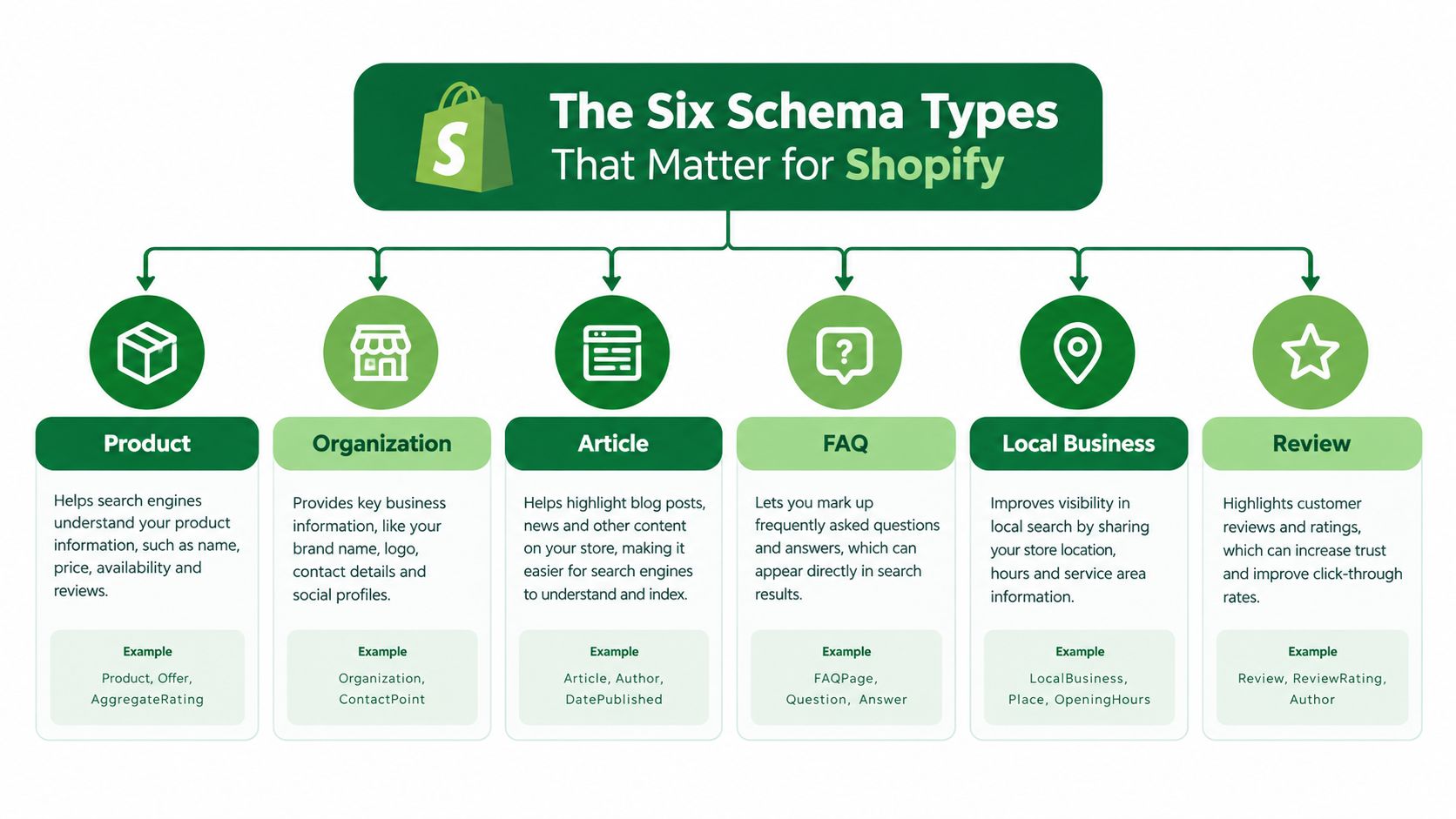
Shopify stores don't need every schema type. They need the types that correspond to real content, commercial entities, and navigational relationships.
Product
Product is the commercial core. It describes the item, its images, description, identifiers, brand, offers, price, currency, availability, and URL. Google's requirements determine whether a product page can qualify for supported enhancements, so the block must reflect the actual visible offer rather than an aspirational catalog record.
For Shopify, variant handling is where implementation quality becomes visible. A product with multiple sizes or colors needs a coherent relationship between the parent Product entity and its offers or variant entities. A stale price, wrong currency, or unavailable item marked as in stock can undermine eligibility even when the JSON syntax is valid.
Article
Article markup gives blog posts and editorial pages a defined content type, author relationship, headline, image, and publication information. It can also provide clearer context for systems retrieving content for answers, particularly when the article explains a product category, use case, or buying decision.
BreadcrumbList
BreadcrumbList represents the page's position within the site hierarchy. It helps search engines understand relationships such as Home, Collection, and Product. It can also support a cleaner breadcrumb presentation rather than relying on the URL path alone. The hierarchy must match the visible navigation and canonical URLs, especially after collection or handle changes.
FAQ
FAQ markup describes a genuine question-and-answer section that appears on the page. It shouldn't be used as a hidden container for keyword variations or content users can't access. FAQ-style content can still help shoppers and answer systems, but merchants shouldn't assume that adding FAQPage automatically creates a prominent Google result.
Organization
Organization identifies the brand behind the storefront. Name, logo, URL, contact details, and consistent social or profile references help connect commercial pages to the same entity. That consistency supports brand understanding across search surfaces.
LocalBusiness
LocalBusiness applies when a merchant operates a real physical location or service area. Store address, opening hours, phone details, and location-specific information must be accurate and visible where appropriate. It shouldn't be added merely because a brand has an online store.
These types serve different jobs. Product describes what's sold, Article explains ideas, BreadcrumbList maps structure, FAQ answers questions, Organization defines the brand, and LocalBusiness describes a place. A practical implementation guide such as Product schema markup for Shopify is useful when teams need to map those entities to actual templates rather than treating them as interchangeable snippets.
Writing JSON-LD That Survives Real Catalogs
A durable Product block starts with source mapping, not with copying a code sample. For Shopify, each important field should map to a value in the Admin API or to a deliberately maintained store record. If the source is unknown, the field is a guess, and guessed commerce data ages quickly.
A healthy product entity generally needs a name, image, description, SKU, an available GTIN or MPN where applicable, brand, URL, and an Offer containing price, currency, and availability. AggregateRating belongs only when genuine reviews support it and the displayed rating reflects the same product. Review implementation deserves separate scrutiny, which is why guidance on structured review markup for SEO can help teams avoid treating ratings as decorative metadata.
A practical field map
| Field | Required? | Common Shopify Source |
|---|---|---|
name |
Required for a useful Product entity | Product title |
image |
Required for product presentation | Product media |
description |
Required for meaningful product context | Product description, cleaned before output |
sku |
Recommended where available | Variant SKU |
gtin or mpn |
Use when genuinely available | Variant barcode or manufacturer data |
brand |
Recommended | Vendor or approved brand record |
offers |
Required for offer eligibility | Variant price, currency, and inventory state |
price |
Required within Offer | Variant price |
priceCurrency |
Required within Offer | Market or store currency |
availability |
Required within Offer | Inventory and selling status |
url |
Required for page identity | Canonical product URL |
aggregateRating |
Optional, only with real reviews | Verified review platform |
Shopify descriptions create a common trap. Liquid output, HTML fragments, and escaped entities can leak into JSON-LD if the value isn't cleaned before serialization. Multi-market stores have another risk, hardcoded currency. The markup needs to represent the market and offer the shopper sees, not the currency used when the original snippet was written.
priceValidUntil also deserves attention where the chosen offer implementation requires it. An expired date can make a block stale even if the current price is correct. Image arrays need consistency too. Don't pad the field with unrelated images or assume that a longer array fixes weak product photography.
A safer implementation pattern
A simplified Product block might look like this conceptually:
@type: Product@id: a stable product URL plus a fragment identifying the product entityname: the visible product titleimage: current product mediadescription: cleaned visible descriptionsku: the relevant variant identifierbrand: the approved brand entityoffers: current price, currency, availability, and URLaggregateRating: included only when supported by real review data
The @id must not collide with the BreadcrumbList or another entity. For stores serving multiple regions, stable IDs and correctly paired hreflang URLs can work together, provided each regional page identifies the right canonical context.
For a deeper implementation reference, see Google JSON-LD structured data guidance. Before shipping, render the block on representative products, test products with variants, unavailable products, discounted products, and products in each active market.
Why More Schema Is Not Always Better
Adding every available type to every template creates the appearance of coverage without creating dependable meaning. The 2025 Web Almanac SEO findings describe structured data usage rising only modestly from 48% of desktop home pages in 2024 to 50% in 2025, with WebSite and SearchAction remaining the most common types. That pattern points to broad but shallow adoption, not proof that more markup automatically produces better visibility.
The mistake is usually duplication. A Shopify theme emits Product, a review widget emits another Product with a different @id, and an app adds Organization data that conflicts with the site's logo or URL. Search engines then have to reconcile competing descriptions of the same entity.
Governance beats markup volume
A well-governed store keeps a register of schema ownership:
- The theme owns page-level structural entities and presentation logic.
- The catalog owns product names, identifiers, offers, and availability.
- The review system owns ratings only when it can substantiate them.
- The SEO team owns validation rules and exception handling.
- Merchandising owns decisions about which content is visible and current.
FAQ and HowTo markup can also become a liability when the page doesn't contain the required content. Search engines may ignore unsupported or low-quality markup, and serious policy violations can create broader search problems. The right question isn't “What else can we add?” It's “Which entity is useful here, who maintains it, and how will we know when it becomes wrong?”
How RankEngine Automates and Verifies Schema
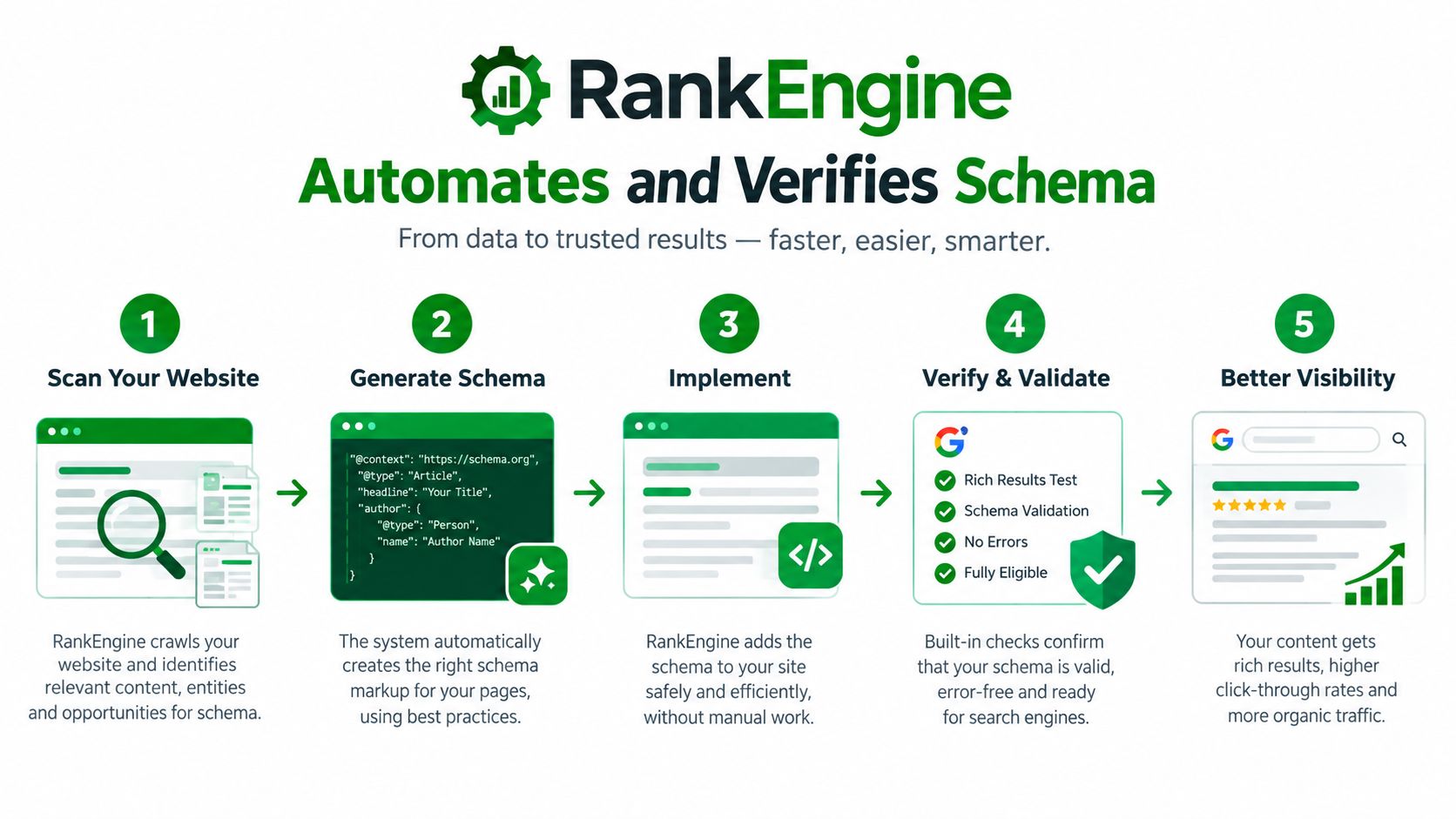
Structured data management becomes workable when the workflow separates detection, repair, and proof. RankEngine is one Shopify option that audits Product, Article, Organization, BreadcrumbList, FAQ, and LocalBusiness JSON-LD, then uses Shopify data to support verified fixes rather than marking a task complete after a hopeful write.
Start with the audit layer
The audit should inspect every relevant page type, parse each schema block, and check:
- Required properties for the entity type.
- Duplicate or colliding
@idvalues. - Conflicting values across templates.
- Relationships between products, offers, and breadcrumbs.
- Whether the markup corresponds to visible page content.
- Whether prices, currencies, availability, and URLs remain current.
Crawling alone can miss the source of a mismatch. A page may expose an old cached value while Shopify's live record has changed. RankEngine's stated workflow reads Shopify data first, writes supported fixes through the Admin API, and re-reads live values before a change is marked complete. That distinction matters because a dashboard saying “fixed” isn't useful if the storefront still serves the old markup.
The fix layer should also preserve control. Restore points give merchants a way to roll back supported changes after a theme deployment or bulk update. Manual review queues remain important for fields that require judgment, such as whether a product really qualifies for a particular content type or whether a brand relationship is accurate.
RankEngine's Shopify SEO app includes structured data auditing and verified fixes alongside other Shopify SEO controls. It should be evaluated as part of a store's governance process, not as permission to automate every decision.
The final layer is verification. Test the rendered output with Schema.org's validator and Google's Rich Results Test, then monitor Search Console for changes in enhancement status. For answer-engine readiness, stable entity IDs, consistent names, authoritative sameAs references, and machine-readable policies are more durable than stuffing extra types into a page.
Validation, Troubleshooting, and the Post-FAQ World
Validation works best as a layered process rather than a single green check. First, use the Schema.org validator to catch syntax and vocabulary problems. Next, use Google's Rich Results Test to check eligibility for supported search enhancements. Finally, use Search Console enhancement reports to observe what Google sees across the property after deployment.
Triage failures in the right order
Fix errors that affect commercial truth first. A missing price, invalid availability value, wrong currency, or mismatched product URL can affect the usefulness of the entire Offer. Then repair relationships, such as a BreadcrumbList pointing to a collection handle that no longer resolves. Only after those issues should teams spend time on optional properties.
| Error | Likely Cause | Fix |
|---|---|---|
Missing priceValidUntil |
Offer logic omits a required or expected date | Add a valid date where the implementation requires it, and keep it current |
| Invalid Offer availability | Liquid or application logic outputs an unsupported value | Map Shopify inventory states to valid schema availability values |
| Broken breadcrumb chain | Collection handle or URL structure changed | Rebuild the chain from canonical, visible navigation |
| FAQ markup on gated content | Questions and answers aren't publicly visible | Remove the markup or expose the same content on the page |
| Duplicate Product entities | Theme and app both emit Product JSON-LD | Assign one owner, then remove or reconcile the duplicate |
| Conflicting ratings | Multiple review sources publish different totals | Select one verified source and align visible ratings with it |
FAQ requires a current policy check. The supplied industry reference reports Google stopped showing FAQ rich results in May 2026 and removed related Search Console and testing support later in 2026. That doesn't make FAQ content useless. It changes the reason for maintaining it. Keep genuine public answers for shoppers and retrieval systems, but shift ecommerce schema effort toward Product, Offer, variant, canonical, Organization, and validation quality.
Troubleshooting sequence: Detect the error, compare it with live Shopify values, patch the source or template, re-validate the rendered page, then monitor the affected enhancement.
Bing or IndexNow feedback can add another monitoring signal, but it doesn't replace validation against the live page. A successful API write is only an intermediate event. The meaningful result is accurate markup rendered on the correct URL and recognized by the systems that consume it.
A Practical Checklist and the Road Ahead
A Shopify schema program needs a short operating checklist:
- Audit continuously: Review templates, representative products, collections, articles, and location pages after meaningful catalog or theme changes.
- Verify Product fields: Check names, images, cleaned descriptions, identifiers, offers, price, currency, availability, and canonical URLs.
- Keep breadcrumbs coherent: Match the visible hierarchy and current canonical links.
- Refresh Organization data: Review logos, brand names, URLs, and profile relationships when the business changes.
- Use LocalBusiness carefully: Add location entities only for real physical locations with accurate public details.
- Protect deployments: Create a restore point before theme edits, app changes, or broad schema rewrites.
- Separate judgment from automation: Let rules handle repeatable field mapping, while people review ambiguous content and entity decisions.
- Monitor after release: Re-test rendered output and watch Search Console for eligibility changes.
The direction is clear. Search systems and answer engines need clean, stable, verifiable entities, not a larger pile of loosely related markup. Stable @id values, consistent brand references, visible policies, accurate offers, and reliable relationships give machines better material to retrieve and reconcile.
That makes structured data management part of the store's technical governance. The best workflow isn't the one that generates the most JSON-LD. It's the one that can explain where each value came from, detect when it changed, verify the fix against the live Shopify record, and restore the previous state when a deployment goes wrong.

RankEngine audits Shopify schema across products, articles, breadcrumbs, organizations, FAQs, and local businesses, then verifies supported fixes against live Admin API values before marking them complete. Visit RankEngine to audit your catalog, protect schema changes with restore points, and build a repeatable validation workflow for search and answer-engine visibility.