 RankEngine
Many Shopify stores already output JSON-LD, but that doesn't mean their structured data is complete, unique, or synchronized with the storefront. A theme and several SEO apps can publish duplicate Product blocks, an app can expose an old price, or a template can describe a review that shoppers can't see. A validator may still accept the syntax while Google interprets the page differently, or shows no enhancement at all.
The useful question isn't “Which schema types should I add?” It's “Which entity belongs on this template, where does its data come from, and how do I prove it stays accurate?” Schema.org launched on June 2, 2011, as a shared vocabulary for machine-readable web content, and JSON-LD later became the practical format most Shopify teams use. By 2023, structured data appeared on 50.6% of examined webpages, compared with 5.7% in the first Web Data Commons release, making accurate implementation more common and more important to audit (Schema.org history and adoption context).
The ten structured data examples below pair each JSON-LD type with its Shopify implementation path, fields worth maintaining, a validation check, and a failure mode that can undermine eligibility. RankEngine manages and validates structured data for Product, Article, Organization, Breadcrumb, FAQ, and LocalBusiness, connecting these examples to a repeatable Shopify workflow. If your aim is to earn rich snippets with structured data, start with data accuracy rather than the size of the JSON block.
Table of Contents
- 1. Product with Offer and AggregateRating
- 2. Article and BlogPosting
- 3. Organization
- 4. BreadcrumbList
- 5. FAQPage
- 6. LocalBusiness
- 7. CollectionPage and ItemList
- 8. VideoObject
- 9. Merchant Shipping and Return Policy
- 10. Person for Author and Expert Profiles
- Top 10 Structured Data Schemas Compared
- Turn These Examples Into a Validated Schema Plan
1. Product with Offer and AggregateRating
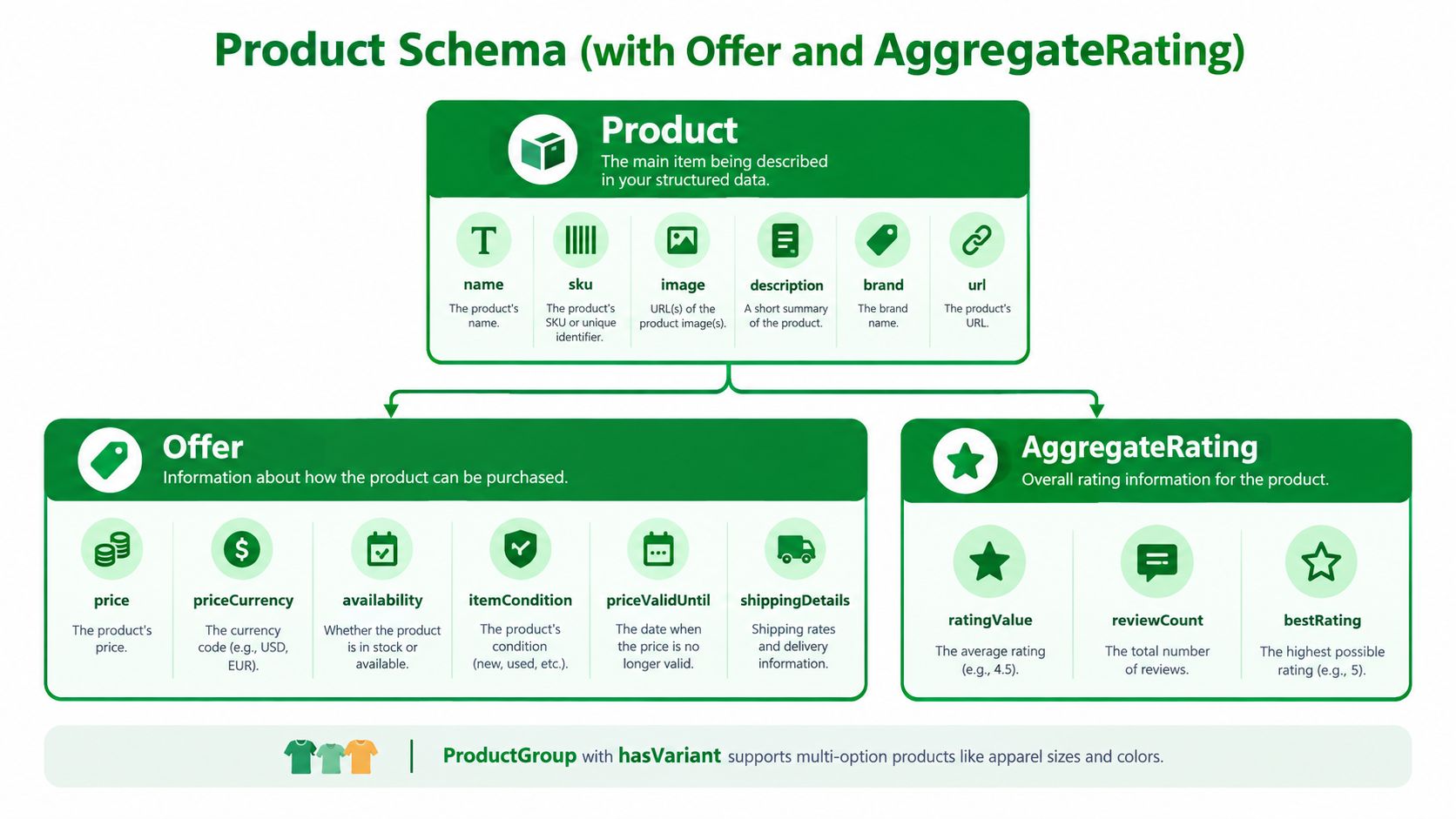
Product markup deserves priority on Shopify stores because it describes the item a customer can buy. A practical object usually includes name, image, description, SKU, brand, plus an Offer with price, priceCurrency, and availability. Add AggregateRating or Review only when the page displays genuine review evidence. Adding ratings solely to pursue stars creates a mismatch between the markup and the customer-facing content.
For an apparel store, ProductGroup can describe a shirt with size and colour variants. Each variant needs a stable identity and an offer matching its own price and inventory state. A single-variant product often works better with a simpler Product object, since forcing variant logic into the theme can introduce stale or conflicting values.
Practical rule: If the visible page says “out of stock,” the JSON-LD must not say
InStock.
Shopify path and verification
Product data commonly comes from the product section, a JSON-LD snippet referenced by theme.liquid, or an SEO app's theme app extension. Inspect templates/product.json, the product section, snippets, app embeds, and custom code that prints application/ld+json. Liquid should read the current product and variant objects instead of relying on hardcoded text. RankEngine's Shopify product schema guidance provides a product-focused implementation reference.
Test a product URL after every theme or app change. Run it through Google's Rich Results Test and the Schema Markup Validator, then compare the rendered price, currency, availability, SKU, GTIN, brand, and rating values with the visible page and Merchant Center feed. Google's documentation includes a publisher-reported Rotten Tomatoes result showing a 25% higher click-through rate on pages enhanced with structured data. That case does not establish a universal Product benchmark (Google's structured data documentation).
Duplication remains a common failure. A theme, review app, and SEO app can each emit Product markup, with one showing the regular price and another showing the sale price. Remove redundant blocks and keep one authoritative product object. Set priceValidUntil when a time-limited promotion has a stated end date.
A product demonstration belongs in its own accurately maintained entity rather than inside Product markup. A missing offer, stale inventory value, or duplicate object can undermine eligibility without any validator error.
2. Article and BlogPosting
A Shopify blog post should identify more than its headline. BlogPosting communicates the headline, author, publisher, datePublished, dateModified, main image, and canonical page. It gives search systems a clearer relationship between the article, the store publishing it, and the person responsible for its content.
Consider an ingredient guide from a skincare brand. The article can name a dermatologist as its author, connect that author to a visible profile page, and use dateModified only after a meaningful editorial update. A buying guide about rugs can use a strong hero image and a canonical mainEntityOfPage, while related posts in the same topic cluster retain their own canonical URLs.
Shopify path and verification
Blog markup typically lives in sections/main-article.liquid, an article section included by the blog template, or a JSON-LD snippet referenced from theme.liquid. Inspect the template that renders every post, not just one published example. The code should pull the post title, featured image, author, publication date, modification date, and canonical URL from Shopify's article object.
A practical test starts with a post whose visible H1, author name, hero image, and dates are known. Run the URL through the Rich Results Test, then inspect the rendered HTML to confirm the JSON-LD is present in the server response. Use Shopify schema markup implementation guidance when deciding whether a store blog should use BlogPosting rather than a broader Article object.
The failure mode is editorial drift. A theme may update dateModified whenever a template saves, even when the article itself hasn't changed. That creates a misleading freshness signal. Another frequent problem is an author value such as “Admin” that doesn't match a visible byline or a real author page.
Use a real author identity, match the marked-up headline to the on-page H1, and connect the article to a canonical URL. Markup supports understanding, but it won't rescue thin or untrustworthy content.
3. Organization
Organization describes the business behind the storefront. On a Shopify homepage, the object can identify the legal or trading name, logo, URL, contact details, social profiles, and identifiers. A stable @id, such as ` lets other entities reference the same brand instead of creating slightly different copies across templates.
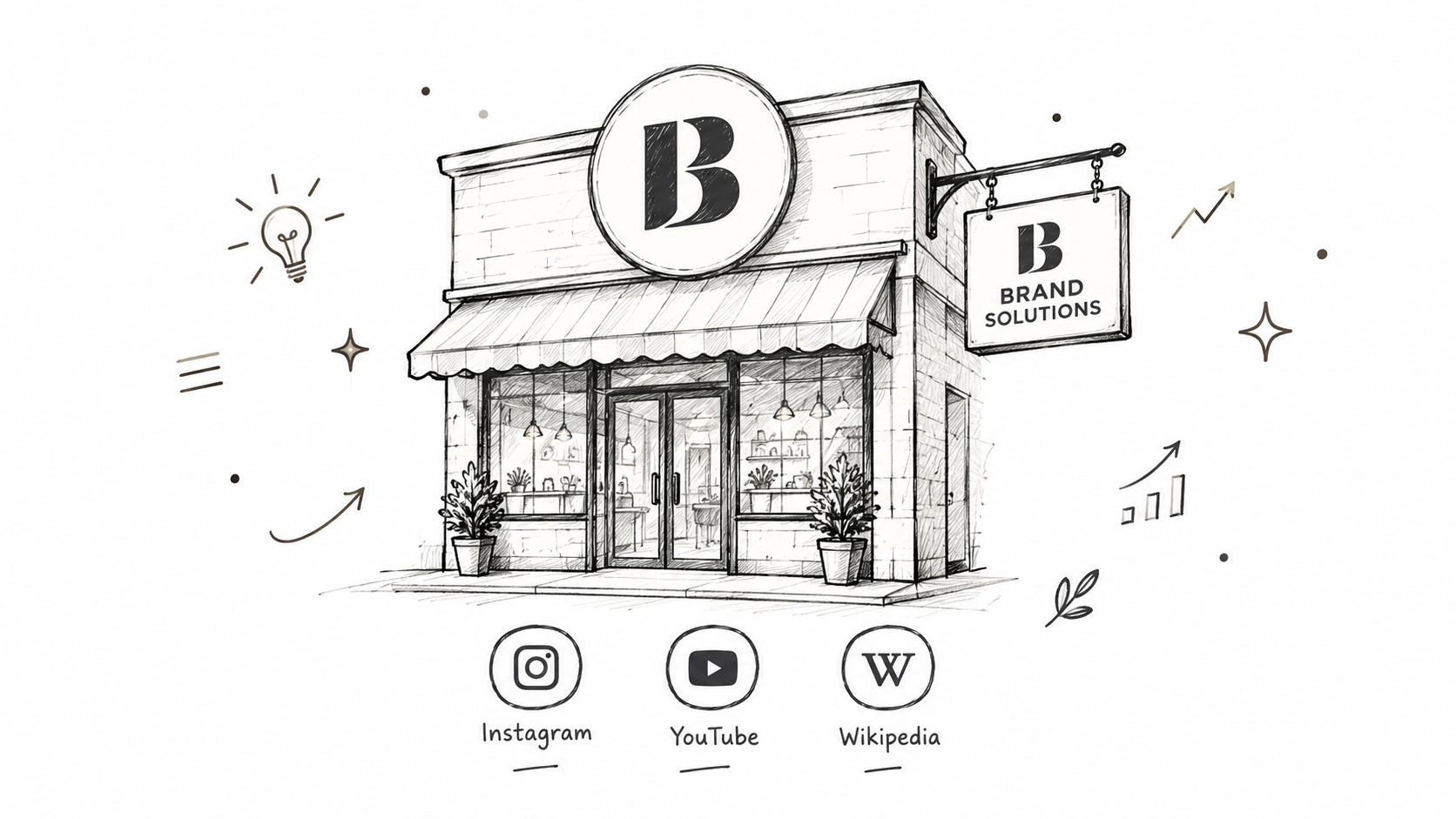
A footwear brand might connect its Organization to controlled Instagram and YouTube profiles through sameAs. A retailer operating several brands should decide whether those brands are separate entities and represent the relationship deliberately. The product pages can then reference the same organization or brand identity consistently.
Shopify path and verification
Organization JSON-LD commonly lives in layout/theme.liquid, the homepage template, or a theme app extension. Place the primary entity where the business is clearly represented, usually the homepage, and ensure the logo URL is absolute, crawlable, and visibly associated with the brand. The logo should be the same meaningful brand asset used across the store and business listings.
Check that the name, logo, URL, telephone number, and contact details agree with the store's visible content and relevant business profiles. Test the homepage in the Schema Markup Validator, then inspect source HTML to ensure the object isn't injected only after a browser executes JavaScript.
A brand entity is useful only when the store treats it as a single, stable identity.
The main failure is overclaiming. Don't add Wikipedia, social, or profile links that the business doesn't control or that don't clearly identify the same organization. Another issue is duplication, especially when an SEO app creates one Organization object and a custom theme snippet creates another with different names or logos. Consolidate the blocks and use the same @id in related markup.
Keep contact data current. A changed phone number or logo can create conflicts between the storefront and the structured data long after a redesign has shipped.
4. BreadcrumbList
BreadcrumbList expresses the page's position in the site's hierarchy. For a product, the path might be Home, Men, Jackets, Waterproof Jacket. For a blog post, it could be Home, Journal, Care Guides. The markup should use the same labels and URLs shoppers see in the visible breadcrumb component.
A product may belong to several Shopify collections, but search engines shouldn't receive a random path on every crawl. Choose a primary collection rule, such as the collection assigned through merchandising logic or a product metafield, and use it consistently. A trail that changes between “Men, Jackets” and “Sale, Last Chance” can make the site's hierarchy harder to interpret.
Shopify path and verification
Breadcrumb JSON-LD usually belongs in the product, collection, page, or article section, although some themes centralize it in a snippet. Inspect the Liquid that determines the current page and confirm that it outputs absolute URLs in each item property. Avoid filter URLs, search parameters, and temporary collection views in the trail.
Test a deep product and a blog article after changing collection rules. Compare the visible breadcrumb labels with the JSON-LD name values, then use the Rich Results Test to check eligibility. A valid object can still be unhelpful if it describes a path no user can see.
The failure mode is a mismatch between navigation and markup. Some themes print “Home” in the interface but omit it from JSON-LD. Others use the product's first collection from Shopify, even when the visible breadcrumb uses a merchandising-specific primary collection. Fix the data source rather than manually editing every product.
For large catalogs, treat breadcrumb logic as a template rule. Test products from different collections, products with no collection, and articles nested in different blogs before releasing the change.
5. FAQPage
FAQPage marks up a set of questions and answers that appear on the same page. A mattress product page might answer questions about firmness, trial terms, delivery, and care. A shipping policy page might explain delivery windows or international duties. Each Question needs an acceptedAnswer, and the answer must be visible to shoppers.
Commercial stores shouldn't treat FAQ markup as a guaranteed Google search feature. Google limits FAQ rich results to well-known government and health websites, so Shopify merchants should use this type primarily to make genuine page content easier for systems to interpret, including answer engines. The markup still needs to reflect useful, customer-facing information.
Shopify path and verification
FAQ content often comes from a product or page metafield, a theme block, or a reusable section. That makes metafields practical for consistency, but only if the Liquid template prints the same questions and answers in the visible accordion. Don't create a second hidden FAQ list solely for JSON-LD.
A store might maintain product questions in a structured metafield and render them on the product page. The JSON-LD can loop over those entries, while the visible section uses the same source. This reduces the risk that a support team updates the visible answer but forgets the schema.

Validate a page in the Schema Markup Validator and inspect the rendered page manually. Confirm that every marked-up question is visible, answers aren't misleadingly truncated, and the content matches the store's current policy. The known failure is publishing stale or hidden answers because an app outputs FAQ JSON-LD independently of the theme content.
Write questions in the language shoppers use, keep answers factual, and don't add promotional copy that doesn't answer the question.
6. LocalBusiness
LocalBusiness is appropriate for a Shopify merchant with a physical location customers can visit. It can describe a showroom, flagship store, pop-up, or retail branch through name, address, telephone, opening hours, geographic coordinates, and related location details. An online-only business shouldn't use it just because it has a mailing address.
A fashion brand with three stores can create one store locator page per location, each with its own entity, address, hours, and coordinates. A home furnishings retailer might use a relevant subtype and publish holiday hours with openingHoursSpecification. A DTC brand with a showroom can place the markup on the contact or location page rather than pretending the entire ecommerce operation is local.
Shopify path and verification
Location data may live in Shopify metaobjects, page metafields, or a store locator app. The strongest implementation uses one structured record per location and renders both the visible address card and JSON-LD from that record. Each location should have a stable, crawlable URL.
Match the name, address, and phone shown on the page with the business profile used for local listings. Check opening hours manually, especially around holidays, and use precise coordinates rather than a broad city-centre point. Google's local business JSON-LD guidance provides useful implementation context, but your storefront remains the source that must stay accurate.
Test each location URL in the Schema Markup Validator and inspect the page source. The common failure is copying one headquarters record across every store page. Another is marking up pickup availability as a physical business when shoppers have no customer-facing location.
Update the location object when hours, telephone details, or service areas change. A valid block with yesterday's opening times is still bad structured data.
7. CollectionPage and ItemList
Shopify collection pages need more than a grid of product links. CollectionPage describes the page's purpose, while ItemList identifies the products or articles included and, when appropriate, their order. This can clarify category pages such as “Trail Running Shoes,” “Best Sellers,” or “Organic Cotton Bedding.”
A running-shoe collection might list the products visible in its default sort order. A paginated bedding collection should avoid pretending that every product appears on every page. If the visible page contains a defined set of products, the list should represent that set, using canonical product URLs.
Shopify path and verification
Collection markup usually belongs in templates/collection.json, the main collection section, or a collection-specific snippet. Liquid can iterate through the collection products and assign ListItem positions. Keep the output aligned with the products rendered, especially when merchandising rules, filters, or inventory availability alter the grid.
A “Best Sellers” collection is a useful real-world test because order matters. If the first visible product is position one in the page, the JSON-LD should reflect that. If the collection's default sort changes, regenerate the positions rather than leaving an old order in the markup.
Read Shopify collection page SEO guidance alongside the implementation. Then test collection URLs with the Schema Markup Validator, check canonical tags, and compare the list against the rendered product cards.
The failure mode is treating filtered URLs as permanent categories. A URL created by a size or colour filter can produce a duplicate ItemList, a weak canonical signal, or a list that changes without editorial intent. Use canonical collection URLs where possible, keep the H1 and description unique, and don't list products in JSON-LD that shoppers can't see.
8. VideoObject
VideoObject describes a video through its name, description, thumbnail, upload date, duration, content URL, or embed URL. On Shopify, it works well for product demonstrations, unboxing videos, recipes, application tutorials, and assembly instructions. It can also help answer engines understand what a video covers, but only when the video is present and accessible on the page.
A cookware brand might embed a recipe demonstration beside a product and include a transcript. A skincare store could mark up an application tutorial, while a furniture retailer could connect an assembly video to the relevant product page. The video title and description should describe the actual content rather than repeat a sales slogan.
Shopify path and verification
Video data may come from a product metafield, a video section, YouTube, or a CDN. Render the embed and the JSON-LD from the same source where possible. Use a stable thumbnail, a valid ISO 8601 duration such as PT2M30S, and a URL that remains available to crawlers.
A transcript adds practical value for accessibility and gives systems text that explains the video's steps. If the video has chapters, make sure the chapter information corresponds to real timestamps and visible content.
Validate the page with Google's Rich Results Test, then verify that the thumbnail URL loads, the video appears without requiring an unavailable interaction, and the duration is correct. The failure mode is stale or mismatched media. A JSON-LD block may describe a video that was removed from the product page, use a thumbnail from another item, or point to a private embed.
Don't add VideoObject to every product merely because the theme supports video. Add it where a real, crawlable video helps explain the page.
9. Merchant Shipping and Return Policy
Shipping and return information belongs close to the offer because it affects whether the product can be bought under the stated terms. OfferShippingDetails can describe delivery destinations, handling and transit time, and shipping cost. MerchantReturnPolicy can describe return conditions, time limits, methods, and regions.
An apparel merchant selling across borders might publish different shipping rules for the United States and other supported countries, alongside a defined return policy. A made-to-order product may need different handling times from an in-stock item. Those distinctions are useful only when the page, checkout, policy content, and Merchant Center settings agree.
Shopify path and verification
Shipping data may be assembled from Shopify Markets, shipping settings, product metafields, a policy page, or an SEO app. Before adding nested properties, document which system is authoritative for each destination, price, handling time, and return condition. Don't hardcode a free-shipping claim into Product JSON-LD while the cart applies a charge.
Implement the highest-priority destinations first, then expand as the business can maintain the values. Use delivery-time properties for handling and transit periods rather than vague phrases such as “fast delivery.” Keep the policy page visible and ensure the marked-up terms apply to the relevant offer.
Check the product in the Rich Results Test, then review Merchant Center diagnostics after deployment. Google distinguishes product snippets from merchant listings and recommends combining on-page Product markup with a Merchant Center feed so product information can be understood and verified across systems (Google Merchant Center product data guidance).
The known failure is policy drift. A carrier changes its delivery window, a promotion ends, or a regional return rule changes, but the JSON-LD remains untouched. Treat shipping and returns as synchronized operational data, not static SEO copy.
10. Person for Author and Expert Profiles
Person gives an identity to a founder, product designer, nutritionist, stylist, reviewer, or article author. Useful properties include name, jobTitle, description, image, URL, sameAs, and credentials. The object becomes more meaningful when it links to a visible profile page and is referenced consistently from content.
A supplement brand might identify a registered dietitian who writes or reviews nutrition guides. A skincare founder can connect a profile to the Organization and to verifiable professional appearances. A home goods store can use a stylist's profile for buying guides and describe relevant expertise without making unsupported claims.
Shopify path and verification
Create a visible author or expert page in Shopify, then store its URL, image, biography, credentials, and controlled profile links in page fields or metaobjects. Article templates can reference the same @id every time that person appears as an author. Product education pages can use reviewedBy where the review is performed and visibly disclosed.
Check that the name and credentials in JSON-LD match the page content. Run the author page and a representative article through the Schema Markup Validator, then inspect the source for consistent identifiers. The failure mode is creating impressive-looking expert markup without a real profile, evidence, or visible relationship to the content.
Use sameAs only for profiles that verify the person's identity. Keep credentials current, update the profile when a role changes, and don't label a generic editorial account as a Person with invented expertise.
Top 10 Structured Data Schemas Compared
| Schema Type | Implementation Complexity 🔄 | Resource & Maintenance ⚡ | Expected Outcomes ⭐📊 | Ideal Use Cases | Key Advantages 💡 |
|---|---|---|---|---|---|
| Product (with Offer and AggregateRating) | High 🔄, nested Offer, variants, Merchant Center sync | Medium–High ⚡, product data, review sourcing, frequent updates | ⭐⭐⭐⭐ 📊, rich snippets (price, availability, ratings); Shopping/AI visibility | Product pages, Shopify stores feeding Merchant Center | 💡 Enables price/availability stars, reduces feed mismatches |
| Article / BlogPosting | Medium 🔄, template fields (author, dates, image) | Low–Medium ⚡, author profiles, image assets | ⭐⭐⭐ 📊, authorship/freshness signals; Discover & citation potential | Blog posts, how‑tos, buying guides | 💡 Supports E‑E‑A‑T and clear attribution |
| Organization | Low 🔄, homepage @id and basic fields | Low ⚡, logo, name, social links | ⭐⭐ 📊, brand entity signals; knowledge panel input (not guaranteed) | Homepage, brand-level referencing across site | 💡 Reusable @id; reinforces brand identity and logos |
| BreadcrumbList | Low–Medium 🔄, map navigation to ListItem positions | Low ⚡, derive from navigation or primary collection | ⭐⭐ 📊, cleaner SERP path display; reinforces site hierarchy | Deep catalogs, collection/product pages | 💡 Improves CTR and crawler understanding of structure |
| FAQPage | Low 🔄, visible Q&A list with acceptedAnswer | Low ⚡, content upkeep; use metafields/blocks | ⭐⭐ 📊, limited Google rich result (restricted); good for AI extraction | Product FAQs, policy pages, support Q&A | 💡 Easy to maintain; extracts concise answers for assistants |
| LocalBusiness | Medium 🔄, per‑location blocks, match GBP data | Medium ⚡, keep NAP/hours synced across directories | ⭐⭐⭐ 📊, local search & map visibility when accurate | Physical stores, showrooms, local pickup pages | 💡 Clarifies hours/address; supports local discovery |
| CollectionPage & ItemList | Medium 🔄, ordered ItemList, pagination handling | Medium ⚡, limit items, maintain canonical/sort logic | ⭐⭐ 📊, helps AI parse categories; no dedicated visual result | Category pages, large catalogs, paginated collections | 💡 Clarifies category contents; scalable for big catalogs |
| VideoObject | Low–Medium 🔄, video metadata, thumbnail, duration | Medium ⚡, host URLs, transcripts, proper thumbnails | ⭐⭐⭐⭐ 📊, video rich result eligibility; better discovery & accessibility | Product demos, how‑tos, tutorials embedded on pages | 💡 Transcripts & chapters boost accessibility and AI parsing |
| Merchant Shipping & Return Policy | High 🔄, per‑zone shipping/return rules, sync needs | High ⚡, many zones, rapid policy changes, Merchant Center mapping | ⭐⭐⭐ 📊, shows shipping/returns in shopping surfaces; reduces mismatches | Cross‑border sellers, multi‑zone merchants | 💡 Machine‑readable policies reduce listing disapprovals if accurate |
| Person (Author / Expert Profiles) | Low–Medium 🔄, create/maintain author @id and credentials | Low ⚡, bio pages, sameAs links, credential updates | ⭐⭐ 📊, supports E‑E‑A‑T and attribution; no standalone rich result | Expert‑led guides, author attribution for Articles | 💡 Strengthens authorship signals and AI attribution |
Turn These Examples Into a Validated Schema Plan
Structured data works best as a maintained data contract between Shopify, the theme, apps, feeds, and the visible storefront. A page can contain syntactically valid JSON-LD and still fail to qualify for a rich result, conflict with Merchant Center, or describe content shoppers can't see. Google also requires the markup to remain up to date and to appear in the HTML returned by the server, not only after a client-side script runs. Treat validation as the beginning of monitoring, not the final deployment tick.
Start with a template audit. Identify what the homepage, product, collection, article, page, location, and policy templates already output. Search theme.liquid, snippets, sections, app embeds, review integrations, and custom scripts for application/ld+json. Record every entity, its source fields, its @id, and whether another app publishes the same type.
Then fix the highest-value identity blocks first:
- Product: Resolve duplicate objects, variant identity, live price, currency, availability, identifiers, reviews, and offer details.
- Organization: Establish one stable brand entity with a consistent logo, URL, name, and controlled profile links.
- Breadcrumb: Match the visible path, choose a consistent primary collection rule, and use absolute canonical URLs.
- Article and Person: Connect genuine authors to visible profiles and keep publication dates honest.
- Shipping, returns, and location data: Synchronize operational details with the storefront, policies, and Merchant Center settings.
Google's own examples show why measurement needs context. Rotten Tomatoes reported a 25% higher click-through rate on pages enhanced with structured data, while Food Network reported a 35% increase in visits after converting 80% of its pages to support search features (Google's documented publisher examples). Rakuten's recipe implementation reported traffic increasing 2.7 times and average session duration increasing 1.5 times after Recipe structured data was deployed (Rakuten structured data case details). These are specific implementations, not forecasts for every Shopify store. Use them as evidence that accurate markup can matter, not as performance guarantees.
For each template, compare visible fields with the rendered JSON-LD. Check page source, not only the browser's live DOM, especially when an app injects markup with JavaScript. Run the Rich Results Test for Google feature eligibility and the Schema Markup Validator for broader vocabulary and syntax checks. A page can pass one and fail the other, or pass both while still not appearing with an enhancement.
After release, inspect representative URLs with URL Inspection, confirm sitemap and indexing status, and monitor Search Console enhancement reports where applicable. Watch for stale prices, out-of-stock products still marked available, unsupported properties, duplicate Product objects, missing author pages, broken thumbnails, and conflicts between page markup and feeds. For large catalogs, sample high-volume templates and recently changed products because a silent Liquid regression can affect many URLs while an individual validator test still passes.
RankEngine can manage and validate Product, Article, Organization, Breadcrumb, FAQ, and LocalBusiness JSON-LD on Shopify. Its workflow is designed to write supported fixes through Shopify and verify the live store before marking a change complete, which fits the central discipline behind these examples: don't call schema finished because code was generated. Call it finished when the right template emits one accurate entity, the visible page agrees, the validators pass, and monitoring can detect the next catalog change.
Audit one product, one collection, one article, and one location page first. Once those templates are clean, roll the rules across the catalog, document the source of every dynamic field, and schedule checks after theme, app, pricing, inventory, and policy changes.
Use RankEngine to audit Shopify templates, manage supported JSON-LD for key page types, and validate fixes against the live storefront. Start with Product, Organization, and Breadcrumb data, then monitor the fields most likely to change, including price, availability, shipping, returns, authors, and locations.