 RankEngine
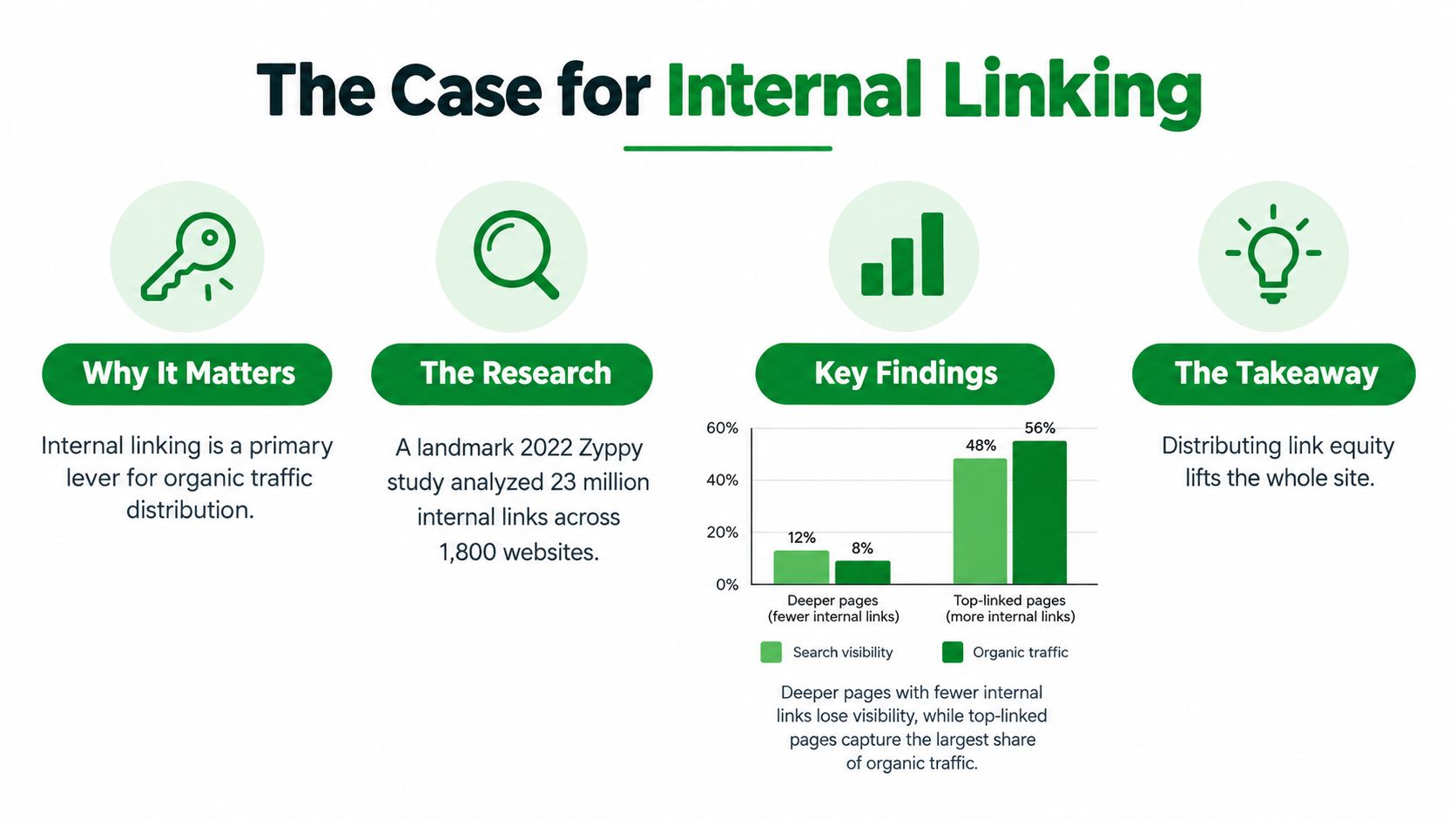
A large 2022 Zyppy study found that URLs with 40–44 internal links received about 4 times more Google clicks than URLs with 0–4 internal links. Internal links matter for SEO because they help search engines discover pages, understand their relationships, and direct authority toward the products and collections that matter most.
That finding changes how Shopify merchants should think about site architecture. Internal linking isn't a decorative navigation task or a box to tick during a technical audit. It's one of the few SEO levers you control entirely, without waiting for another website to link to you or producing another article.
A store can have excellent products, strong branding, and technically valid pages, yet still leave valuable URLs buried behind weak pathways. The practical question isn't just why are internal links important for SEO. It's how to connect a large catalog so that search engines and shoppers can reach the right pages efficiently, while avoiding a cluttered experience.
Table of Contents
- The Case for Internal Linking
- How Search Engines Navigate Your Store
- Building a Practical Shopify Linking Strategy
- Internal Links and AI Search Visibility
- Common Internal Linking Mistakes to Avoid
- Measuring and Maintaining Link Health
The Case for Internal Linking
The Zyppy study examined 23 million internal links across 1,800 websites, covering about 520,000 URLs. URLs with 40–44 internal links received about 4 times as many Google clicks as URLs with 0–4 internal links, according to the study of internal links from Zyppy. The same dataset found that pages with at least one exact-match internal anchor received roughly 5 times more search traffic than pages without one.
Those findings don't mean every product page should receive exactly 40 links. Correlation isn't a universal prescription, and a store shouldn't add irrelevant links to hit a target. The useful conclusion is more practical: pages that receive meaningful connections from elsewhere on the site tend to have stronger discovery and visibility than pages left at the edge of the architecture.
Internal links distribute existing strength
Your homepage, major collections, and useful buying guides often attract the most attention and external references. Contextual links from those pages give search engines a clearer route to less prominent products, subcollections, and support content. That doesn't create authority from nothing, but it helps distribute the value your site has already earned.
For Shopify stores, this is especially important when products sit several layers below the homepage. A collection page about running shoes can link to trail running shoes, waterproof running shoes, and relevant buying guides. Those pages can then point to individual products using descriptive anchors such as “waterproof trail running shoes” rather than vague text like “view more.”
Practical rule: Link toward the pages that support business priorities, but only when the destination genuinely answers the shopper's next question.
Internal linking also clarifies relevance. A product page linked from a collection, a comparison guide, a care article, and a related-products module occupies a different semantic position from an identical page linked only through a generic menu. The links tell users and crawlers how that URL fits into the store.
Merchants looking beyond technical implementation can also review Aim Set Win Texas digital marketing for broader search strategy context. Internal links won't replace strong content, accurate product data, or external authority, but they can make those assets work harder across the catalog.
How Search Engines Navigate Your Store
A Shopify store behaves like a large shopping mall. The homepage is the main entrance, collection pages are the directory levels, product pages are individual stores, and internal links are the corridors, signs, and escalators connecting them.
A shopper who enters through the homepage can follow the main navigation to a collection, filter or browse to a product, and then move to a size guide or related item. Googlebot follows crawlable links in much the same way. If an important product has no clear route from established pages, its existence becomes harder to interpret and its importance becomes less obvious.

Discovery isn't the same as navigation
A URL can appear in a sitemap and still have a weak internal position. Sitemaps help communicate which URLs exist, but internal links provide relationship and prominence signals. A product linked from a relevant collection carries different context from one listed only in a file that a crawler may process separately.
Independent summaries of Ahrefs-linked research report that 66.2% of web pages have only one internal link pointing to them. The same research is associated with a pattern in which nearly 90% of first-page Google results sit within three clicks of the homepage, while clearer internal structures can support indexation of new pages up to 40% faster. These figures are reported in this overview of internal linking strategies.
For a merchant, the operational implication is straightforward. Review products, collections, and editorial pages that matter commercially, then ask:
- Can a crawler reach the URL through ordinary HTML links?
- Is the page close enough to a meaningful hub?
- Do several relevant pages point toward it?
- Does the anchor text explain what the destination contains?
A link in a navigation menu helps establish access. A contextual link in a buying guide explains why the destination matters. Breadcrumbs add hierarchy, while related-product links connect comparable commercial options. These formats serve different jobs and shouldn't be treated as interchangeable.
The following video offers another visual explanation of how crawling, indexing, and ranking relate to site architecture.
A useful technical reference is this guide to crawling, indexing, and ranking in SEO. It helps separate the act of discovering a URL from the later decisions about indexing and ranking it. Internal links support the first two stages, but they don't guarantee a ranking. The destination still needs useful content, accessible rendering, appropriate canonicalization, and a reason to satisfy the query.
Building a Practical Shopify Linking Strategy
Random linking produces a busy store, not a coherent one. A practical Shopify strategy starts with commercial priorities, maps them to the catalog, and then adds links where a shopper would naturally need the next piece of information.
Start with the primary path: homepage to collection, collection to subcollection or product, product to related product or supporting content. This structure gives broad pages a way to introduce narrower pages without forcing every URL into the main menu.
Use the right source pages
A collection header can link to a useful subcategory with anchor text such as “women's waterproof hiking boots.” A product description can reference a compatible accessory with “replacement filters for this purifier.” A buying guide can link to a product group using “quiet air purifiers for bedrooms.” Each anchor sets an expectation before the click.
The source page matters. A strong collection page is usually a better place to link to a product family than an unrelated blog article. A detailed product guide is often the right source for a specific model or accessory. Relevance beats volume.
A link should answer a likely next question, not merely fill an internal-link quota.
Build commercial pathways deliberately
Use these patterns as a working framework:
Collection hubs: Link from category introductions to meaningful subcollections and best-fit product groups. Keep the links inside explanatory copy when the relationship needs context.
Product relationships: Add related-product modules for genuine alternatives, complementary items, and replacement parts. Don't link every product to every other product. That makes the module harder to use and weakens the distinction between primary and secondary recommendations.
Editorial support: Connect buying guides and educational articles to collections and products mentioned in the text. The link should lead to the page that lets the reader act on the advice.
Breadcrumbs: Keep the hierarchy consistent so a product can lead back to its relevant collection and broader category. Breadcrumbs help shoppers recover when they enter through search.
Footer links: Reserve the footer for stable destinations that deserve broad access, such as important collections, customer support, and policy pages. A giant footer of barely related product links creates clutter rather than useful architecture.
Shopify's theme and app blocks make related products and navigation easy to deploy, but templates can also create problems at scale. Check whether a block outputs crawlable links, whether discontinued products remain linked, and whether faceted URLs multiply without serving a clear search purpose.
For a concrete comparison of linking patterns, see this internal linking example. The implementation should always be reviewed against the live storefront, not just the theme editor. A link that appears in an administrative setting but fails to render for users and crawlers isn't doing the job.
Internal Links and AI Search Visibility
Internal linking now has a second audience beyond traditional search crawlers. AI search systems and answer engines need to retrieve relevant passages, identify relationships between pages, and decide which content provides a reliable answer to a specific request.
The evidence base for AI retrieval is still developing. There isn't verified data here proving that a particular internal-link count guarantees citation in an AI answer, so merchants shouldn't treat AI visibility as a mechanical ranking formula. The stronger conclusion is architectural: a machine-readable site with clear hubs and explicit relationships gives retrieval systems more useful signals than a disconnected catalog.
Make relationships explicit
Consider a store selling coffee equipment. A broad collection page can connect to espresso machines, grinders, filters, and maintenance guides. An espresso machine page can link to compatible grinders and cleaning instructions. A guide about dialing in espresso can point back to the relevant product family and explain which equipment the advice applies to.
That structure serves several audiences at once:
- Shoppers can move from education to evaluation and purchase.
- Search engines can interpret the hierarchy and topical relationships.
- AI systems can retrieve a product, its specifications, and its supporting explanation through connected paths.
Structured hubs are particularly useful when product facts are distributed across templates, FAQs, buying guides, and help pages. If those pages never connect, an answer engine may retrieve an isolated passage without enough context to understand which product, category, or use case it belongs to.
Write anchors for retrieval and people
Use anchors that identify the destination precisely. “How to clean a stainless steel grinder” gives more context than “learn more.” “Replacement HEPA filters” tells a shopper and a retrieval system what the linked page contains. Natural phrasing matters, so don't force the same exact keyword into every link.
A useful AI-search review includes questions such as:
- Does each product have supporting content that explains its use?
- Do FAQs link to the products or collections they describe?
- Do cluster articles point to a clear hub?
- Can an agent distinguish an accessory from a primary product?
- Are key links present in ordinary HTML rather than hidden behind interaction-only elements?
The AI search optimization guide provides a broader framework for preparing content and structure for answer engines. Internal links are one part of that work. They won't compensate for missing product information, weak explanations, or inaccessible content, but they can give machine systems a clearer map of what belongs together.
Treat AI visibility as a reason to improve information architecture, not as permission to add artificial cross-links. A clean structure helps regardless of which search interface a customer uses.
Common Internal Linking Mistakes to Avoid
The most damaging internal-linking problems usually come from reasonable decisions applied too broadly. A merchant adds every product to the menu, places a related-products block on every template, or links to a discontinued URL because the old page still appears in the CMS. Each action increases connection count while reducing clarity.
Navigation alone leaves gaps
A main menu is valuable, but it can't describe every relationship in a large catalog. A product may be reachable through a dropdown yet receive no contextual connection from a buying guide, collection introduction, or related product. That creates a route for basic navigation without explaining topical relevance.
The opposite mistake is adding every important URL to the navigation. This makes the header harder to scan and forces broad categories to compete with narrow products. Keep the main menu focused, then use collection content, breadcrumbs, editorial links, and product modules to handle depth.
Another common failure is orphaning seasonal landing pages. A campaign URL can be published, included in a sitemap, and then forgotten after launch. Once the supporting links disappear, the page loses its practical place in the architecture. Either maintain a relevant hub or retire and redirect the page responsibly.
Anchor text can clarify or obscure
Compare these choices:
| Weak pattern | Stronger pattern |
|---|---|
| Click here | Read the waterproofing guide |
| View product | Shop replacement carbon filters |
| Learn more | Compare lightweight hiking backpacks |
Descriptive anchors help users decide whether to click and give crawlers context about the destination. Exact-match anchors can be useful when they accurately describe the page, but repeating one phrase unnaturally across every source can make the copy awkward. Vary wording where the surrounding sentence calls for it.
More links aren't automatically better
Excessive footer links, long lists of loosely related products, and automated modules that ignore inventory status all dilute attention. They also create maintenance work. When a product is discontinued, every template and article that links to it becomes a potential dead end.
The practical test is simple. If removing a link would make the page less useful, keep it. If the link exists only because a tool suggested it, review the destination, anchor, placement, and commercial purpose before publishing it.
Don't hide important internal links behind controls that crawlers or users may not access reliably. A visible, crawlable link in relevant content is usually more dependable than a relationship exposed only after a complex interaction.
Measuring and Maintaining Link Health
Internal linking requires maintenance because Shopify catalogs change constantly. Products sell out, handles change, collections are reorganized, campaigns expire, and theme updates alter which modules render. A strategy that worked after launch can degrade as merchandising teams make ordinary updates.
Manual review still matters for relevance and tone, but it doesn't scale well across a large catalog. An automated audit should identify orphaned pages, weak incoming-link coverage, excessive depth, broken destinations, redirects, and anchor-text problems. It should also distinguish a commercially important product from a low-priority utility URL, because not every page deserves the same linking treatment.
Audit the live storefront
A reliable workflow looks at the actual Shopify state rather than assuming that a planned change reached production:
- Find candidates: Identify important products, collections, guides, and pages with weak or missing internal connections.
- Review the source: Check whether an existing collection, article, or product page offers a naturally relevant placement.
- Apply the fix: Add or update the link through the appropriate Shopify content or theme control.
- Verify the result: Re-read the live Shopify values and confirm that the intended link, anchor, and destination now exist.
- Keep human review: Reject suggestions that create awkward copy, irrelevant recommendations, or unnecessary template clutter.
Verification rule: A fix isn't complete when a task system says it was written. It's complete when the live store confirms the intended value.
The verified behavior matters because optimistic status labels can hide unresolved issues. Fixes are verified by re-reading live Shopify values before status changes to “done.” That approach gives operators a more trustworthy maintenance record and makes it easier to investigate changes after a theme release or catalog import.
Measure quality, not just quantity
Review whether priority pages gain sensible pathways from strong hubs, whether new products receive links soon after publication, and whether old links still resolve directly. Search Console can help identify pages receiving search attention, while a crawl or Shopify-backed audit can expose structural gaps that analytics alone won't show.
RankEngine audits Shopify site architecture, surfaces issues such as orphan pages, link depth, anchor text, and broken internal links, and supports editable fixes with live verification. It should be used alongside human judgment, especially for deciding whether a recommendation fits the merchandising strategy and customer journey.
Set a recurring review cadence around catalog and theme changes rather than treating internal linking as a one-time project. The store doesn't need the largest possible network of links. It needs a deliberate, current, and understandable one.
If your Shopify catalog has orphaned products, weak collection pathways, or broken internal links, RankEngine can audit the live store, surface actionable architecture issues, and verify supported fixes before marking them complete. Use it to turn internal linking from a manual cleanup task into a monitored part of your Shopify SEO workflow.