 RankEngine
Images account for 42.3% of average mobile page weight, according to the HTTP Archive data summarized in Shopify image optimization guidance. That makes image delivery one of the clearest places to look when a Shopify store feels slow, especially on product grids, collection pages, and image-heavy product templates.
A Shopify image optimization app shouldn't be judged by how many files it compresses. Judge it by whether it delivers the right format, at the right dimensions, with the right loading priority, while preserving useful metadata and leaving a recoverable record of every change. Compression matters, but compression alone is an incomplete solution.
Table of Contents
- What a Shopify Image Optimization App Actually Does
- The Four Features That Actually Matter
- Shopify's Built-In Image CDN Versus a Third-Party App
- Choosing the Right Optimization Model for Your Store
- Implementing Image Optimization on a Live Shopify Store
- Where Image Apps End and SEO Platforms Like RankEngine Begin
- A Merchant Checklist for Picking and Rolling Out an App
What a Shopify Image Optimization App Actually Does
Google analysis found that the Largest Contentful Paint element is an image on 72% to 81% of web pages, as reported in this Shopify image optimization reference. On a Shopify store, an oversized hero or product image can therefore delay the page's most important visible element. Image optimization is a delivery-mechanics problem, not a checklist limited to compression and alt text.
A Shopify image optimization app manages the path from an uploaded asset to the file a shopper receives. Depending on its architecture, it may process images during upload, rewrite existing files in bulk, or transform them when the storefront requests them. The useful work includes format selection, responsive sizing, loading behavior, filenames, alt text, and a record of each image-level action.
That differs from an image editor. An editor creates a product photo, banner, or lifestyle asset. An optimization app controls how that asset is served, cached, resized, and described across storefront contexts. A 2000-pixel product image may be suitable as a source file, yet wasteful when a mobile product card receives the same rendition.
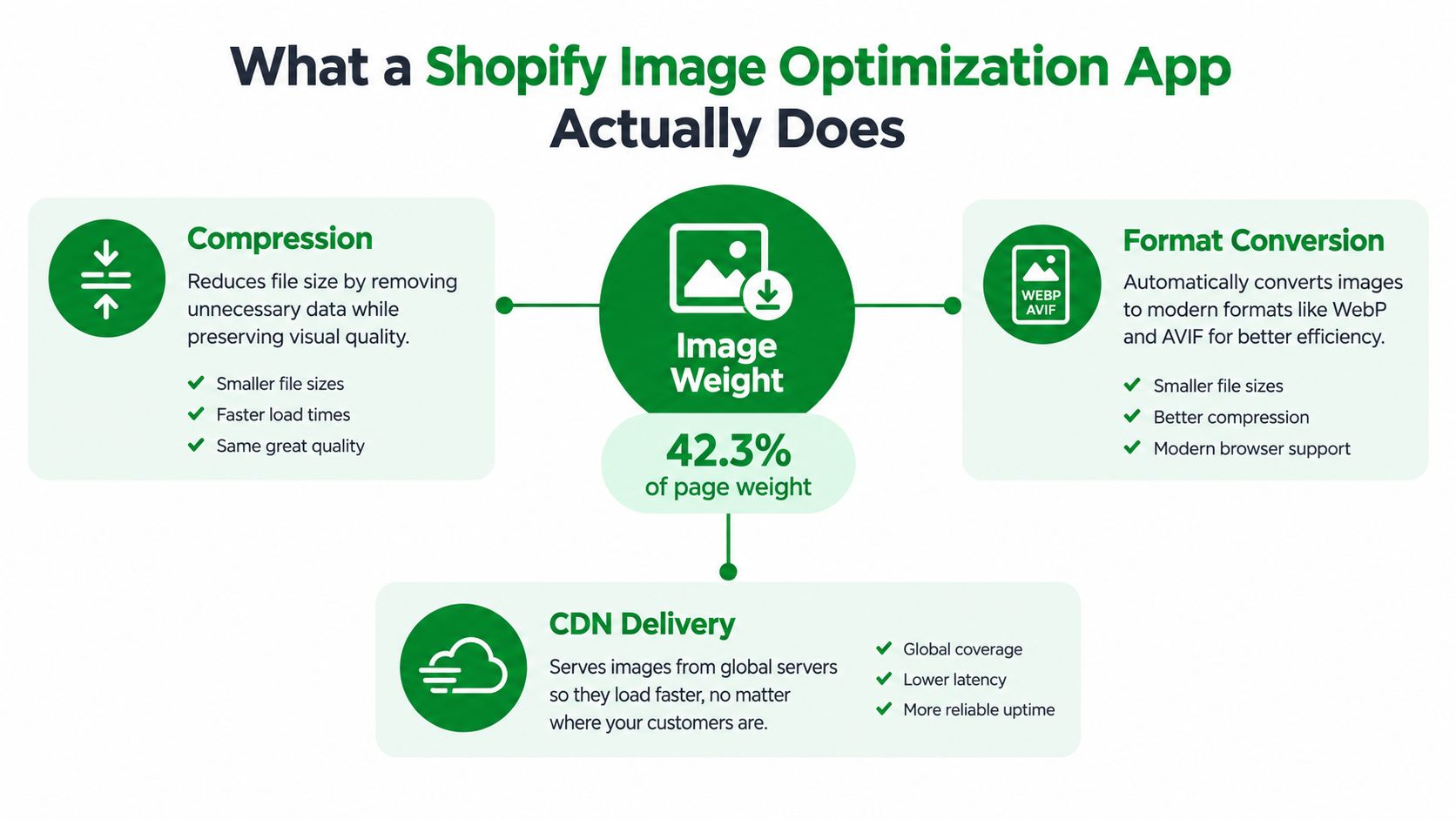
Shopify's performance documentation says its image CDN can select an appropriate format, resize images, and compress them. It recommends compressed WebP and notes that smaller files generally load faster, with image files generally kept under 100 KB where practical. Review the Shopify image performance guidance before buying an app. A tool that only repeats Shopify's existing delivery functions is poor value.
Judge an app by whether it records and applies the right action to each asset:
- Compression and format selection, matched to the image and browser context.
- Responsive delivery, so each viewport and component receives a suitable rendition.
- Metadata controls, including alt text and filenames without destructive overwrites.
- Action history, showing what changed and allowing operators to reverse a bad batch.
The app should improve the media pipeline, not merely produce a bulk-compression report. Compare its output with this guide to optimizing images for a website. RankEngine can handle broader SEO and structural work, while the image app handles the files, formats, sizes, and delivery decisions.
The Four Features That Actually Matter
Most image apps advertise the same checklist. The difference appears when you inspect the output on a live theme. A useful tool must demonstrate the following behavior, not merely display the feature name in its dashboard.
Compression that understands the asset
Compression should be content-aware. Product photography, transparent logos, editorial illustrations, and large hero images don't all benefit from the same settings. The app should support modern formats such as WebP and AVIF, retain a sensible JPEG or PNG fallback where required, and let you control quality by image type or storefront use.
Don't accept a tool that converts every file to one format without showing the result. Compare visual quality, transferred bytes, transparency, and browser fallback behavior on representative product images. A tiny file that introduces visible artifacts isn't an SEO win.
Responsive sizing that follows the layout
A browser shouldn't download a large desktop rendition when the image occupies a narrow mobile card. The app should generate multiple widths and connect them to proper srcset and sizes behavior, or integrate cleanly with the theme's existing responsive image output.
This feature deserves more attention than another compression slider. Shopify's image SEO guidance recommends combining compression and resizing with descriptive metadata, rather than treating any single adjustment as sufficient. The Shopify guide to image SEO also emphasizes that modern delivery and accurate image descriptions work together.
Alt-text automation with safeguards
Automation is valuable on a large catalog, but generic output creates new cleanup work. A useful system should use product titles, variants, vendors, and relevant structured fields to create concise descriptions. It should identify missing and duplicated alt text, allow bulk editing, and preserve existing copy unless the merchant explicitly approves replacement.
Alt text isn't a speed metric. Shopify explains that it is text-based and doesn't affect website performance, but it remains important for accessibility and image interpretation. The Shopify alt-text guidance recommends descriptive, unique text and gives merchants control over editing media descriptions.
Per-image action history
A bulk log saying “optimization completed” is not enough. Operators need to know which file changed, when it changed, which format was created, what compression profile was used, and whether the original remains available. That history matters during theme changes, catalog migrations, and SEO investigations.
| Feature Pillar | Minimum Acceptable Behavior |
|---|---|
| Compression and formats | Chooses suitable formats, preserves quality, and provides fallbacks |
| Responsive sizing | Generates useful renditions and connects them to viewport-aware delivery |
| Alt-text automation | Uses product context, flags weak coverage, and preserves approved copy |
| Action history | Records per-image changes, timestamps, outcomes, and rollback options |
Practical rule: If an app can't show you what happened to one specific image, don't trust it with the entire catalog.
Shopify's Built-In Image CDN Versus a Third-Party App
Shopify already handles much of the basic delivery layer. Its image CDN can resize and compress images and serve modern formats where appropriate. That means many small stores don't need an app just because they want smaller product images.
The native pipeline becomes less sufficient when the merchant needs catalog governance, not just delivery. Shopify doesn't automatically give every operator a useful workflow for finding old oversized assets, reviewing compression decisions, generating contextual alt text across a large catalog, or auditing each change. Those are the areas where a third-party app can earn its place.
What Shopify already handles
Use Shopify's native functionality when your theme outputs responsive image sizes correctly, your source files are reasonable, and your team can maintain metadata manually. Before installing an app, inspect the rendered HTML and network waterfall. Confirm that the browser receives a suitable image candidate for each major template.
A third-party subscription won't fix a theme that lazy-loads the LCP image, loads multiple hero assets, or sends unnecessary app scripts. Image optimization is one part of storefront performance, and the rest of the theme still controls loading priority, layout dimensions, and component behavior.
What an app should add
An app becomes defensible when it handles work that your native workflow can't perform consistently:
- Legacy catalog processing: Finds and processes existing images rather than waiting for new uploads.
- Advanced format policy: Selects WebP or AVIF with an appropriate fallback.
- Bulk metadata governance: Identifies missing, duplicated, or weak alt text without erasing approved descriptions.
- Per-image reporting: Shows savings, status, errors, and previous actions for individual assets.
- Operational controls: Provides dry runs, restore points, exclusions, and clear failure states.
| Capability | Shopify Native CDN | Third-Party Image App |
|---|---|---|
| Request-time resizing | Available through Shopify's image pipeline | May add rules, presets, or reporting |
| Basic compression | Built into delivery | May offer stronger or configurable profiles |
| Modern formats | Supported according to Shopify's delivery behavior | May add explicit AVIF and WebP policies |
| Legacy catalog cleanup | Requires merchant-led workflow | Can scan and process existing assets |
| Alt-text coverage | Merchant-managed in the admin | Can audit and automate at scale |
| Per-image history | Limited as an optimization workflow | Should provide detailed action records |
| Rollback controls | Depends on the merchant's source files and workflow | Should expose restore or reversal features |
Use the Shopify speed optimization workflow to assess the broader page before buying an image tool. If the default CDN, a sound theme, and a manual metadata process solve the actual problem, don't install an app. Fewer dependencies are usually better.
Choosing the Right Optimization Model for Your Store
The right optimization model depends on how your catalog was built and how much rollout risk your team can accept. There are three practical approaches, and each solves a different operational problem.
On-upload processing
On-upload optimization processes new assets as they enter the catalog. It suits a store with a relatively clean existing library, a steady merchandising workflow, and clear rules for image formats and quality.
The weakness is coverage. Existing product media remains untouched unless someone reprocesses it, so a store can have excellent new images and an aging legacy catalog with inconsistent file weights. Ask the vendor whether the app catches images added through imports, integrations, and bulk product updates, not only manual admin uploads.
Bulk retroactive processing
Bulk processing walks through existing media and applies a policy to the catalog already in Shopify. This model is the most useful for stores with years of accumulated imagery, inconsistent file sizes, or a large backlog of missing metadata.
It also carries the greatest rollout risk. A poorly configured batch can alter visual quality, overwrite useful alt text, or create unexpected behavior across product galleries. Insist on exclusions, a test batch, detailed logs, and a way to restore original files before processing the full library.
CDN or on-demand transformation
On-demand systems transform images when the storefront requests them, without rewriting every original asset in storage. That makes them easier to test and safer for a cautious rollout. They can also respond to viewport and component needs more dynamically than a fixed batch of files.
The tradeoff is dependency. Every request relies on the app's transformation and delivery layer, so you need to evaluate edge latency, cache behavior, failure handling, and what happens if the app is disabled.
| Model | Best For | Risk During Rollout | Coverage on Legacy Catalog |
|---|---|---|---|
| On-upload processing | New or orderly catalogs | Low for existing storefront assets | Limited unless old files are reprocessed |
| Bulk retroactive processing | Established catalogs with inconsistent media | Higher because many assets change together | Broad, if the app can access all media |
| CDN or on-demand transformation | Testing and flexible delivery rules | Lower storage risk, higher service dependency | Broad at request time, subject to app coverage |
The Shopify image optimization plugin comparison is useful when you need to assess the surrounding SEO workflow as well as the media model. Choose on-upload for prevention, bulk processing for remediation, and on-demand delivery when reversible testing matters most.
Implementing Image Optimization on a Live Shopify Store
Treat the rollout as a controlled change to a production system. Don't install an app, process every image, and assume a better Lighthouse result proves the job worked. Your sequence should separate diagnosis, media changes, theme behavior, and SEO validation.
Establish the baseline
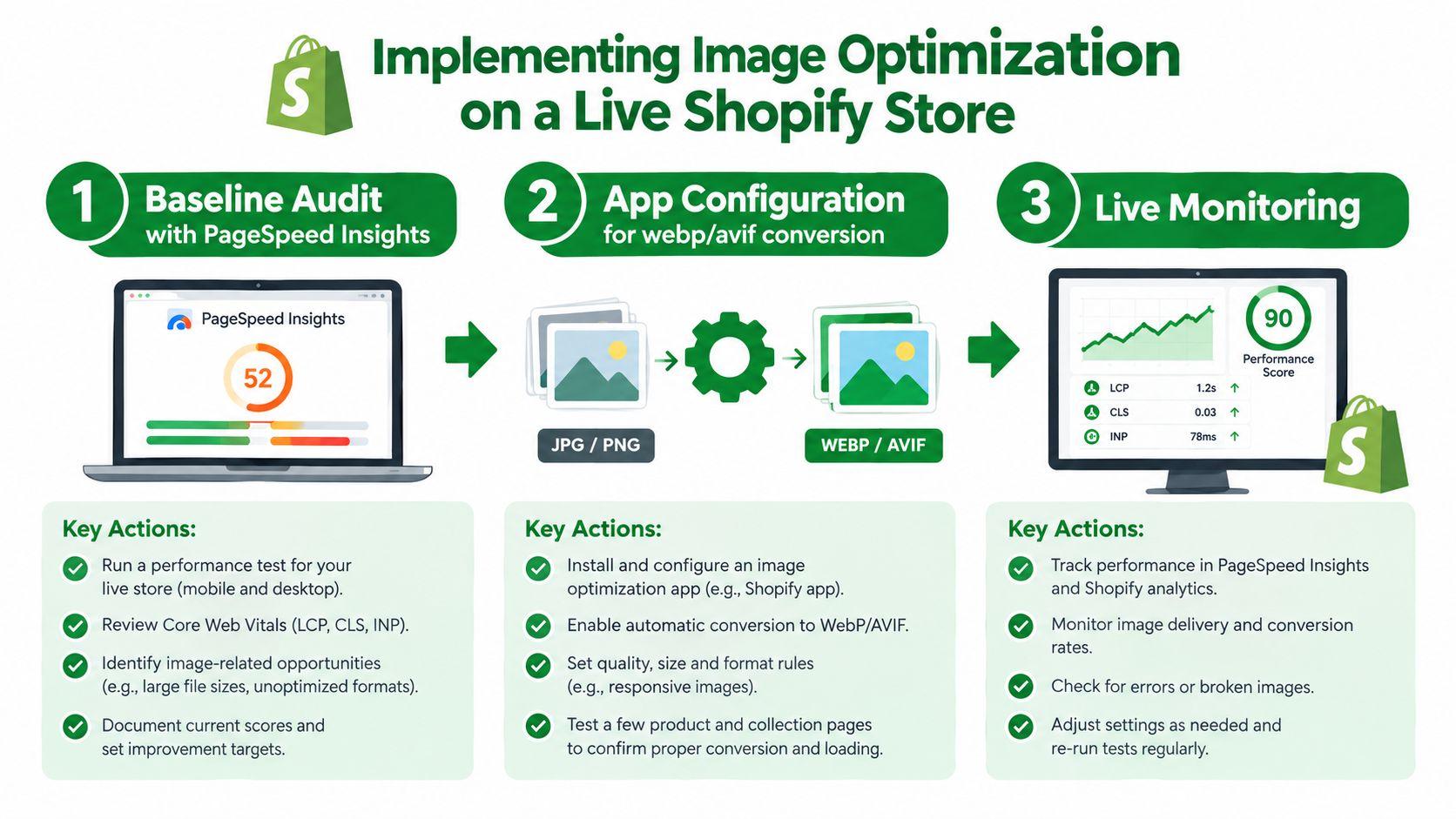
Start with PageSpeed Insights and test the templates that generate revenue and organic visits. Record the image requests, the LCP element, rendered dimensions, loading attributes, and approximate transferred size. Shopify's file and media reports can help you identify oversized source assets, but the browser waterfall tells you what shoppers download.
Look for the specific failure:
- A hero image served at desktop dimensions on mobile.
- A product image marked lazy when it is the LCP candidate.
- A gallery that loads every slide immediately.
- Missing width and height attributes that allow layout movement.
- A modern format that isn't being selected by the browser.
Test the app away from production
Use a duplicate theme or development environment. Process a representative group of product images, transparent assets, collection banners, and editorial images. Check the rendered HTML, image URLs, alt text, filenames, visual quality, and fallback behavior.
Don't test only the dashboard preview. Open the storefront on mobile and desktop, inspect the network requests, and compare the output across product, collection, home, and content templates. Confirm that the app doesn't replace existing alt text without notice or alter image references in a way that breaks theme sections.
Roll out and verify
Enable the app during a controlled maintenance window, preferably with a dry-run or review mode. Start with a limited batch, check the results, and only then expand processing. Keep the original files or confirm the provider's restore process before committing irreversible changes.
After publication, inspect the key revenue pages manually. Check LCP, CLS, image count, image dimensions, zoom behavior, variant switching, and add-to-cart interactions. Then monitor field data in Search Console and your performance tooling over time. If results worsen, change one variable at a time, such as compression quality, lazy-loading rules, or responsive breakpoints.
The following video provides a visual implementation reference before you configure the live store:
Keep the media pipeline separate from the SEO layer during testing. If image quality falls, diagnose the image app. If alt text changes, inspect the metadata workflow. If LCP worsens, inspect theme loading and request priority rather than blaming every change on one tool.
Where Image Apps End and SEO Platforms Like RankEngine Begin
An image optimization app and an SEO platform shouldn't be evaluated as interchangeable products. The image app owns delivery mechanics: compression profiles, WebP or AVIF conversion, responsive sizing, loading behavior, and the record of media transformations.
An SEO platform owns the structural layer around those assets. That includes crawlability, canonicals, structured data, internal links, content quality, indexing controls, and visibility in search and answer engines. It can identify that an image lacks useful context or that a product page has weak semantic signals, but it shouldn't be expected to replace the system serving the file efficiently.
The two layers solve different failures
A store can deliver lightweight images and still fail to earn visibility because its product schema is incomplete, its internal links are weak, or its collection pages lack useful content. The opposite problem is just as common. A store can have strong titles, structured data, and internal linking while sending oversized images that delay the main content.
The practical division is straightforward:
- Image app: Compresses, converts, resizes, and serves media.
- SEO platform: Audits how pages describe, connect, and expose that media.
- Merchant: Approves brand language, product claims, exclusions, and visual quality.
- Shared workflow: Uses image status and SEO findings to prioritize the pages that matter most.
Per-image action history is particularly useful at the boundary. The image system records what happened to the file. The SEO layer can use that information alongside alt-text coverage, product semantics, page type, and organic priorities. That prevents teams from treating “optimized” as a single status that hides separate delivery and discoverability problems.
Fast pages and understandable pages are separate requirements. A reliable Shopify operation manages both.
Use RankEngine as the structural complement when you need Shopify-focused audits, verified SEO fixes, image SEO insights, and per-image action history alongside a dedicated media pipeline. Don't ask one app to solve the other's job. A clear division reduces troubleshooting time and makes performance and visibility changes easier to attribute.
A Merchant Checklist for Picking and Rolling Out an App
Use a hard buying filter. A credible Shopify image optimization app should support AVIF and WebP with fallback, generate responsive image candidates, preserve approved alt text, expose per-image action history, and provide rollback or restore controls. Pricing should also be clear about whether you pay by image, transformation, catalog size, or delivery volume.
Run a representative test on your own theme before subscribing long term. Check product photography, transparent logos, banners, thumbnails, variant media, and images with existing alt text. Reject tools that show only a bulk completion message, hide failed files, or make it difficult to compare the original and processed assets.
The rollout itself should happen in phases:
- Development validation: Install on a duplicate theme, test representative templates, and document the output.
- Controlled catalog processing: Start with a limited group of products, review quality and metadata, then expand in batches.
- Production monitoring: Watch Core Web Vitals, image requests, accessibility coverage, visual quality, and app errors after publication.
- Policy enforcement: Define acceptable formats, quality thresholds, naming rules, alt-text behavior, and exclusions for future uploads.
- SEO coordination: Connect image findings with your broader technical and content priorities so important product pages receive attention first.
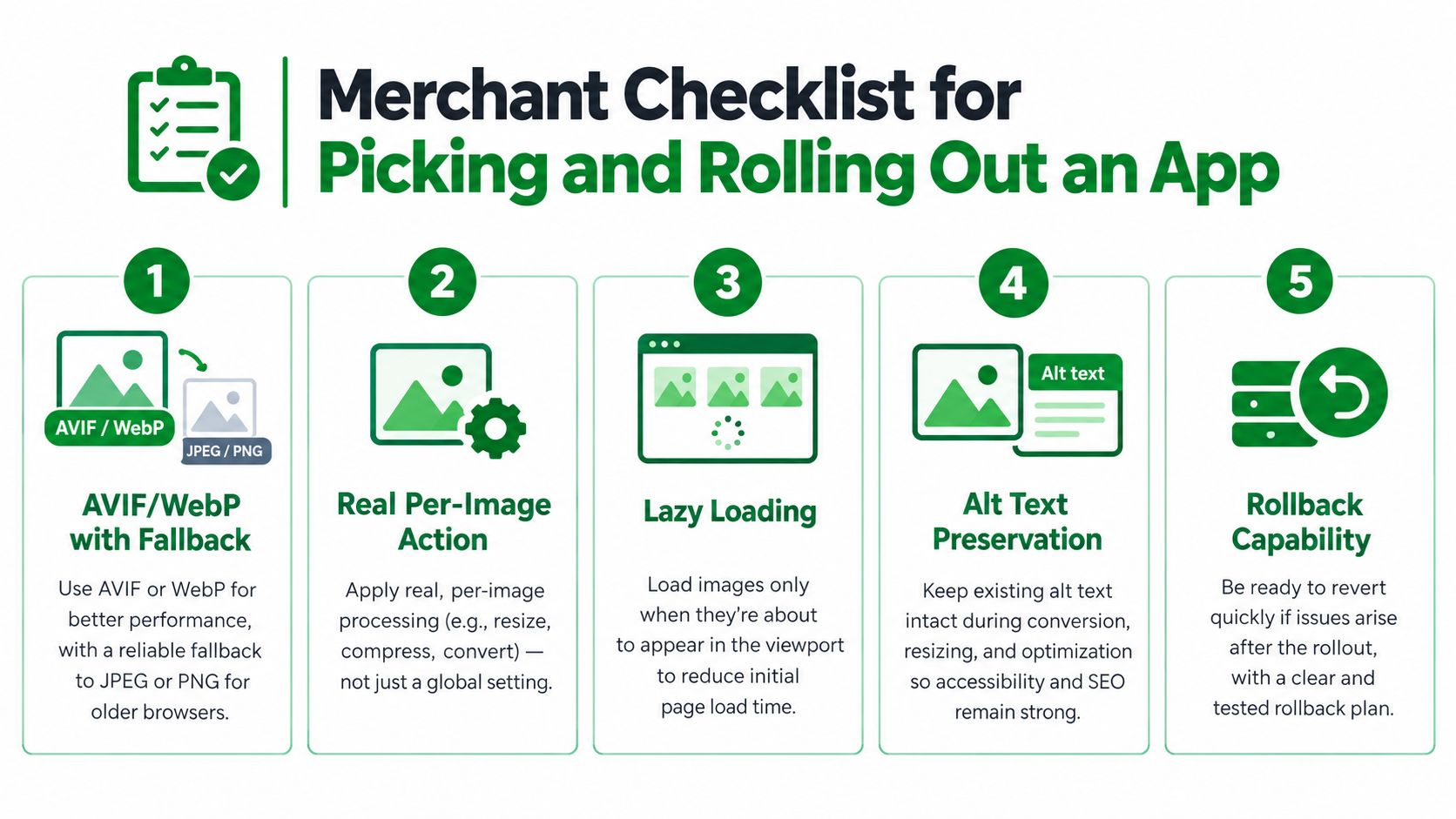
The winning approach isn't the app with the longest feature list. It's the one that proves its changes on your storefront, respects existing metadata, delivers the correct rendition to each browser, and lets your team understand or reverse every important action.
RankEngine audits Shopify products, pages, collections, blog content, structured data, internal links, and image SEO signals, while verified fixes and per-image action history keep changes accountable. Visit RankEngine to connect your media optimization workflow with the SEO and answer-engine work that determines whether fast images also support discoverability.