 RankEngine
You've installed a new theme, changed a product's price, or added another marketing app, and now you're wondering whether Google still sees the right product information. A schema dashboard may show a green checkmark, but that doesn't tell you what the live storefront is publishing.
That's the difference between treating structured data as a setup task and treating it as an operational control. A good Shopify schema app should do more than add JSON-LD. It should help you keep that markup accurate as your catalog, theme, and app stack change.
Table of Contents
- What a Shopify Schema App Actually Does
- Core Features Every Shopify Schema App Should Cover
- Theme Injection vs. Admin API and Metafields
- Validation Beyond a Green Checkmark
- Choosing a Shopify Schema App for Your Catalog
- When Less Schema Is the Better Answer
- Where Verified Tools Like RankEngine Fit
What a Shopify Schema App Actually Does
A merchant checks a product listing in Google and sees a plain blue link where they hoped for price, availability, or review information. The next step is often to install a Shopify schema app. But the app's job isn't to decorate a search result. It translates store data into a format machines can interpret.
Structured data is information about a page presented in a consistent, machine-readable format. A schema app typically reads Shopify data such as product names, prices, variants, and availability, then outputs JSON-LD in the storefront's HTML. That markup tells search engines what the page represents, rather than leaving them to infer every detail from visible text.
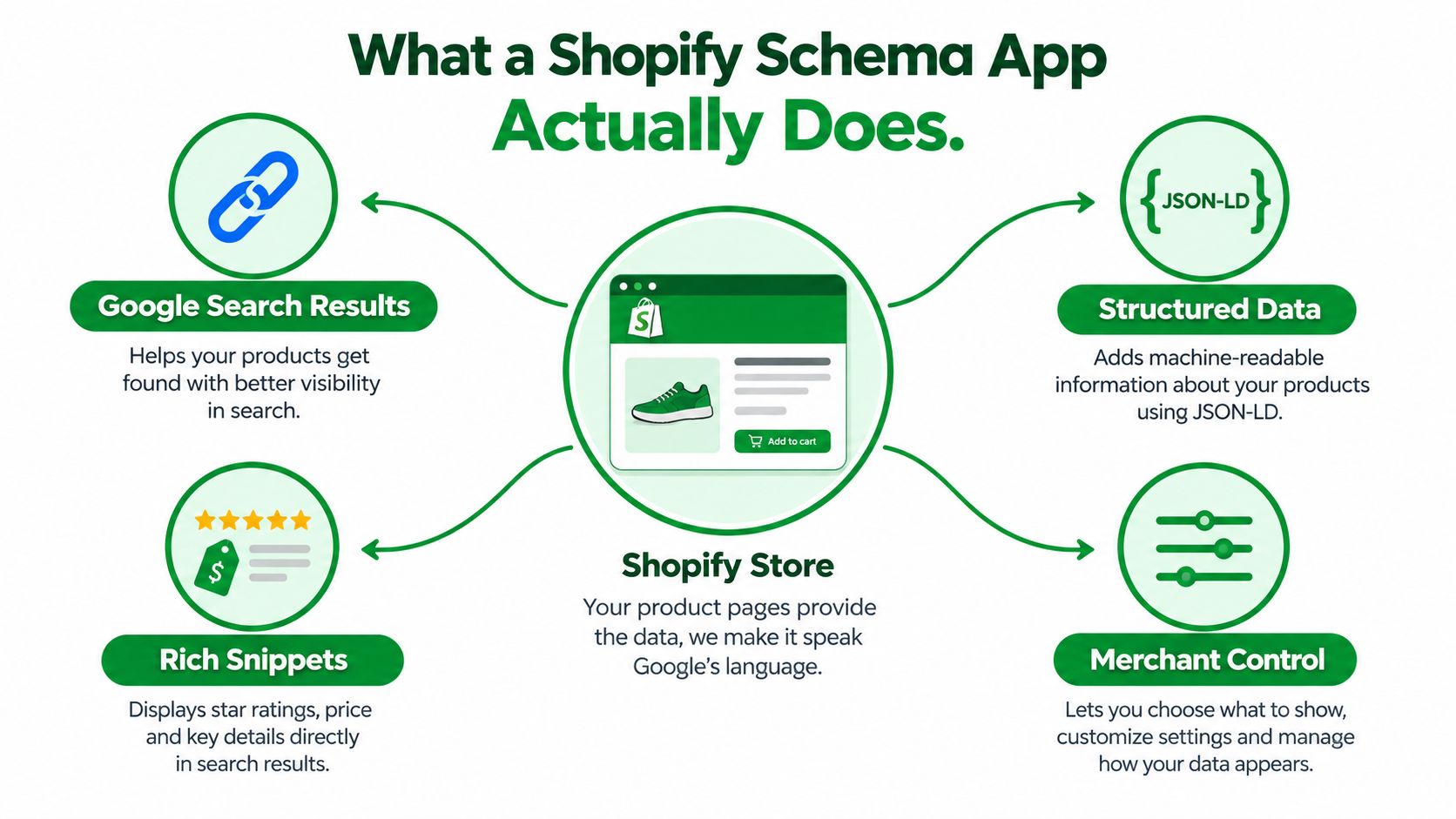
For example, a Product object can connect a product's name to an offer that specifies its price and currency. If genuine review data exists, the markup may also describe ratings. The storefront still needs to show accurate information, and the structured data must match what shoppers can see. Google says valid markup can make a page eligible for enhanced search presentations, but it doesn't guarantee that Google will show them (Google's structured data documentation).
Schema can also make page information easier for other machine readers to interpret. That's useful for answer engines and other automated systems, but don't mistake it for a promise of AI citations or a shortcut to rankings.
Practical rule: A schema app handles structured data. It doesn't replace technical SEO, content quality, internal linking, or a broader audit of your store.
Treat schema as one technical layer in your SEO stack. Its value depends on whether it describes the live page correctly, not on how many markup types appear in an app's feature list.
Core Features Every Shopify Schema App Should Cover
Start with JSON-LD, the structured-data format Google recommends because it's generally easier to implement and maintain. For merchants, the important question isn't how to write the syntax by hand. It's whether the app can use your actual Shopify data to describe each page accurately.
A product page is the clearest test. Product markup should identify the item and connect it to valid offers data, including price and currency where applicable. Availability must reflect the product's current state. If a store has ratings, the app should only emit aggregateRating when genuine ratings exist, with rating and count values that agree with the review data. Schema.org defines an offer as an offer to sell or otherwise transact an item, and an aggregate rating as an average derived from multiple ratings or reviews (Schema.org's Offer definition).
From there, assess page coverage by what each type describes:
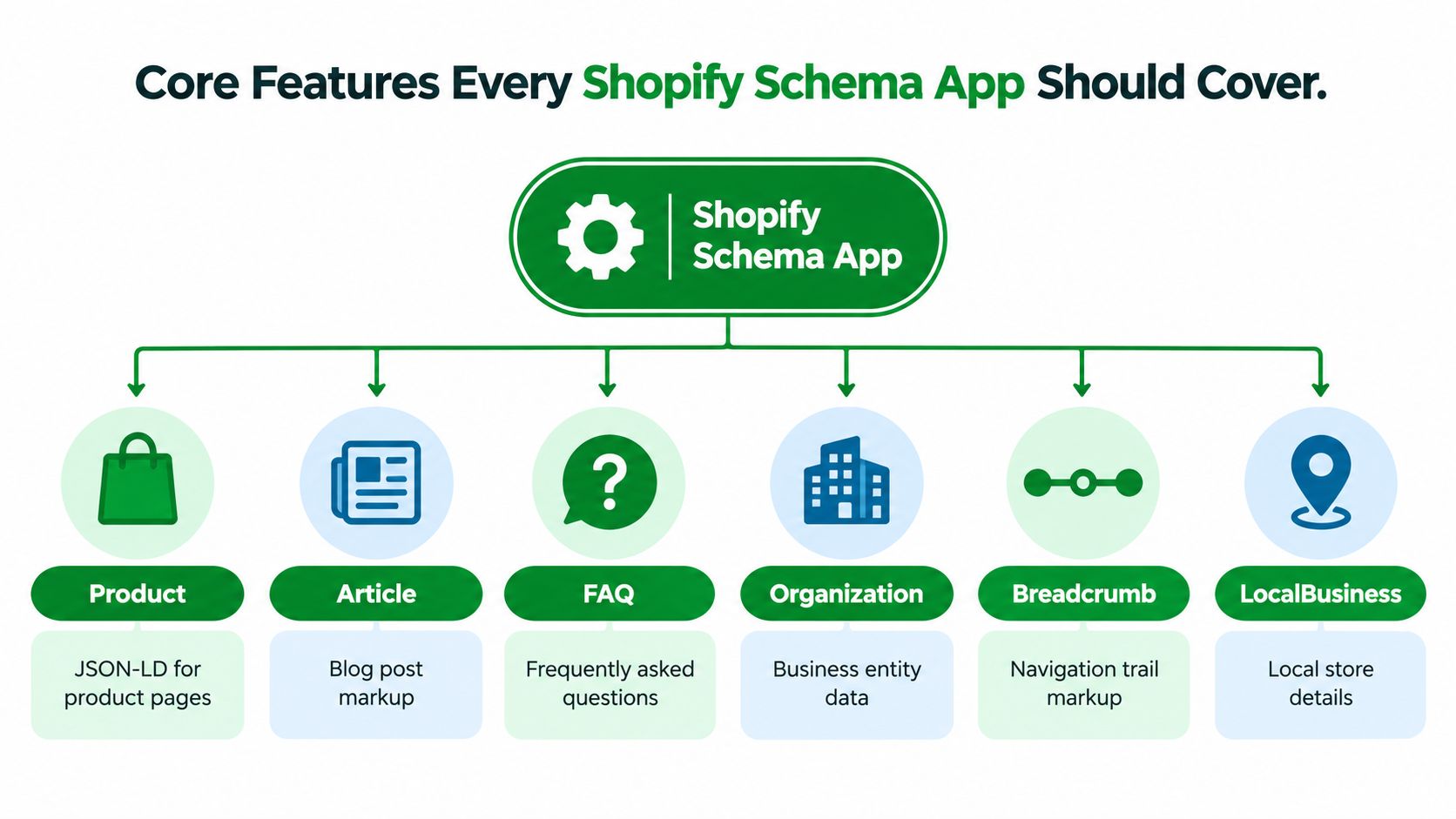
- Product: Describes an item for sale and its offer details. This is the core commerce markup to inspect on product pages.
- Article: Identifies editorial content, such as a blog post. Choose the article type that accurately reflects the page, and check the rendered output rather than assuming an app's label maps cleanly to the right type.
- FAQ: Describes questions and answers that are visible on the page. Treat it as machine-readable context, not a guaranteed search feature.
- Organization: Connects your brand to business information across the site.
- Breadcrumb: Describes a page's position in the site hierarchy, helping clarify navigation relationships.
- LocalBusiness: Adds business details for a store with a physical location, when those details are relevant and accurate.
Don't accept a coverage list as proof of implementation. The app should select markup based on the current page type and populate it from authoritative store data. A Product block on a blog post, or store-location details on a page with no relevant location information, is not useful completeness. It's just extra output.
Theme Injection vs. Admin API and Metafields
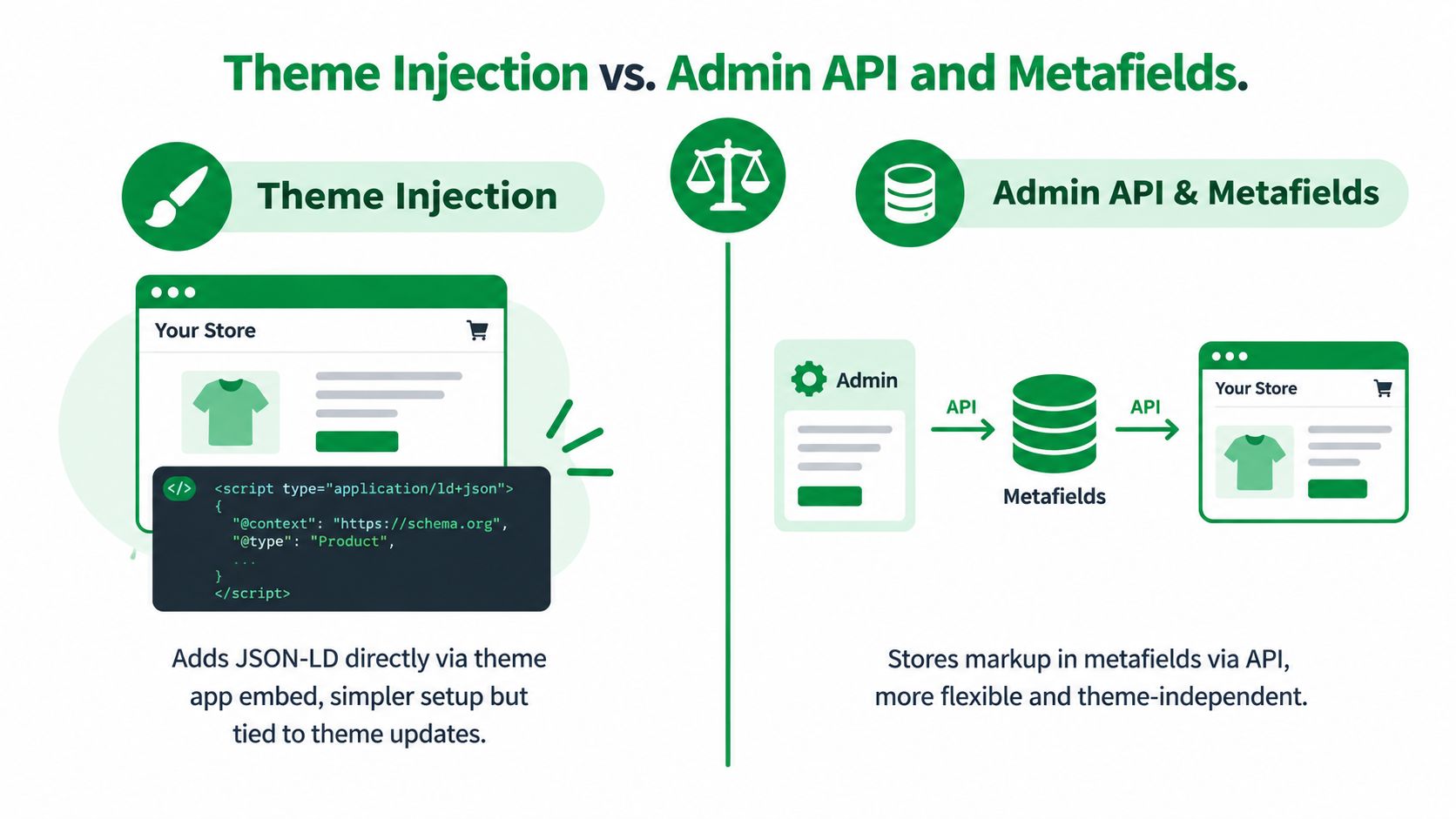
Schema apps can deliver JSON-LD through a theme extension or by managing data through Shopify's Admin API and metafields. Those approaches solve related problems, but they aren't interchangeable.
Theme app embeds let an app add functionality through the theme editor and can target the document head or body. App blocks can also be managed in the editor, but depend on a compatible Online Store 2.0 theme and sections that support the generic @app block. Shopify documents these differences in its theme app extension configuration guidance.
| Approach | Where it fits | Main trade-off |
|---|---|---|
| Theme app embed or extension | A merchant wants app-managed output without manually editing theme files. | Theme support and app configuration determine where markup renders. A theme change can require a fresh check. |
| Admin API and metafields | A workflow needs to store or manage structured data separately from theme code. | Stored values still need to be rendered correctly on the storefront; saving data doesn't prove Google can see it. |
| Direct theme edits | A developer needs precise control over a custom theme. | Code can be overwritten, duplicated, or left behind when the theme changes or an app is removed. |
The phrase “theme-independent” can be misleading. Metafields can keep data out of hard-coded template content, but the storefront still needs a reliable rendering path. A schema app that stores values in metafields but fails to output them on a product page hasn't completed the job.
Before installing anything, inspect what your theme and existing apps already emit. Two Product JSON-LD blocks can conflict, and a new app embed can overlap with schema already generated by the theme or a review app. If you're evaluating a metafield-based setup, understand how Shopify metafields work before deciding where schema values should live.
This comparison video provides another view of the implementation choices:
Choose the least fragile integration your theme supports, then verify the rendered HTML after activation. The install method is only one part of reliability.
Validation Beyond a Green Checkmark
A schema app that reports “validated” without rereading the live storefront is making a limited claim. It may have checked a saved setting or accepted an API response, but that doesn't prove the rendered product page now contains accurate markup.

Judge validation through four separate checks:
- Syntax: Is the JSON-LD valid and parseable? Malformed markup can't reliably communicate anything.
- Completeness: Does it include the required properties for the feature you want? A valid object can still be incomplete.
- On-page alignment: Does the markup match what shoppers can see, including price, availability, and relevant product details?
- Live recheck: Does the tool fetch or reread the storefront after a change and confirm the rendered output?
That last check is where many workflows fall short. An API call can succeed while a theme fails to render the expected values. A product price may change, a variant may become unavailable, or another app may add a second Product block. The admin-side action can be successful even though the live page remains wrong.
A useful verification report should tell you what page was checked, what markup was found, which fields were compared, and whether the current storefront agrees with Shopify's underlying data. It should also distinguish an error from a warning and identify the source of conflicting output when possible. A single green indicator hides too much to guide a fix.
Be especially skeptical of rating data. If your review app has no genuine ratings for a product, a schema app shouldn't create aggregateRating to make the listing look richer. The property describes real review information, not an SEO decoration.
For a deeper look at product-level requirements, use this guide to Product schema markup. Then test the actual page after any theme, app, inventory, or pricing change. A fix is complete when the live storefront confirms it, not when a dashboard records that a setting was saved.
Choosing a Shopify Schema App for Your Catalog
The right app depends less on the size of its feature list than on how well it fits your catalog and your store's change process. A simple setup can be enough for a merchant with a straightforward theme and a small, stable product range. A large or frequently changing catalog needs stronger safeguards against stale values, duplicated output, and bulk mistakes.
Match the app to your store's risk
| Store profile | What to prioritize |
|---|---|
| Small, straightforward catalog | Clear setup, sensible defaults, and an easy way to inspect the output on representative pages. |
| Large or changing catalog | Batch scanning, per-template checks, a record of changes, and a safe way to reverse a bad update. |
| Busy app stack | Duplicate detection and the ability to identify whether markup comes from the theme, the schema app, or another app. |
| Custom or older theme | Compatibility testing before deployment, especially if the app relies on app blocks or theme-editor support. |
Theme compatibility is not a footnote. Shopify app blocks depend on compatible templates and sections, while app embeds have broader support. Ask the vendor what happens when the relevant block isn't available, and test the actual templates you use rather than relying on a demo store.
Consider market and language complexity, too. If your storefront uses multiple languages or regional presentations, check that product names, currency, availability, and other page data remain consistent in the version shoppers and search engines receive. Don't assume that “supports JSON-LD” means it handles every storefront variation.
Ask what happens after installation
A schema app should show you more than a setup screen. Before choosing one, ask whether it can:
- Inspect existing markup before adding another Product block.
- Recheck live pages after changes to products, themes, and app settings.
- Explain failures in terms a merchant or developer can act on.
- Preserve a recovery path if a bulk fix causes problems.
- Separate automatic fixes from manual decisions when data needs human judgment.
Then evaluate billing plainly. Look for transparent pricing, a clear explanation of any free-plan limits, and a checkout path you recognize through Shopify. Don't pay for a broader AI-readiness bundle unless you need its separate capabilities, such as machine-readable files or visibility tracking. Those may support a wider strategy, but they don't replace sound Product markup.
When Less Schema Is the Better Answer
More markup isn't automatically better. If your theme already emits Product data and a second app adds another Product object, you've added output without improving its reliability. Before expanding coverage, find out what the live page already contains.
A common failure is duplicate schema from a theme, SEO app, review app, or custom code. Another is a mismatch between visible content and structured data, such as an offer with an old price or availability that no longer reflects the product. In both cases, removing or correcting output can be more useful than adding another schema type.
FAQPage needs a more deliberate decision than many app guides suggest. Google has restricted FAQ rich results to authoritative government and health-focused sites, and an industry summary reports that Google retired FAQ rich-result display for most sites on May 7, 2026 (Geneo's discussion of FAQ structure and machine readability). The markup type can still describe visible questions and answers for machines, but that's different from expecting a Google FAQ accordion.
Keep an FAQ section when it answers real shopper questions. Don't publish it just to chase a search appearance your store may not receive.
Ratings also need restraint. aggregateRating should reflect genuine ratings and coherent review counts. If a product has no valid reviews, leaving out rating markup is the correct implementation, not a missed opportunity.
Use a conservative rule: publish schema only when it reflects current, visible, supportable store information. If an app can't explain where a field came from or how it stays current, don't let it emit that field. If you're comfortable making theme changes yourself, this guide to adding schema to Shopify without an app can help you compare the manual route with app-managed output.
Where Verified Tools Like RankEngine Fit
A schema tool belongs in your operating workflow, not just your installation checklist. The useful cycle is straightforward: inspect the store's source data, apply a supported change, reread the live storefront, and keep the issue open if the rendered result still doesn't match.
RankEngine is one option in this category. It audits Shopify SEO and structured data, supports JSON-LD for Product, Article, Organization, Breadcrumb, FAQ, and LocalBusiness, and verifies supported changes against the live store before marking them complete. That workflow is relevant when your main concern is whether a fix appeared on the storefront, rather than whether an app setting was saved.
Schema should remain one part of the decision. A broader Shopify SEO and answer-engine workflow may also involve indexing controls, redirects, image information, content management, or AI-search readiness. Choose a consolidated tool only if you'll use those capabilities; otherwise, a focused schema app or a developer-managed implementation may be easier to maintain.
Before installing any contender, check its operational claims:
- Live recheck: Does it reread rendered storefront pages after changes?
- Restore support: Can you roll back a supported update if the output is wrong?
- Manual-review clarity: Does it identify issues that need merchant judgment instead of presenting every recommendation as an automatic fix?
- Shopify-native billing: Are the charges and plan limits clear through the expected Shopify billing flow?
- Theme compatibility: Has it been tested with your theme and the templates that matter to your store?
Ask the vendor to demonstrate a real product-page change and show the live output before and after. If the tool can't explain what it verified, treat its success status as an unconfirmed install, not proof that your schema is reliable.
If you're evaluating a Shopify schema app, use RankEngine to audit structured data, apply supported fixes, and verify them against your live store. Visit RankEngine to see whether its Shopify SEO and answer-engine tools fit your workflow.