 RankEngine
A Shopify catalog can look healthy in the admin and still send confusing signals to search engines. Product pages may share the same title template, collection pages may contain little more than a product grid, and a schema app may report warnings while the live storefront exposes different prices or availability. Meanwhile, a page can earn visibility in an AI-generated answer without receiving a conventional click.
That's why a useful on-page SEO process isn't a keyword-placement exercise. It's a relevance, understanding, and verification workflow. You map indexable URLs, match each page to an intent, improve visible content and markup, fix shared template problems, then reread the live storefront and compare search signals. The practical priority is simple: work first on pages that matter commercially and can be indexed, not on an alphabetized list of every URL.
Table of Contents
- Why Most Shopify On Page Workstalls Before It Helps
- Map and Prioritize Every Indexable Page Type
- Rewrite Titles Metas and Headings That Match Intent
- Fix Images Links and Page Experience by Template
- Add Structured Data and Answer Ready Content
- Verify Roll Back and Keep Rankings Compounding
Why Most Shopify On Page Workstalls Before It Helps
The familiar failure pattern starts with a bulk export. A merchant finds hundreds of duplicated titles, applies a new template, sees a successful API response, and moves on. A week later, some pages still show the old title because the theme overrides the value, variants expose competing URLs, or an app injects a second heading. The spreadsheet says “fixed.” The storefront says otherwise.
Collection pages create a different problem. A template such as “Shop all accessories” tells neither shoppers nor search systems what makes the category useful. Product descriptions may be copied from a supplier, internal links may point only through navigation, and structured data may describe a product that's unavailable on the rendered page. These problems aren't solved by inserting the target phrase into every field.
Google recommends a unique, clear, concise, and accurate title for each important page because the title link is often the first information users evaluate. It also recommends descriptive meta descriptions, while explaining that snippets may come from page content instead of the meta description itself. Google's SEO Starter Guide also emphasizes crawlable internal links, descriptive anchor text, and structured data that reflects the page users see.
Start with business impact and indexability
A workable sequence looks like this:
- Inventory the storefront. Separate products, collections, blog articles, static pages, variants, and parameter-based URLs.
- Assign intent. Give every indexable URL one primary topic and a clear purpose.
- Repair relevance. Align the title, H1, opening copy, metadata, and supporting headings with that purpose.
- Improve discovery and experience. Strengthen internal links, image context, template performance, and mobile rendering.
- Add machine-readable context. Validate structured data against visible product, article, organization, or navigation details.
- Verify the live result. Re-read rendered HTML, inspect canonicals and robots behavior, and monitor Search Console signals.
Templates are valuable because they remove repetitive work. They become dangerous when they make claims about product differentiation, compatibility, materials, shipping, or use cases without human review. A practical audit therefore needs both verified fixes for repeatable fields and a manual queue for decisions that require merchandising judgment. For a broader technical perspective, these Shopify technical audit tips are useful alongside the live-store verification habit.
Map and Prioritize Every Indexable Page Type
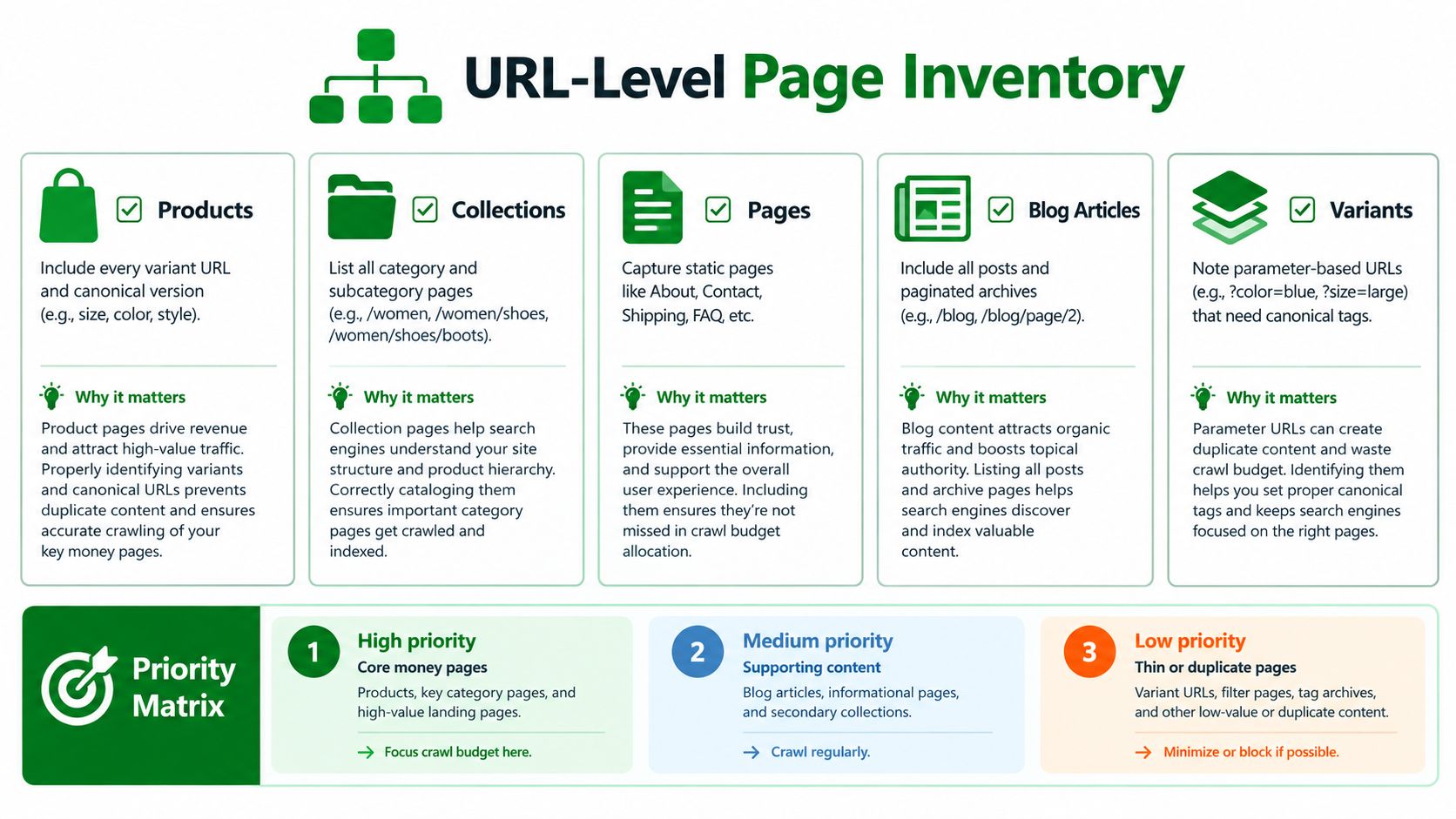
Before changing copy, build a URL-level inventory. Export the URLs that Shopify, your sitemap, internal links, feeds, and theme templates expose, then record the signals that determine whether each URL deserves optimization, consolidation, redirection, or exclusion.
Build the inventory around page purpose
Use one row per URL, not one row per product family. Record:
- Page type: Product, collection, blog article, static page, variant, or parameter-based URL.
- Primary intent: Transactional, category exploration, informational, comparison, support, or brand navigation.
- Canonical target: The URL you want search systems to treat as the primary version.
- Indexability state: Whether the URL is intended to be crawlable and indexable.
- Content condition: Missing, duplicated, boilerplate, outdated, misleading, or useful.
- Commercial role: Core product, high-value collection, supporting article, service page, or low-value utility URL.
- Review status: Safe for a rule, needs an editor, or should be removed from the optimization queue.
Variants deserve special attention. A color or size URL may be useful for shoppers but unnecessary as a separate search landing page. Parameter-based URLs can multiply near-duplicates, while paginated archives can expose thin or overlapping paths. Don't automatically noindex every variation. Decide whether the URL has distinct search intent, unique content, and a stable canonical relationship to the main page.
Prioritize the queue instead of rewriting everything
Sort the work by commercial value, search visibility, indexability, and defect severity. A collection with strong impressions but a generic title may deserve attention before a new product with no search history. A product that converts well but is blocked from indexing needs a different escalation than a blog post with weak internal links.
A practical priority matrix looks like this:
| Priority | Typical URLs | First action |
|---|---|---|
| High | Core collections, important products, pages with impressions or serious indexability defects | Manual intent review, then controlled fixes |
| Medium | Supporting articles, secondary collections, useful products with weak metadata | Apply safe rules and sample the output |
| Low | Thin archives, duplicates, stale variants, utility URLs | Consolidate, redirect, canonicalize, or exclude |
Keep manual review for claims that a template can't safely infer. Product differences, compatibility statements, certifications, sustainability language, warranty promises, and shipping conditions all need a source of truth. A batch process can identify the pages, but it shouldn't invent the answer.
For implementation patterns, compare the inventory fields with a practical Shopify product page template. The point isn't to force every product into identical copy. It's to give editors a consistent structure while preserving the details that distinguish one product from another.
Rewrite Titles Metas and Headings That Match Intent
Titles, meta descriptions, headings, and opening copy should tell the same story from different angles. If a collection title says “Women's Linen Shirts,” the visible H1 shouldn't say only “New Arrivals,” and the opening copy shouldn't describe a completely different product group. Alignment reduces ambiguity for shoppers and search systems.
Write for the page's actual value proposition
Start with the page's primary topic, then add the detail that makes the page worth choosing. Avoid titles that repeat the store name, category, and a generic adjective across the catalog.
Weak product title:
“Blue Shirt | Brand Name”
Stronger product title:
“Organic Linen Camp Shirt in Blue | Brand Name”
The second version identifies the product type, a meaningful material or feature, and the distinguishing variation. It doesn't need every attribute. Put the remaining details into the visible product information, headings, structured data, and supporting copy.
For collections, make the scope clear:
Weak collection title:
“Summer Collection | Brand Name”
Stronger collection title:
“Lightweight Summer Dresses for Warm-Weather Events”
The stronger version communicates what the shopper will find and why the page exists. Don't force a phrase into a title when it makes the result inaccurate. Google can build title links from the HTML title, visible main title, headings, og:title, and other prominent text, so changing only the title tag isn't a dependable control mechanism.
Treat metadata as search-result copy, not a ranking shortcut
A meta description should summarize the specific page and give a reason to continue. It may influence the displayed snippet, but Google primarily generates snippets from page content and uses the meta description when it better represents the page.
For a product, describe the product and its meaningful decision factors:
Practical rule: If the description could be pasted onto ten other URLs without becoming inaccurate, it isn't page-specific enough.
A safe batch template can use controlled variables such as product name, material, category, and a verified use case. Stop the automation when a variable is missing, contradictory, or too vague. “Premium quality for every occasion” adds little context and may describe nearly every item in the store.
Keep the visible hierarchy coherent
Use one clear primary heading that matches the page purpose. Product pages commonly need an H1 for the product name, followed by sections for details, materials, sizing, delivery, care, or compatibility. Collections benefit from an H1 that names the category, then useful subheadings that organize selection advice or category details.
The opening copy should answer the page's main question immediately. A collection introduction might explain what products belong in the category and which shopper need they address. A product introduction should identify the item, its important attributes, and its intended use before expanding into specifications.
A useful product SEO guide from Presidio can complement this page-level work, especially when your team is standardizing product content without flattening genuine differences between items. The final test is rendered output. Inspect the live page on mobile and desktop, confirm the H1 and opening content are present, and check that app blocks haven't inserted duplicate headings or stale metadata.
Fix Images Links and Page Experience by Template
Image, linking, and performance work becomes more efficient when you group it by template. A shared product template can create the same oversized gallery image, missing alt text pattern, or late-loading review script across many URLs. Fixing the cause is more valuable than editing each symptom separately.
Improve image meaning without stuffing
Every meaningful product image needs useful alternative text that describes what a shopper would otherwise miss. A strong example is “side view of navy waterproof hiking jacket with hood,” not “jacket product image navy hiking jacket waterproof jacket.” Decorative elements can use empty alternative text when they add no information.
Review image handling at the template level:
- Product galleries: Check that the primary image describes the product and that variant images reflect the selected option.
- Collection cards: Use concise descriptions when the image communicates product identity or a meaningful visual difference.
- Editorial media: Describe the subject and its relationship to the article, not just the file name.
- Performance weight: Resize images to their displayed dimensions, compress them, and avoid loading every gallery asset before interaction requires it.
For a practical Shopify-specific reference, see this guide to a Shopify image optimization app. The audit should record the image URL, template, missing context, and the action taken, so future theme changes don't recreate the same gap.
Make internal links describe destinations
Google advises that every page should be reachable through a crawlable link from another discoverable page. Use anchor text that tells users what they'll find, such as “linen shirts for summer” or “care instructions for waterproof outerwear,” rather than repeated “learn more” links.
Linking priorities differ by template:
- A collection page should guide shoppers to relevant subcategories and useful buying information.
- A product page should connect to compatible products, related categories, sizing, care, and shipping content where those links help.
- A blog article should link to the commercial pages it supports, using context that makes the relationship clear.
Use Core Web Vitals as a triage system
Google's page-experience guidance gives three quantitative targets: LCP within 2.5 seconds, INP below 200 milliseconds, and CLS below 0.1. These thresholds come from Google's Core Web Vitals documentation. They're page-level user-experience targets, not a promise of rankings, and they should be reviewed with real-user data in Search Console.
| Template | Top fix | Verify with |
|---|---|---|
| Product | Reduce hero and gallery weight, reserve image dimensions, review app scripts | Rendered mobile page and field LCP, INP, and CLS |
| Collection | Optimize above-the-fold product cards and filter behavior | Collection render, interaction testing, and template-level field data |
| Blog article | Delay nonessential embeds and stabilize media blocks | Mobile render, layout inspection, and real-user measurements |
| Static page | Remove unnecessary app dependencies and fix navigation paths | HTML inspection, crawlable links, and field performance |
Prioritize shared causes such as oversized hero images, render-blocking resources, unstable image dimensions, delayed scripts, and excessive third-party code. A high lab score won't compensate for real users experiencing a slow or shifting storefront.
Add Structured Data and Answer Ready Content
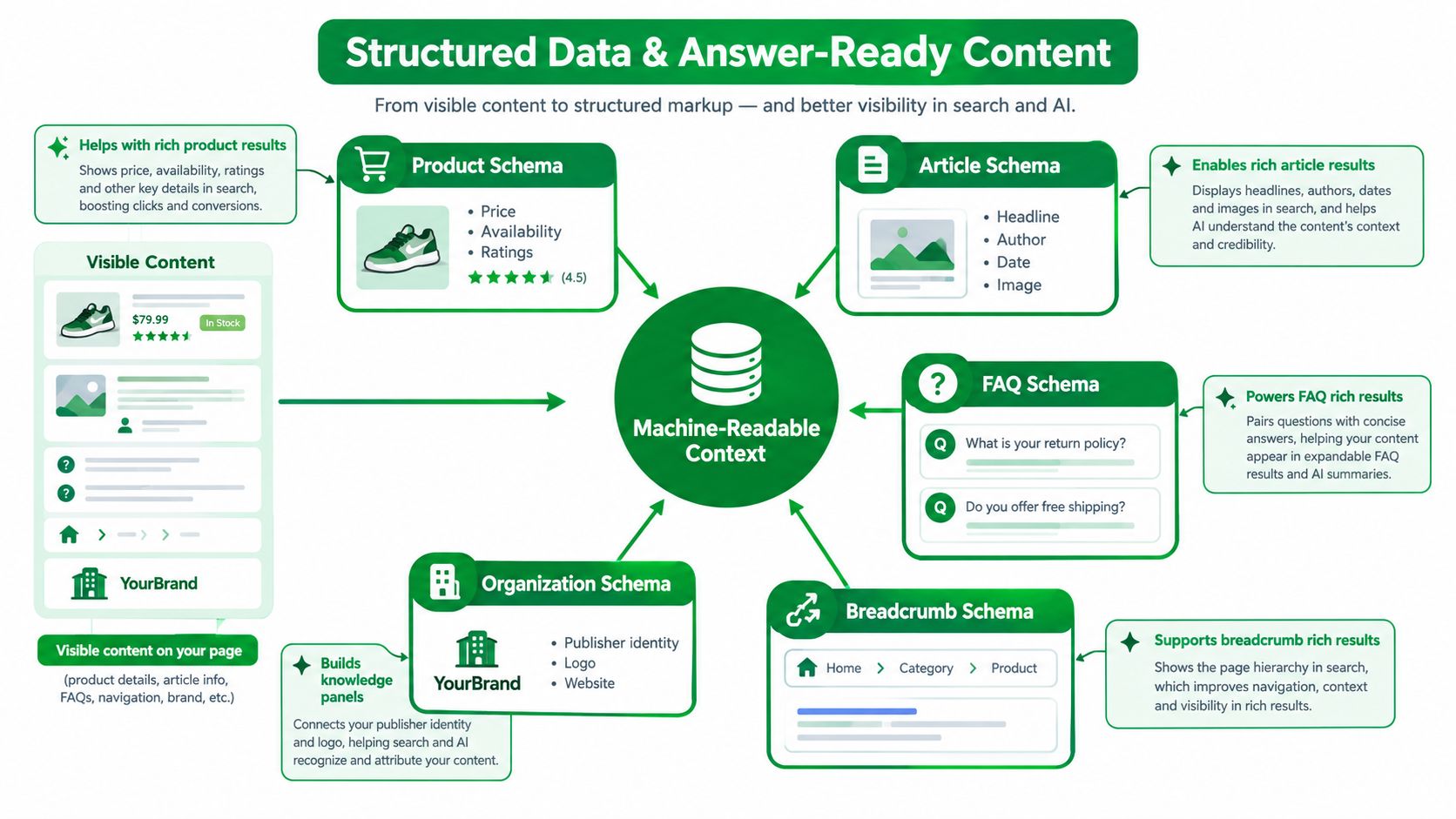
Structured data works best when it describes information already visible on the page. It adds machine-readable context, but it doesn't repair incomplete product content or guarantee a rich result. Google explains that valid structured data can make pages eligible for enhanced search features, while eligibility doesn't guarantee that those features will appear.
Match markup to what shoppers can see
For each template, compare the rendered page with its JSON-LD:
- Product markup should match the visible product name, image, price, availability, and other supported details.
- Article markup should reflect the visible headline, author, publication information, and primary image.
- Breadcrumb markup should follow the navigation hierarchy users can follow.
- FAQ markup should represent visible questions and answers, not hidden promotional text.
- Organization markup should identify the publisher or business consistently across the site.
A syntactically valid script can still be wrong. Common failures include a stale price, unavailable stock marked as available, a product schema block appearing on a collection page, or a review property that the visible page doesn't support. Validate required properties, then compare the markup with the live page after deployment.
The Shopify schema markup guide is a useful implementation reference, but testing remains essential. Don't treat an app's “installed” status as proof that search systems receive accurate data.
Write blocks that answer without guesswork
AI-generated answers create a second visibility layer. A Pew analysis of nearly 70,000 Google searches from approximately 900 U.S. users found traditional-result clicks in about 15% of searches without an AI Overview, compared with roughly 8% when an AI Overview appeared. Links inside the summaries received clicks in about 1% of searches, according to this Pew analysis summary.
That doesn't mean conventional SEO is obsolete. It means the workflow should also ask whether a system can represent the product accurately without requiring a click. Write extractable blocks for:
- Attributes: Material, dimensions, compatibility, capacity, or included components.
- Use cases: Who the product suits and what problem it addresses.
- Limitations: What it doesn't support, fit constraints, or care requirements.
- Delivery information: Shipping regions, processing expectations, and return conditions, when current and verified.
- Comparisons: Distinguishing facts that help users choose between products or categories.
Measure assisted visibility separately from conventional CTR. Track whether product facts are cited correctly, whether the brand appears for comparison questions, whether prices and availability remain current, and whether answer engines send qualified users to the appropriate high-intent page. There's no special “AI schema” field that substitutes for clear structure, reliable product data, and relevant markup.
Verify Roll Back and Keep Rankings Compounding
A change isn't complete when Shopify accepts the write request. It's complete when the live storefront exposes the intended value, the related technical signals agree, and search data gives the team something to evaluate.
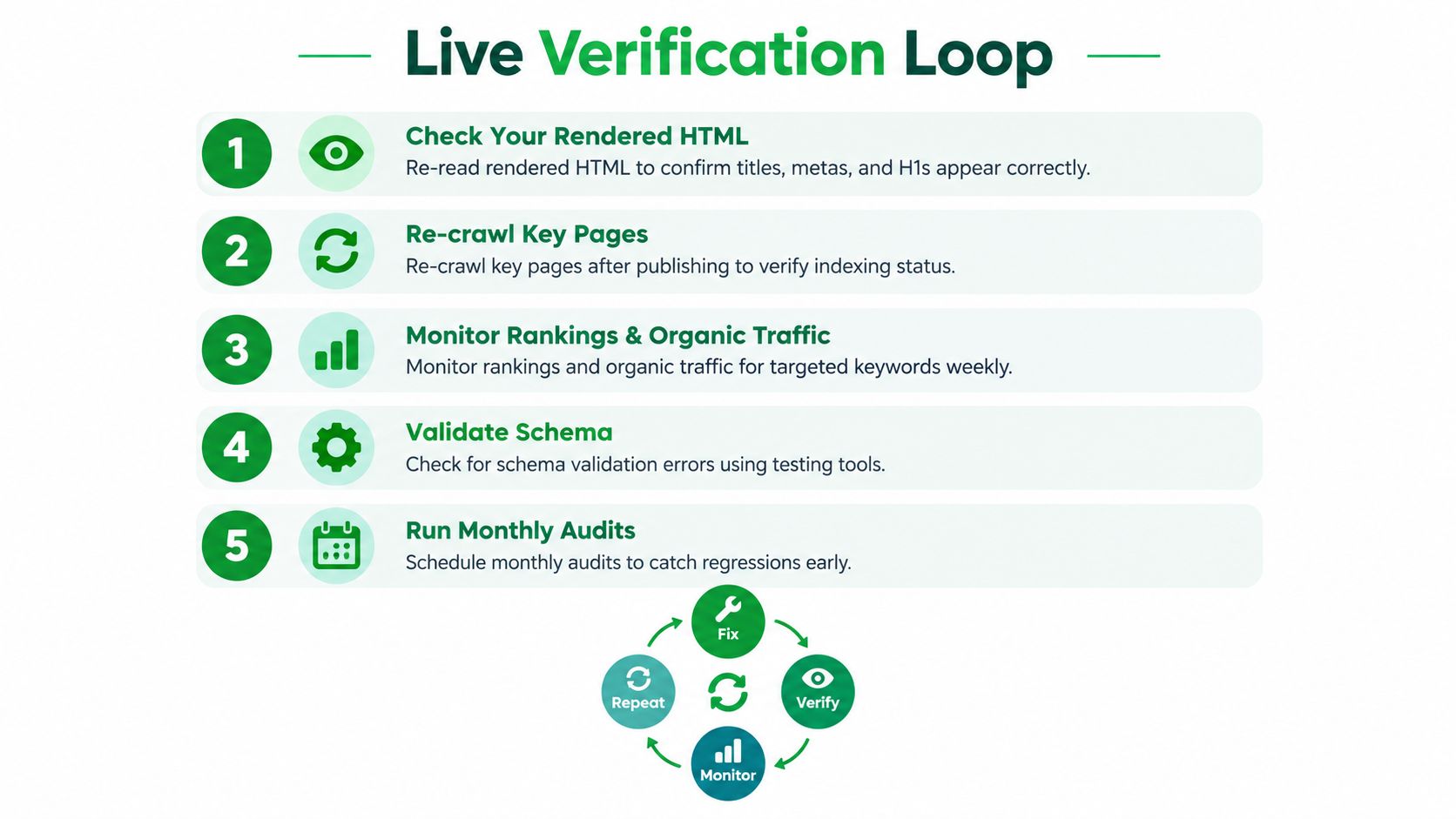
Use a live verification loop
For every batch or template change, retain the intended value, affected URL, timestamp, and source of truth. Then:
- Re-read rendered HTML. Confirm the title, meta description, H1, visible copy, canonical, and structured data are present in the delivered page.
- Check the surrounding signals. Compare canonical tags, robots directives, sitemap inclusion, and internal links for contradictions.
- Validate page-type markup. Confirm the schema describes the page users see and that price, availability, and identity remain current.
- Sample by template and device. Inspect representative products, collections, variants, and localized pages instead of trusting one URL.
- Monitor outcomes. Use Search Console to compare impressions, clicks, CTR, query coverage, and indexing behavior after recrawl.
Add guardrails to routine operations
A weekly QA pass can check new products, changed collections, broken links, missing alt text, unexpected noindex directives, and schema errors. A monthly review should sample theme templates, app injections, localized storefronts, and recently changed merchandising fields.
Automation should stop rather than guess when it encounters missing product attributes, conflicting availability, unusual canonical behavior, or a claim that needs approval. Keep restore points for supported changes and preserve before-and-after evidence. If a theme update introduces duplicate H1s or removes a structured-data block, the team should be able to identify the release and reverse the affected change.
RankEngine is one option for this workflow. It audits Shopify products, collections, pages, articles, images, links, schema, and indexability, writes supported fixes through Shopify, and rereads live values before marking a change complete. Its monitoring and restore-point features can support teams that need batch controls without removing manual review.
The operating principle is simple: nothing is done until the live storefront and search signals confirm it. Start with a URL inventory, fix the highest-impact templates and pages, record every change, and make verification part of publishing rather than an emergency response after rankings move.
RankEngine audits Shopify products, collections, articles, images, metadata, links, schema, and indexability, then verifies supported fixes against the live storefront before completion. Visit RankEngine to build a monitored on-page SEO and answer-engine workflow for your catalog.